14
The Sapling Company, Inc.
670 Louis Drive
Warminster, PA 18974
USA
P. (+1) 215.322.6063
F. (+1) 215.322.8498
www.sapling-inc.com
Before Installation - Clock Setup - Network Servers
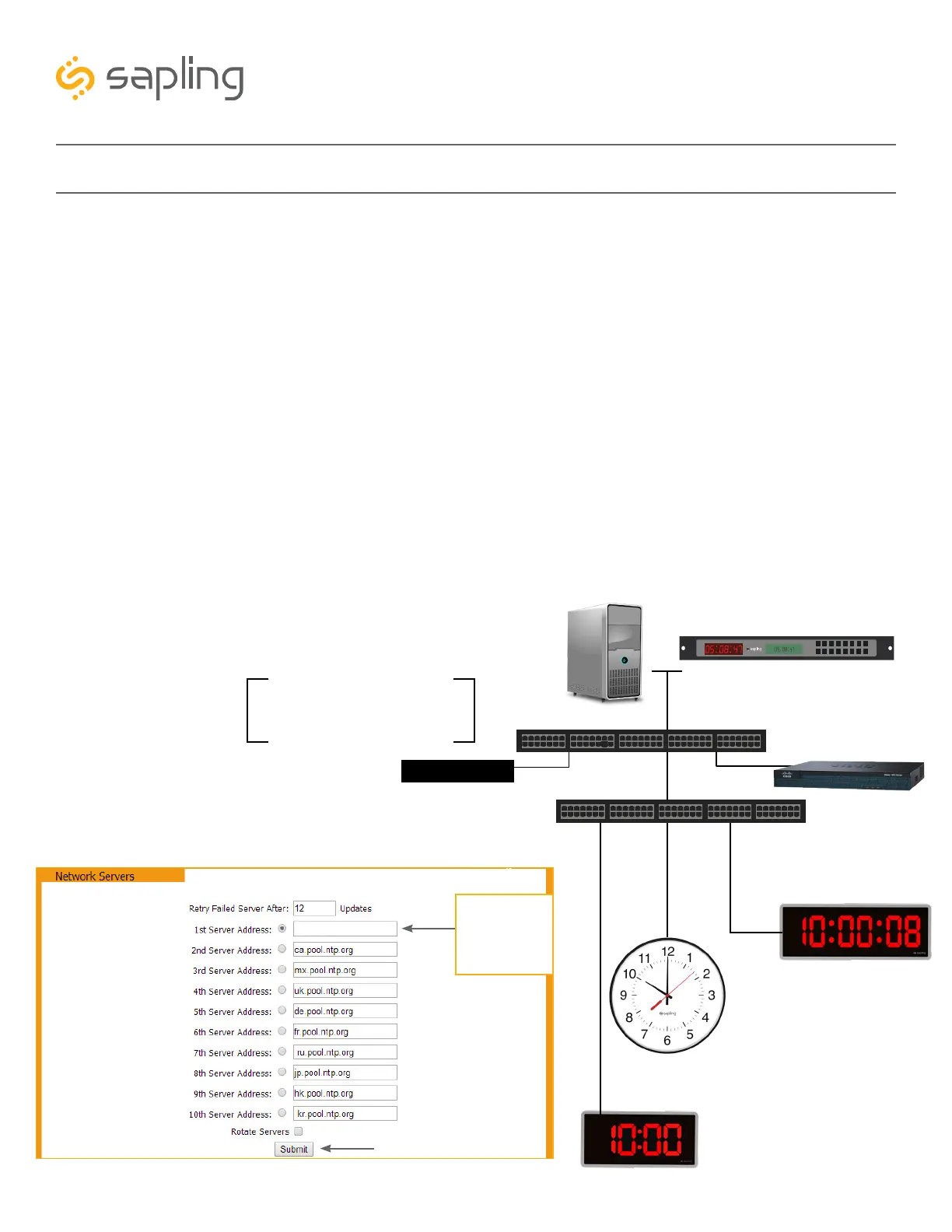
Time Input – From an In-House NTP Time Server or from a Master Clock
If the facility has their own in-house NTP Time Server or a master clock capable of providing time data to
the IP clocks, the IP clocks should be programmed accordingly. To set the clocks to receive the time data
from the in-house time source, please follow the below steps:
• Set the in-house NTP Time Server or master clock (capable of providing time data to the IP clocks) with a
static IP address.
• Once the IP address of the in-house time source has been identified, program it in the clock “1st Server
Address” text box in the “Network Servers” tab of the clock built-in web interface.
• Make sure to click the circle next to the “1st Server Address” text box, which will command the clock to
take time data from this selected time source.
• Make sure that the option “Rotate Servers” is not selected, which commands the clock to receive time
data from the “1st Server Address” as long as it is active.
• Regardless of what server or master clock you are using as a time source, all IP clocks must still be set
with the UTC/GMT Offset and DST separately, as explained in this manual.
• If you only want the clocks to receive time data from the in-house NTP time server or from the in-house
master clock, you can delete all other pre-loaded server addresses (2nd Server Address – 10th Server
Address). If you leave these third-party time servers listed, they can be used as a backup to the in-house
NTP time server, as long as the clocks can access the internet.
Network Cable
Network Cable
Network Cable
Network Cable
PoE Switch
*Dedicated DHCP
Server or
Router acting as
DHCP server
Data Switch
Router
In House NTP
Time Server
Master Clock
IP Digital Clock
IP Digital Clock
IP Analog Clock
The need for a DHCP server is
eliminated when IP clocks are set
with a static IP address
OR
000.000.000.0
Static IP Address
of the in-house
time server /
master clock



 To Next Page