42
The Sapling Company, Inc.
670 Louis Drive
Warminster, PA 18974
USA
P. (+1) 215.322.6063
F. (+1) 215.322.8498
www.sapling-inc.com
42
The Sapling Company, Inc.
670 Louis Drive
Warminster, PA 18974
USA
P. (+1) 215.322.6063
F. (+1) 215.322.8498
www.sapling-inc.com
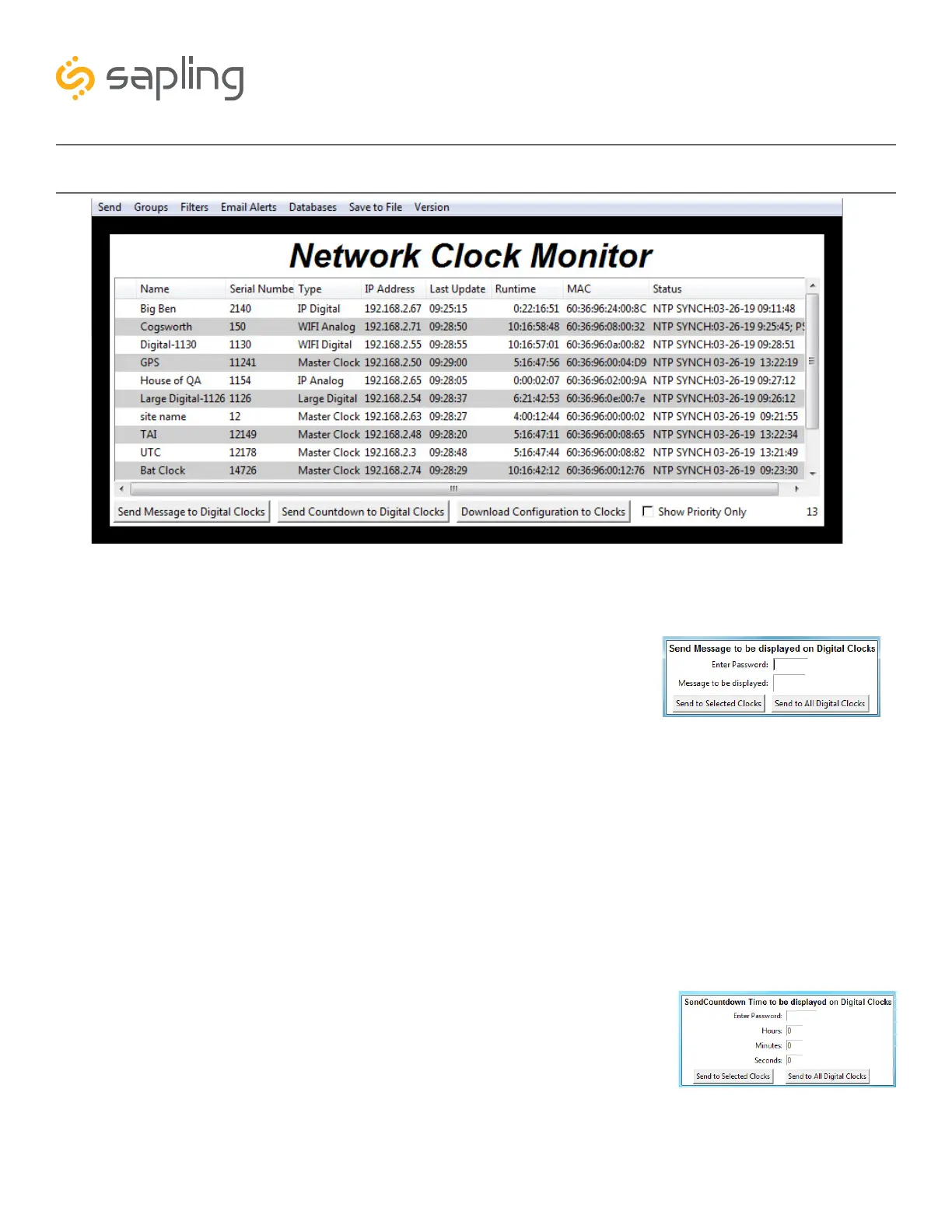
Network Monitor Software - Main Screen
A
B
D
C
1. Send Message to Digital Clocks -Allows the user to generate a message that will be sent to digital clocks.
a. Enter Password - The default password is 6063
b. Message to be displayed - Lets the user enter a message to be
displayed on digital clocks. Messages may consist of the digits 0-9
and the English letters A-Z. The message is generated in a font
that matches its appearance on the clock, so you can preview the
appearance of each message before sending it. The message will
repeat ten times once sent.
c. Send to Selected Clocks - Applies the message to whichever
clocks have been highlighted on the Device List.
d. Send to All Digital Clocks - Applies the message to all IP-PoE Digital, Wi-Fi Digital, and Large
Digital Clocks.
A
B
D
C
1
2. Send Countdown to Digital Clocks - Allows the user to generate a countdown that will be sent to digital clocks.
a. Enter Password - The default password is 6063
b. Start values - Enter the starting hour, minute, and second into the
fields. For example, entering a 1 into each field will start a countdown
from 1:01:01
c. Send to Selected Clocks - Applies the countdown to whichever
clocks have been highlighted on the Device List.
d. Send to All Digital Clocks - Applies the countdown to all IP-PoE
Digital, Wi-Fi Digital, and Large Digital Clocks.
2



 To Next Page