16 Picus
®
2 Operating Instructions
Operating Design
4.3 Messages
YES
NO
1 32
Dispense
Pre-Out
Clear this preset?
Tip
Ejecting
...
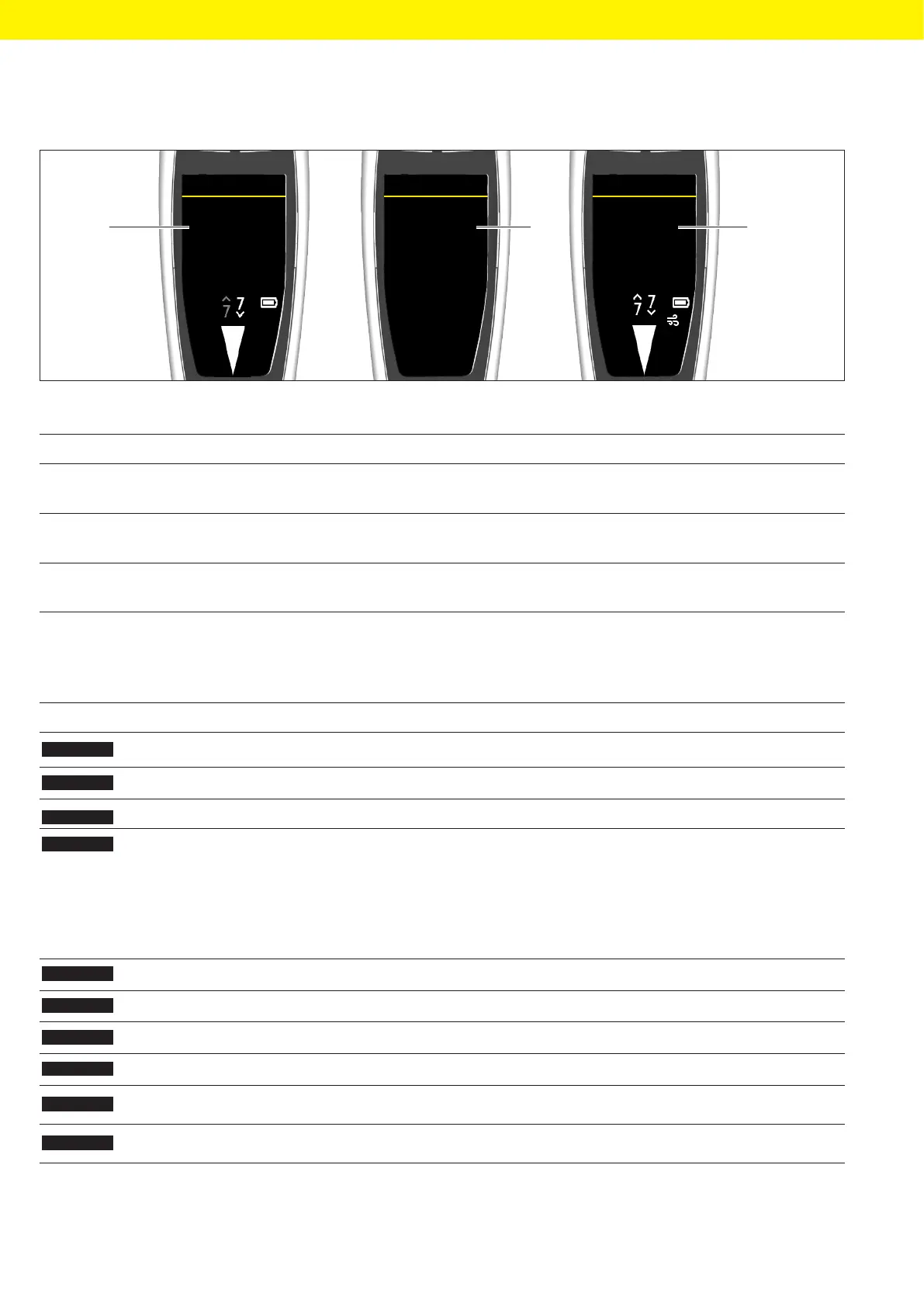
Fig. 7: Messages (example)
Pos. Name Description
1 Prompt — Shows what the device will do next.
— Initiation via the operating button is required.
2 Query — Shows the operator options.
— The selection is made using the softkeys.
3 Notification — Shows what the device is doing.
— No action by the operator is required.
4.3.1 Function of the Softkeys
Symbol Designation Description
MENU
[MENU] softkey Opens the main menu.
[ADV] softkey Opens the window with the available advanced functions.
[EDIT] softkey Activates edit mode.
[OK] softkey — In the menu: Opens the selected menu entry.
— In edit mode: Applies the selection.
— For advanced functions:
— Opens parameter entries
— Activates edit mode
— Returns to the menu
[BACK] softkey Returns to the previous display.
[Pick] softkey Selects the current entry.
[NEXT] softkey Skips to the next parameter.
[END] softkey Cancels the pipetting process.
SAVE
[SAVE] softkey Saves the current program at the selected memory place.
RESET
[RESET] softkey Resets the date and cycle counter.







 To Next Page