Appendix: Passwords
Service Password
t Press e to turn on the device.
y When turned on the scale is in an application program.
t Enter the service password and confirm with the M key.
y The device in now is Service mode. An “S" appears in the top right-hand corner
of the display.
General Password
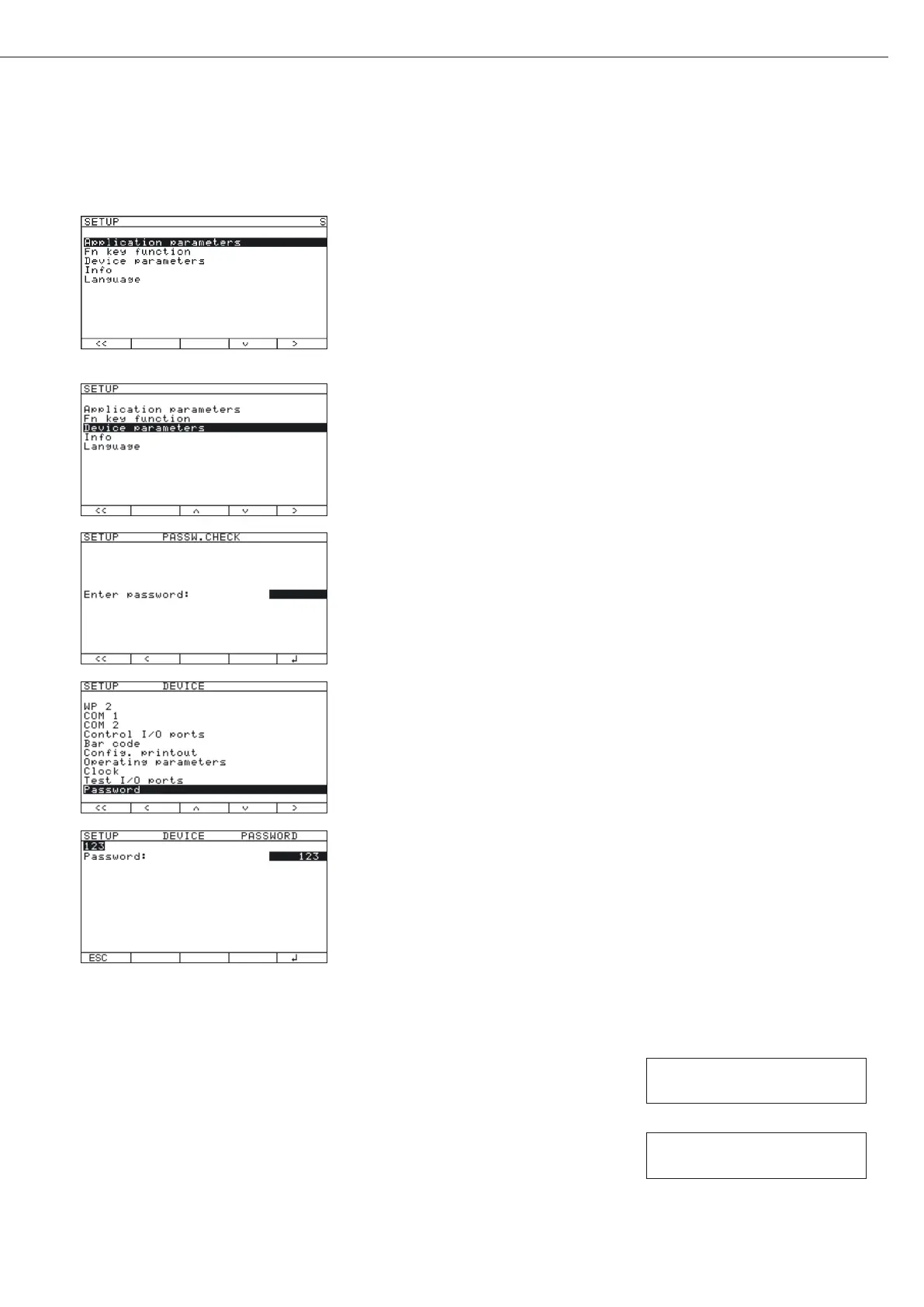
t Press M.
y The menu appears on the display.
t Press the “q" soft key several times to select the “Device
parameters
" line (or “Application parameters").
t Press the “O" soft key.
y The Access window appears on the display.
t Enter the general password (see below) via the keypad, see “Numeric Input via
the Keypad."
t Press the “l" soft key.
y The device selection appears on the display.
t Press the “q" several times to select the “Password" line.
t Press the “O" soft key.
y The input line appears on the display.
t Read the old password, or enter a new password (max. 8 characters).
t Press . or c several times to delete the password.
t Press the “l" soft key to save the delete.
If not yet saved, the process can be canceled using the “ESC" soft key.
t Press M or “oo" to exit the Setup menu.
t Press e to turn off the device.
t Press e turn the device back on.
General password:
40414243
Service password:
202122





 To Next Page