External Calibration/Adjustment with a User-Defined Weight
Configuration
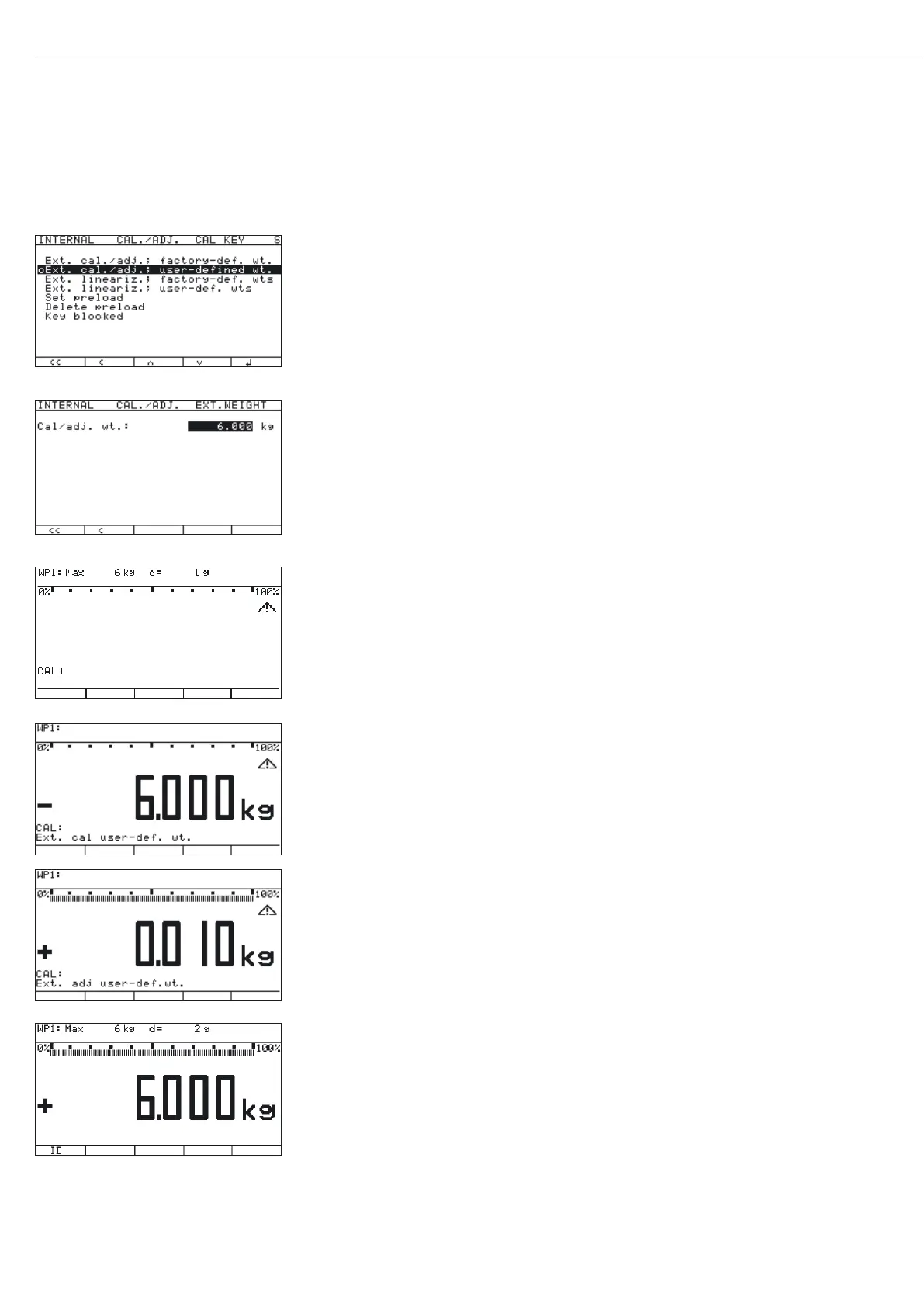
Select the “
CAL key function:Ext. cal./adj.; user-def.
wt." menu item (external adjustment using a user-defined weight).
Note:
The menu items “
Ext. cal./adj.; factory-def. wt." (external
adjustment with a factory-defined, standard weight), “
Ext. cal./adj.;
user-defined wt." (external adjustment with a user-defined weight) and
“
Key blocked" can also be accessed without activating the Service mode.
t Use the “Q" or “q" soft key to select this menu item and confirm with “l."
y The menu item is marked as set by a circle “o."
t Enter the target value of the adjustment weight in the
“
Calibration/adjustment" menu under “Parameter for
external weight" in the “Cal/adj. wt" input field.
t Press e to turn off the device.
t Press e turn the device back on.
y The Sartorius logo is displayed briefly, after which the device is in normal weighing
mode.
t Press ( to unload and zero the scale.
t Press J to start the external adjustment.
y The display “C.EXT.U" appears briefly.
Note
If the display of geographical data (elevation and latitude or gravity) is activated, this
data is displayed and confirmed each with a press of the J key (you can cancel the
calibration/adjustment process using the ( key). See also “Entering Geographical Data
for Use in Legal Metrology" in this chapter.
Procedure
t Press J to confirm the displayed value or press ( to cancel the adjustment.
y The target value of the required adjustment weight (6.000 kg in the example) is displayed
as a negative value.
t Place the required adjustment weight on the platform.
If the calibration/adjustment sequence is set to “Cal. then auto adjust”, refer to the note
under “External Calibration/Adjustment with Factory-Defined Weight (Default Weight).”
y After a brief pause, the difference since the last span adjustment is displayed
(calibration).
t If you only want to perform a calibration, press the ( key to cancel the
calibration/adjustment procedure.
t Press J to adjust the scale.
y At the conclusion of the calibration procedure, the calibration weight is displayed as
a positive value.
36
Configuring Weighing Platforms
C.EXT.USE.





 To Next Page