THE PROFESSIONAL EQUIPMENT------------------|USER’S MANUAL| THE PROFESSIONAL EQUIPMENT------------------|USER’S MANUAL|
NO
Description
FUNCTION
LNB IN Connect to satellite antenna cable
AV OUT
Connect to AV port for TV
AV IN
Connect to AV port for meter
Power witch
Turn on/off meter
USB Port
Connect to USB memory
DC Slot
Connect to Adaptor Input
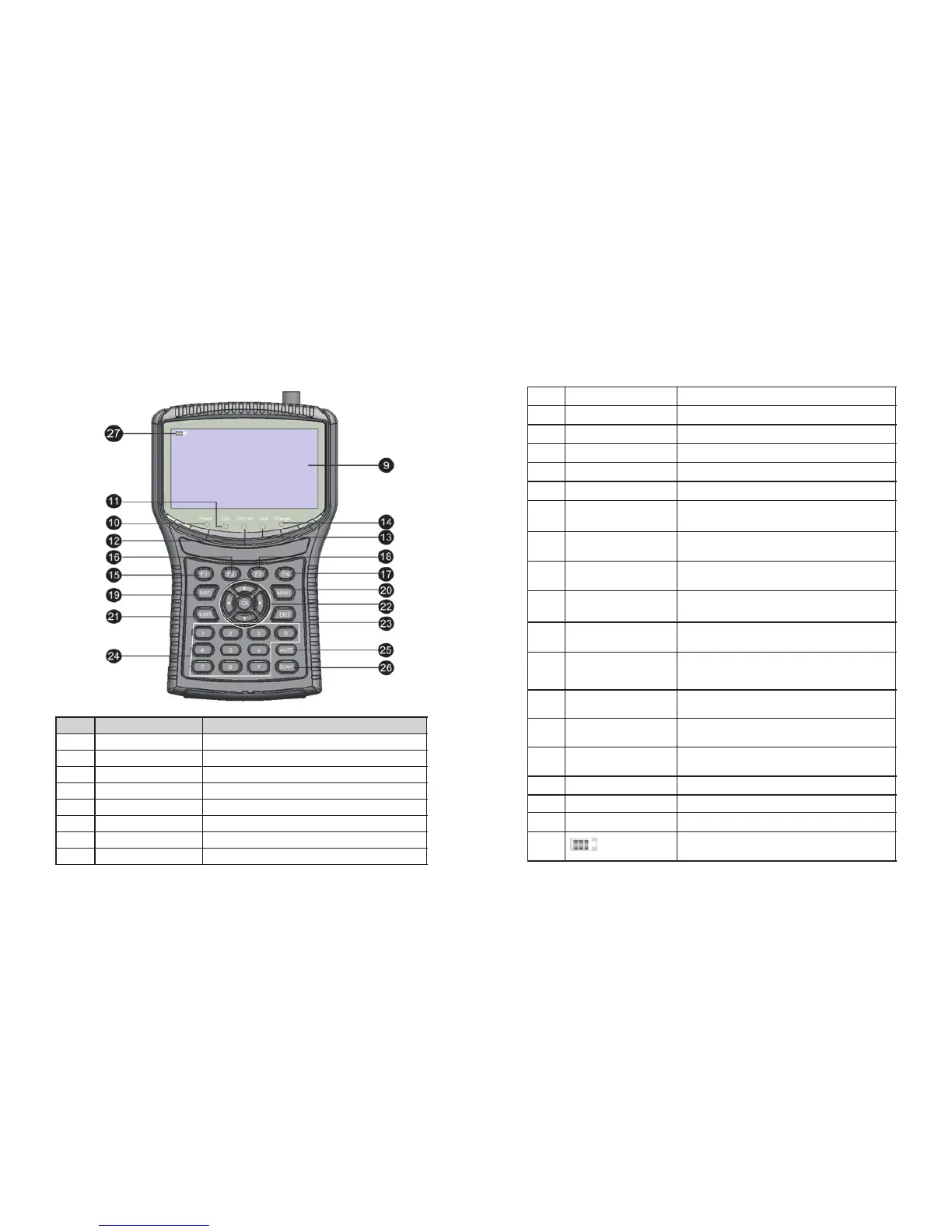
Torch LED
Night lighting
Speaker
Speaker Integrated
LCD Screen
Video display
Power Power indicator light
5V ANT 5V output indicator light
12V/24V
ANT 12V/24V output indicator light
LOCK
Signal lock indicator light
Charger (Note1)
Charger indicator light
F1 (Note 2)
1)Shows the Subtitle menu ;
2)TV/Radio switch
F2(Note 2)
1)Shows the EPG menu;
2)Audio select
F3(Note 2)
1)Shows the Favorite Manager menu;
2)lock beep alarm
F4(Note 2)
1)Shows Manager Channel menu;
2)TV system switch
INFO
To display channel status or various
program information of current channel
MENU
Show the main menu on the screen
or jump back to previous menu in
sub-menu setting conditions
M.INFO
NEVIGATION KEY
Volume Control or move cursor,
channel or change, confirm etc
EXIT
Escape from present menu and save
the settings
0-9
Select channels or enter programming
MUTE
Enable or disable the audio output
SCAN
'Quick Search' menu shortcut key
(Note 3)
When power on the meter ,
displays the battery level
1
2
3
4
5
6
7
8
9
10
11
12
13
14
15
16
17
18
19
20
21
22
23
24
25
26
27
03-Digital Satellite Meter Digital Satellite Meter-04
Show 5 channels signal information
for DVB-T



 To Next Page