EasyManua.ls Logo

Satloc FALCON - Page 33

Default Icon
45 pages
Print Icon
To Next Page IconTo Next Page
To Previous Page IconTo Previous Page
Loading...
Section Two
30
www.Satloc.com Falcon User Manual, Rev A
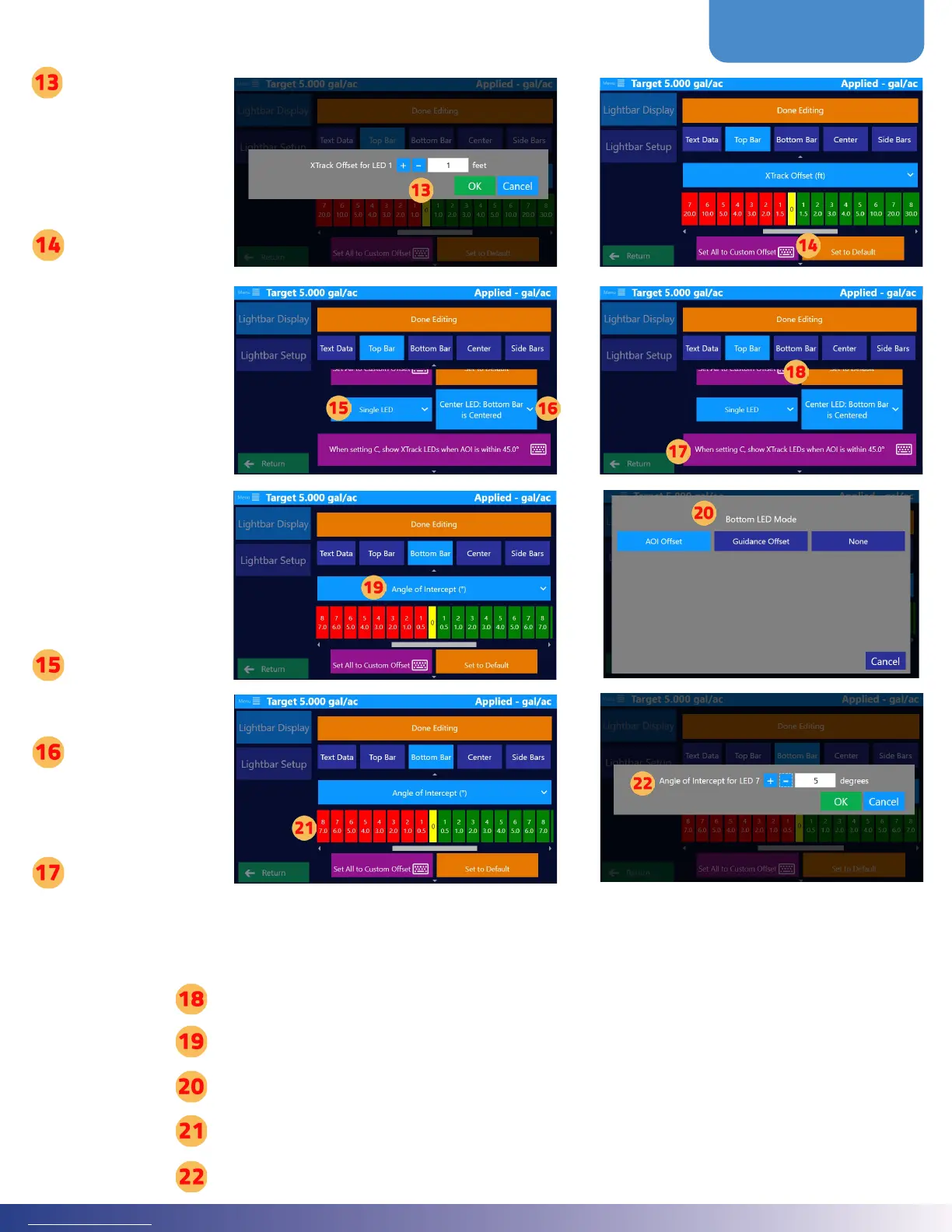
Set the distance
from the center
for LED. is
automatically sets
both sides.
en, tap ‘OK.
Tap ‘Set All to
Custom Oset
to set a distance
between each
LED. is
distance will be
applied to all
LEDs.
Tap ‘Set All to
Custom Oset
to set a distance
between each
LED. is
distance will be
applied to all
LEDs.
Tap ‘Single LED
or ‘Solid Bar’ to
choose a bar style
Tap ‘Center
LED’ to choose
the middle LED
operation
Tap ‘When setting
C, Show XTrack
LEDs when AOI’
to set degrees
BOTTOM BAR
Tap ‘Bottom Bar’
Tap blue selection button, oen seen as the default ‘Angle of Intercept
Choose Bottom LED Mode
Tap on the colored bar to set specic osets for certain areas.
Set the distance from the center for LED. is automatically sets both sides. en, tap ‘OK.

Other manuals for Satloc FALCON

Related product manuals