EasyManua.ls Logo

Satloc FALCON - Page 34

Default Icon
45 pages
Print Icon
To Next Page IconTo Next Page
To Previous Page IconTo Previous Page
Loading...
Section Two
31
www.Satloc.com Falcon User Manual, Rev A
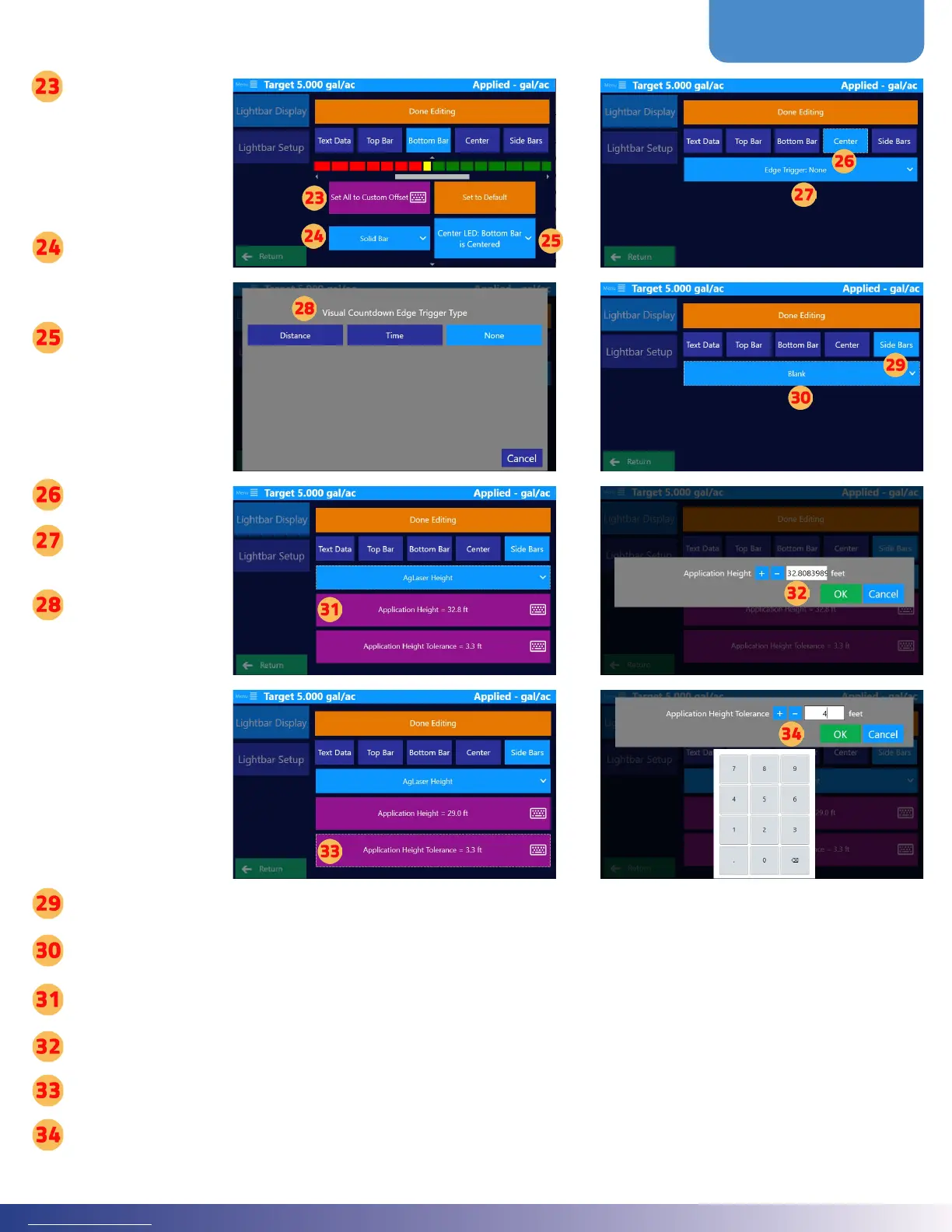
Tap ‘Set All to
Custom Oset
for all lights to be
set to the same
distance from
each other
Tap ‘Single LED
or ‘Solid Bar’ to
choose a bar style
Tap ‘Center LED
to choose the
Bottom Bar LED
operation
CENTER
Tap ‘Center
Tap ‘Edge Trigger:
None’
Choose ‘Distance
or ‘Time’ for
the visual edge
countdown
e next steps/
settings will
depend upon
which type was
chosen for the
visual edge.
Side Bars
Tap ‘Side Bars
Tap the long blue button to set le/right edge for AgLaser Height
Tap ‘Application Height
Input application height and then tap ‘OK
Tap ‘Application Height Tolerance
Input application height tolerance and then tap ‘OK’

Other manuals for Satloc FALCON

Related product manuals