Section Two
34
www.Satloc.com Falcon User Manual, Rev A
Dual Encoder Knob Setup
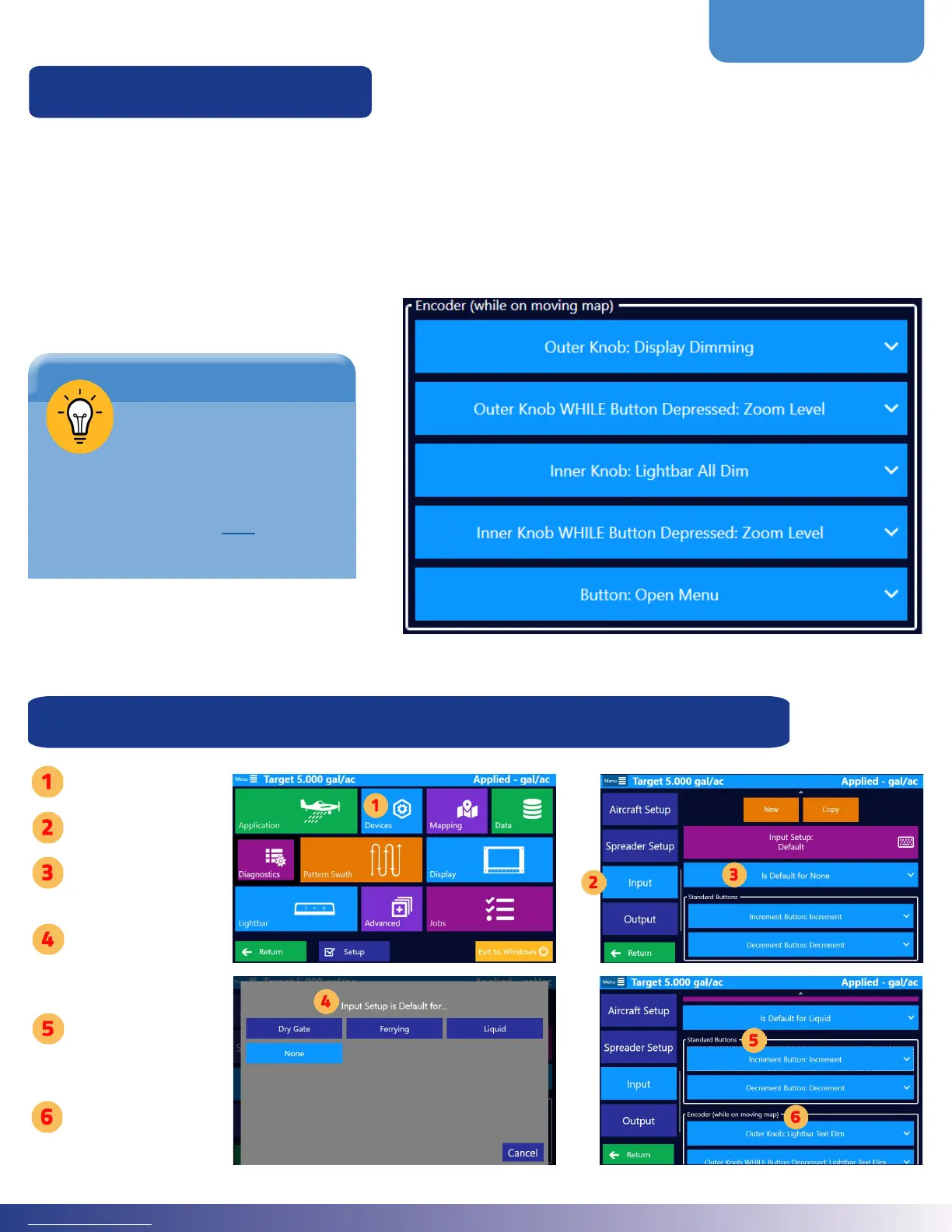
e Falcon Pro models have Increment, Decrement, and a multi-purpose Encoder Knob. e dual encoder knob allows
ve (5) dierent selections. e dual encoder has a button attached to the smaller inner knob. Spinning either knob
while this button is pressed down (depressed) or simply clicking this button has unique actions in addition to simply
spinning the outer and inner knobs. All of these settings only apply while on the moving map screen.
Follow this path to setup the dual encoder knob: Main Menu > Devices > Input. Below is an image of the ve (5)
programmable selections for the dual encoder knob.
For a visual of how-to
use and customize the
Falcon Dual Encoder
knob, visit Satloc’s YouTube
channel or click this link to take
you directly to the video.
TIP
Setup Encoder Knob as a Default for Dierent Guidance Modes
Tap ‘Devices’
Tap ‘Input’
Select ‘Is Default
for None’
Choose a
Guidance Mode
for the Input
Choose settings
for ‘Standard
Buttons’
Choose settings
for ‘Encoder’



 To Next Page