Section Two
35
www.Satloc.com Falcon User Manual, Rev A
2.8 ADS-B IN SETUP & TESTING
e Falcon models are equipped to give on-screen and Lightbar indications of nearby contacts.
Not every nearby aircra is equipped with ADS-B Out. ADS-B In provides information to pilots that help
prevent accidents. HOWEVER, ADS-B In does not replace pilot best practices, pilot situational awareness,
and properly functioning equipment.
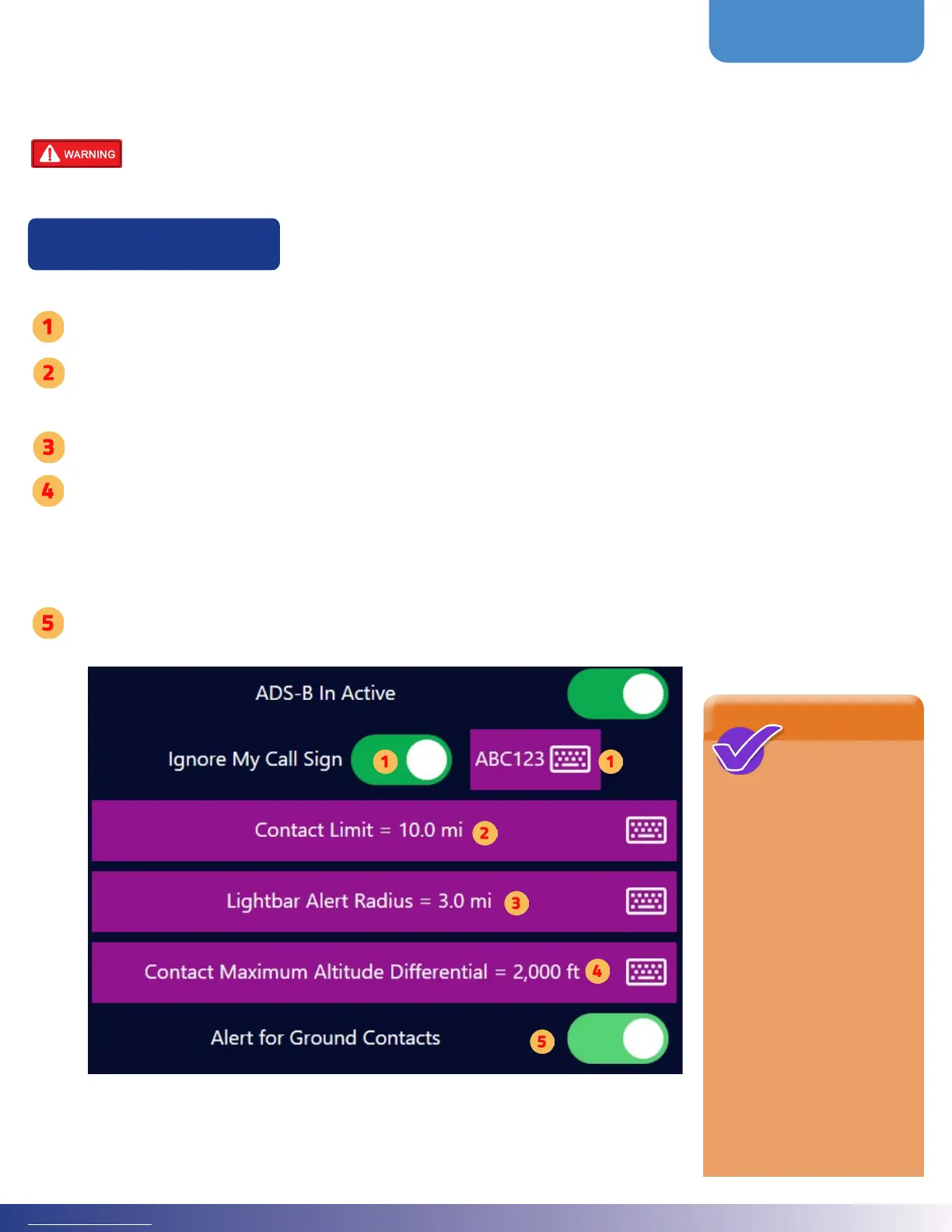
Navigate to ADS-B In settings by follwing this path: Main Menu > ADS-B In Setup
If your plane is equipped with ADS-B Out, select ‘Ignore My Call Sign’ and enter your transmitted call sign in the text eld.
Tap ‘Contact Limit’ to set contact distance limit. e ADS-B device will receive air-to-air contacts in your immediate area
and rebroadcast contacts from nearby ground stations for an extensive area. e Contact Limit input limits the On-Screen
contacts to a square extending this distance from your location.
Tap ‘Lightar Alert Radius’ to set distance alert on lightbar.
Tap ‘Contact Maximum Altitude Dierential’ to set distance alert on lightbar.
Note: Alerts on the Lightbar are even further restricted. e Falcon creates a cylinder with your aircra in the center. Any
contact within the Lightbar Alert Radius and the Contact Maximum Altitude Dierential (above and below your current
altitude) will show on the Lightbar circle.
Toggle On or O the ‘Alert for Ground Contacts.’ In the ADS-B data, this indicates contact is on the ground (not airborne).
Turning this o would then ignore such contacts.
NOTE
On the Lightbar,
a contact is
identied with a single white
LED in the relative direction
to your heading. ere
are 18 such LEDs, so each
represents 20 degrees. e
chasing LEDs surrounding
the contact LED indicate
the urgency of the perceived
threat based on the rate of
change in distance. Contacts
that are getting further away
are slow blue-chasing LEDs.
A contact whose distance is
converging quickly results in
fast red-chasing LEDs. e
urgency colors change from
Blue, Purple, Orange, and
then to Red.
ADS-B In Setup



 To Next Page