Step
å
NOTE: If fastening your Keyboard Drawer to the left side
of your unit, go to step 27 now.
å
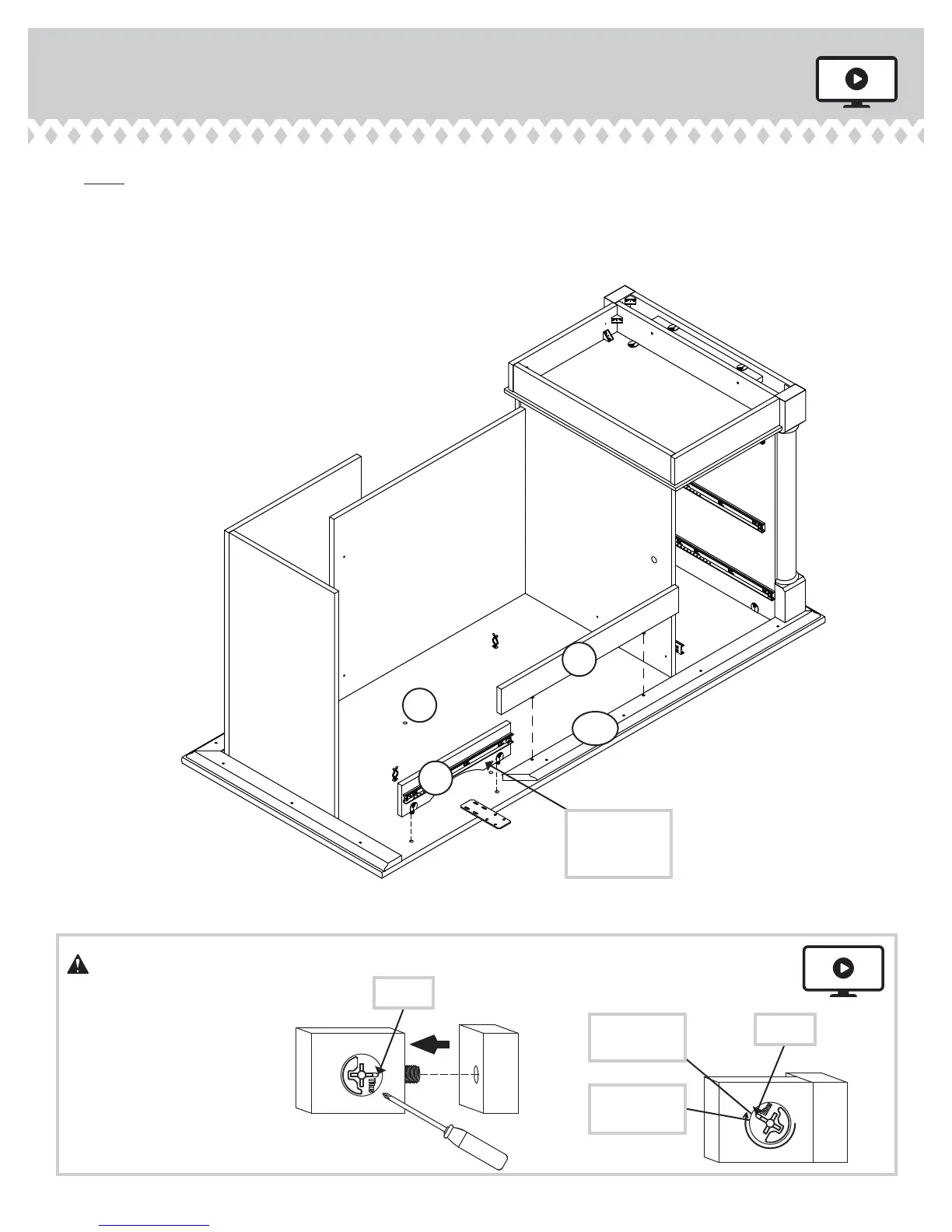
Fasten the FRONT PANEL (QQ) to the TOP LEFT FRONT
MOLDING (CCC) on the LEFT TOP (H2). Tighten two
HIDDEN CAMS.
å
Fasten the KEYBOARD UPRIGHT (VV) to the LEFT
TOP (H2). Tighten two TWIST-LOCK® FASTENERS.
Step 26
KEYBOARD DRAWER ON RIGHT
H2
QQ
VV
CCC
Start Tighten
Arrow
Minimum
190 degrees
Caution
Risk of damage or
injury. HIDDEN CAMS
must be completely
tightened. HIDDEN
CAMS that are not
completely tightened
may loosen, and parts
may separate. To
completely tighten:
Arrow
Maximum
210 degrees
Surface with
TWIST-LOCK®
FASTENERS
417714 www.sauder.com/servicesPage 32


 To Next Page