This document describes the Savant Pro Remote, a device designed to control various aspects of a Savant smart home system. It serves as a user guide, detailing the remote's hardware, software, and functionalities for managing services, scenes, and settings.
Function Description
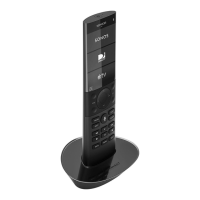
The Savant Pro Remote acts as a central control unit for a Savant smart home system. It allows users to interact with and manage various connected services, such as audio/video systems, lighting, and environmental controls. The remote features a multi-colored LCD touchscreen display for intuitive navigation and control, complemented by physical buttons for common functions. It supports user profiles, allowing personalized access to scenes and settings. The remote can capture and activate scenes, which are pre-configured states for multiple devices, simplifying complex actions into a single command. Voice commands are also integrated, offering an alternative hands-free control method.
Important Technical Specifications
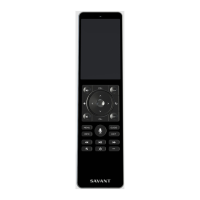
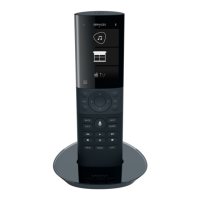
The document outlines three models of the Savant Pro Remote: REM-1100 (Single-Room Pro Remote), REM-2000 (Multi-Room Pro Remote), and REM-4000 (Pro Remote X2). While specific differences in capabilities are implied by the "Single-Room" vs. "Multi-Room" designations, detailed technical specifications like processor speed, memory, or battery capacity are not provided.
Connectivity:
- Wi-Fi: Supports 802.11 b/g/n on both 2.4 GHz and 5 GHz bands.
- Wi-Fi Security: Compatible with WPA1™, WPA2™, WPA1™ + WPA2™, or no security.
Hardware Components (common across models, with some variations):
- Power Button: Powers the remote on/off and can toggle the last used A/V service.
- Microphone: Positioned on the top of the remote for voice commands.
- Touchscreen Display: Multi-colored LCD for viewing and controlling services, motion-activated, supports touch and swipe gestures.
- Navigation (D-pad): Standard up, down, left, right arrows for on-screen control, with a central Select button. Also supports press-and-hold for page up/down in menus.
- Volume Buttons: Increase or decrease volume for the active service.
- Channel Buttons: Channel Up or Channel Down for the active service.
- Voice Command Button: Activates voice command functionality.
- Service Control Buttons: Generic buttons for basic A/V service control; functions can change based on the active service.
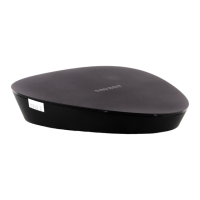
- Remote Base: Charges the remote's battery when docked. Features a Status LED (Off: Not powered, Solid Green: Powered).
REM-4000 (Pro Remote X2) specific features:
- Microphones: Front and rear panel microphones for voice commands.
- Navigation (D-pad): Includes dedicated page up/down buttons.
- Channel/Volume: Includes Last/Back and Mute functions respectively.
- Service Control: Includes Menu/Info/Guide/Exit/Rewind/PlayPause/FastForward/Back buttons.
- Ellipses Button: Configurable by Savant Integrator.
- Savant "S" Button: Quick activation of Savant Home app for Apple TV (configurable by Savant Integrator).
- Power Button: Can be configured to require two presses to turn off the last used A/V service.
Software/System Information (viewable in "About" settings):
- Name: Configured by Savant Integrator.
- UID: Savant Unique ID for custom button programming.
- Model: Remote model number.
- Version: Software version.
- S/N: Serial number.
- FCC/ID and IC: Regulatory information.
Usage Features
Gestures:
- Tap: Touch and release a button or icon.
- Touch and Hold: Activates pop-up menus or other features.
- Swipe Right/Left/Up/Down: Navigates between screens or scrolls through content.
User Management:
- User Log In/Log Out: Users can log in/out of their accounts, which are synced from the Savant Pro App.
- Passcode Protection: Optional passcode for accessing user accounts.
- Savant User (Default Profile): A basic user profile with limited access, available if no cloud user accounts are configured. Requires syncing with a Savant Cloud User Account for full functionality.
Interface Settings:
- Customization: Users can create and activate new interfaces to customize screen elements.
- Single Screen Mode: Hides the Scenes menu and moves Settings to the bottom of the main screen.
- Interface Lock: Disables editable interface elements and requires a user passcode to access sensitive settings (Interface Settings, Users, Wi-Fi Info, Factory Reset).
- Accessible Rooms: For multi-room remotes, users can enable specific rooms for control.
- Room Images: Option to show or hide room images on the Home screen.
- Clock: Toggle between 12-hour and 24-hour formats.
- Text Labels: Option to enable additional text labels below Service Icons.
Services:
- Navigation: Swipe up/down to scroll through available services.
- Activation: Tap a service icon to open it.
- Status Indicators: A dot indicates an active service in the current room; a halo indicates an active service in a different room with the source component in use.
- Reordering: Touch and hold a Service Icon to re-order its position on the remote (if interface is unlocked).
- Channel Favorites: For Cable TV services, users can swipe right to access and select programmed channel favorites.
- Powering Off A/V Services: A power button on the bottom right of A/V service screens allows users to power off the active service or the entire room (including A/V and Lighting Services).
Scenes:
- Creation: Scenes can be captured on the remote by setting desired device states and levels.
- Synchronization: Scenes created on the remote are automatically synced with the Savant Pro App.
- Sharing: Option to share scenes with all users and devices.
- Limitations: Only Lighting and Media Services can be captured directly on the remote. Timers, schedules, and fade adjustments must be configured via the Savant Pro App.
- Scene Icons: Various icons indicate scene status (Shared, Schedule Enabled/Disabled, Timer Active/Not Active).
Sleep Timer:
- Functionality: Powers off an active service after a user-defined period (5, 10, 15, 30, 45 minutes, or 1 hour).
- Activation: Accessed via the Power icon on an active service screen.
- Adjustment/Cancellation: Tapping the power off button when the timer is active allows adjustment or cancellation.
Voice Commands:
- Activation: Press and hold the voice command button, wait for the prompt, then speak the command.
- Confirmation: The remote displays the command for confirmation before execution.
- List of Commands: Press and hold the voice command button and say "Voice Commands" to view a categorized list of supported commands.
- Siri Voice Commands: Enabled when an Apple TV service with IP control is active, allowing the voice command button to activate Siri.
Maintenance Features
Remote Settings:
- Power Button Behavior: Configure single press to instantly power off room/services, or require two-step confirmation.
- Sleep: Adjust the remote's active time before going to sleep (10 seconds to 2 minutes) to conserve battery.
- Brightness: Adjust screen brightness (five levels) to balance visibility and battery life.
- Wake Sensitivity: Adjust the amount of movement required to wake the remote (Low, Medium, High).
- Wi-Fi Information: View SSID name, IP address, Wi-Fi signal strength, channel, and frequency band.
- Configure Wi-Fi: Reconfigure or reset Wi-Fi information and saved SSID.
- Factory Reset: Resets the remote to its factory default settings.
Diagnostics:
- Send Diagnostics: Uploads embedded log files to the Savant Host for troubleshooting by the Savant Support Team. Requires full communication between the Remote, Remote Base, and Host.
Battery Management:
- The remote base charges the battery. The "About" screen displays the current battery percentage. Adjusting sleep timers and brightness can help extend battery life.

 Need help?
 General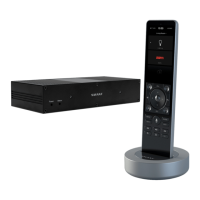

 To Next Page