SGT-88IV Ethernet Interface Printer Setup Tool Instructor
Note: it is suitable only for Win2000/WinXP/Win2003/WinVista /Win7/Win8/8.1/10
Operating System.
1.User could open setup tolls from enclosed CD.(Printer setting tool )
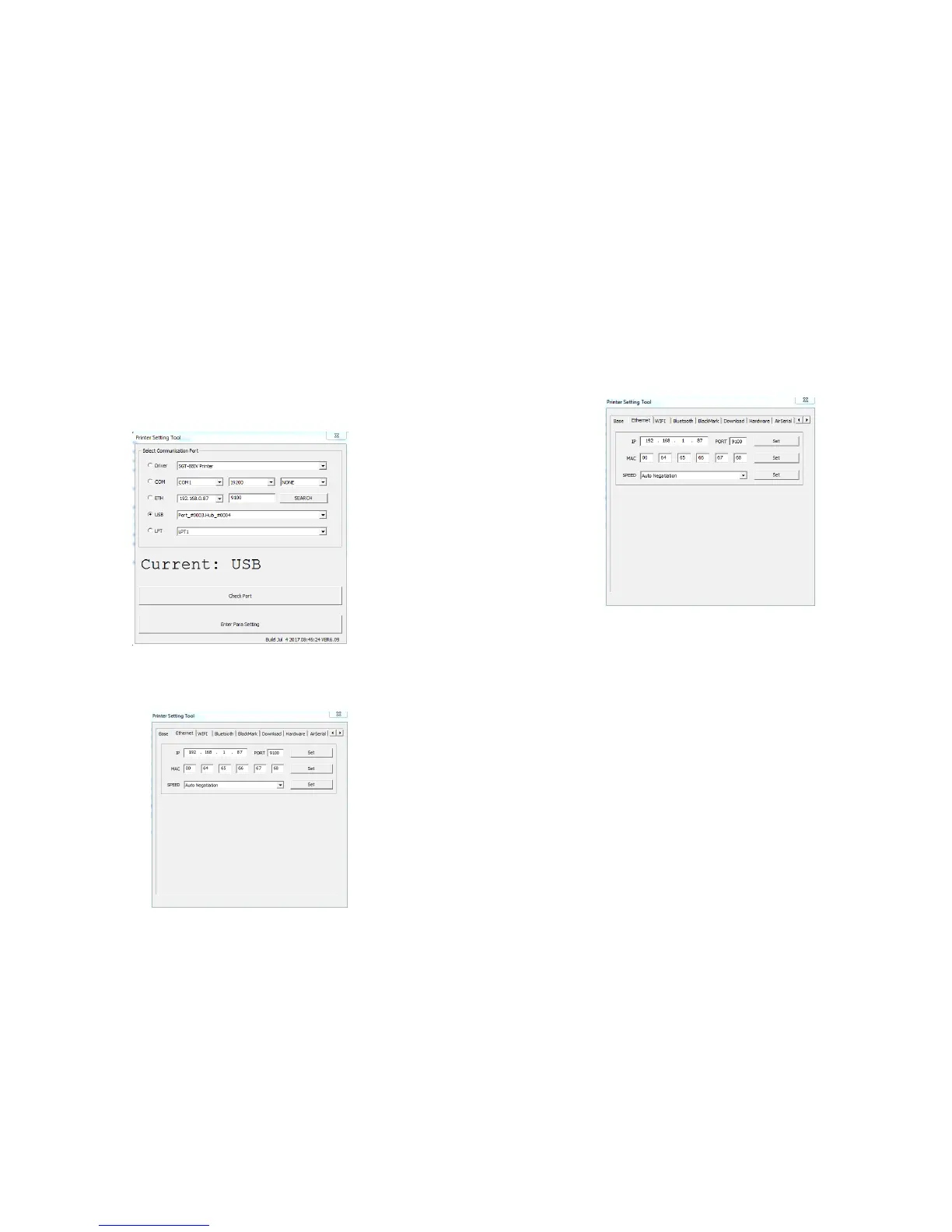
2.Run Ethernet interface printer configuration program Pinter setting toool--Ethernet (see the
following picture):
3.Connect the printer to PC,concentrator or Router
4.On picture 1, you can choose serial/USB/Ethernet to revise the IP address of printer:
6.2 Using Ethernet port to revise the IP address
Select“Ethernet” on picture 1,the default IP “192.168.1.87”,click “test”,check if the communication
is normal, if it is, it will show “OK”,if not, it will show “ERROR”,if error happens, please check if the
line is connected property. After everything goes well, input the new IP on the input box (such as
192.168.1.121)
After finishing inputting new IP, select “set”,and then will show “OK”.
5.Check the printer IP address through power-on self-test page.
6.If the printer is connected with PC through Ethernet, please set the IP Address of PC so that the
printer’ and PC’ IP addresses are in the same network segment. For example, if the printer’s IP
Address is: 192.168.1.87, you need to set the PC’s IP Address as 192.168.1.60.
If you did not set up successfully, please check the following items:
A.Is the IP address of PC in the same network segment as printer IP? Note: Need to make PC IP
address and printer IP address in the same network segment, so that the PC can be connected with
printer successfully.
B.Does the cable that connect PC with printer meet the requirement of network communication?
**Note: Direct communication between PC and Printer needs cross line cable.Communication
between PC and HUB Or ROUTER, the printers need to be connected to HUB or ROUTER through
parallel line. Check the connection through internet cable tester.
C.Testing trough “ping” instruction to see if the PC can communicate with printer successfully.Note: In
network, the IP address of host computer can not be the same as printer Ethernet interface IP address.
**Note: usually the ID address will change as the user revise the IP address, so that every Ethernet
printer will have there unique ID address which users don't need to change.
7.Once finding there are same ID addresses during installation, you need to change ID address
through printer configuration program Pinter setting toool--Ethernet . (Note: MAC address of the
Pinter setting toool--Ethernet is the ID Address).
12 13
6.1 Using USB port to revise the IP address


 To Next Page