Warning:
Do not attempt to open the camera head at any time. The camera head is not
user serviceable and should only be opened by a Scanprobe engineer or agents
explicitly authorised by Scanprobe Techniques Ltd.
Warning:
Do not look directly at the LEDs when illuminated to full brightness. The LEDs
are very bright and may cause temporary or permanent damage to the eyes.
Connecting Camera to Pushrod
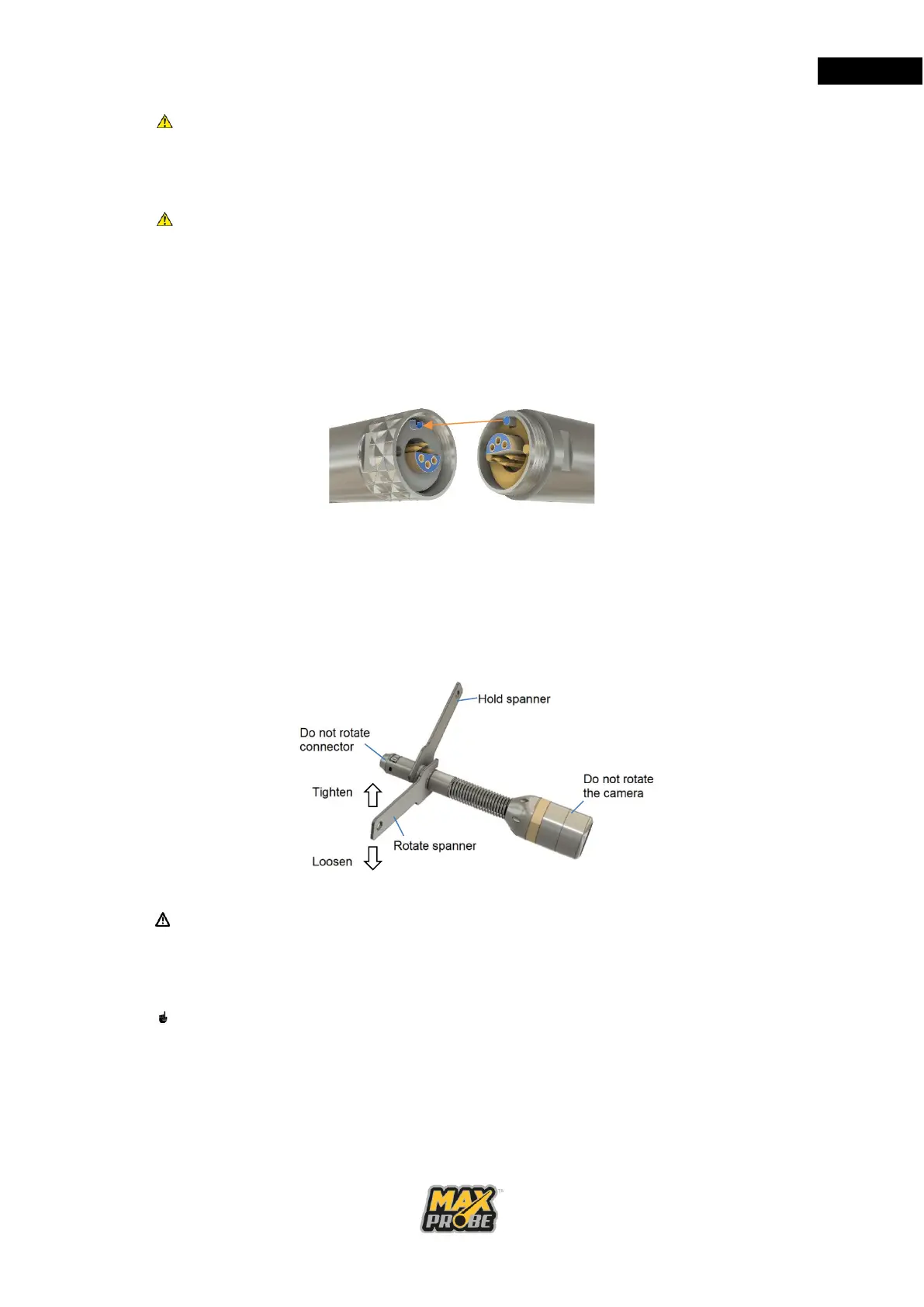
• Align the connector pins correctly using the keyway pin and the connector
terminals male to female, as shown in Figure 20.
Figure 20: Aligning Pushrod and Camera Connectors
• Push the male and female connectors together.
• Hold the rod connector and camera still, so ONLY the outer shell can rotate.
• Screw the outer shell over both parts.
• Using the camera spanners (see Figure 21), screw the outer shell over the rod
connector until tight.
Figure 21: Use of Camera Spanners
Caution:
Take care with the connector thread, avoid extreme force, always use the
provided spanners to tighten and just nip the connectors together. Do not over
tighten!
Note:
Always ensure the connector is clean and electrical contacts remain grease free.



 To Next Page