Scantech-ID Shuttle
C
SG-15
Colour
39
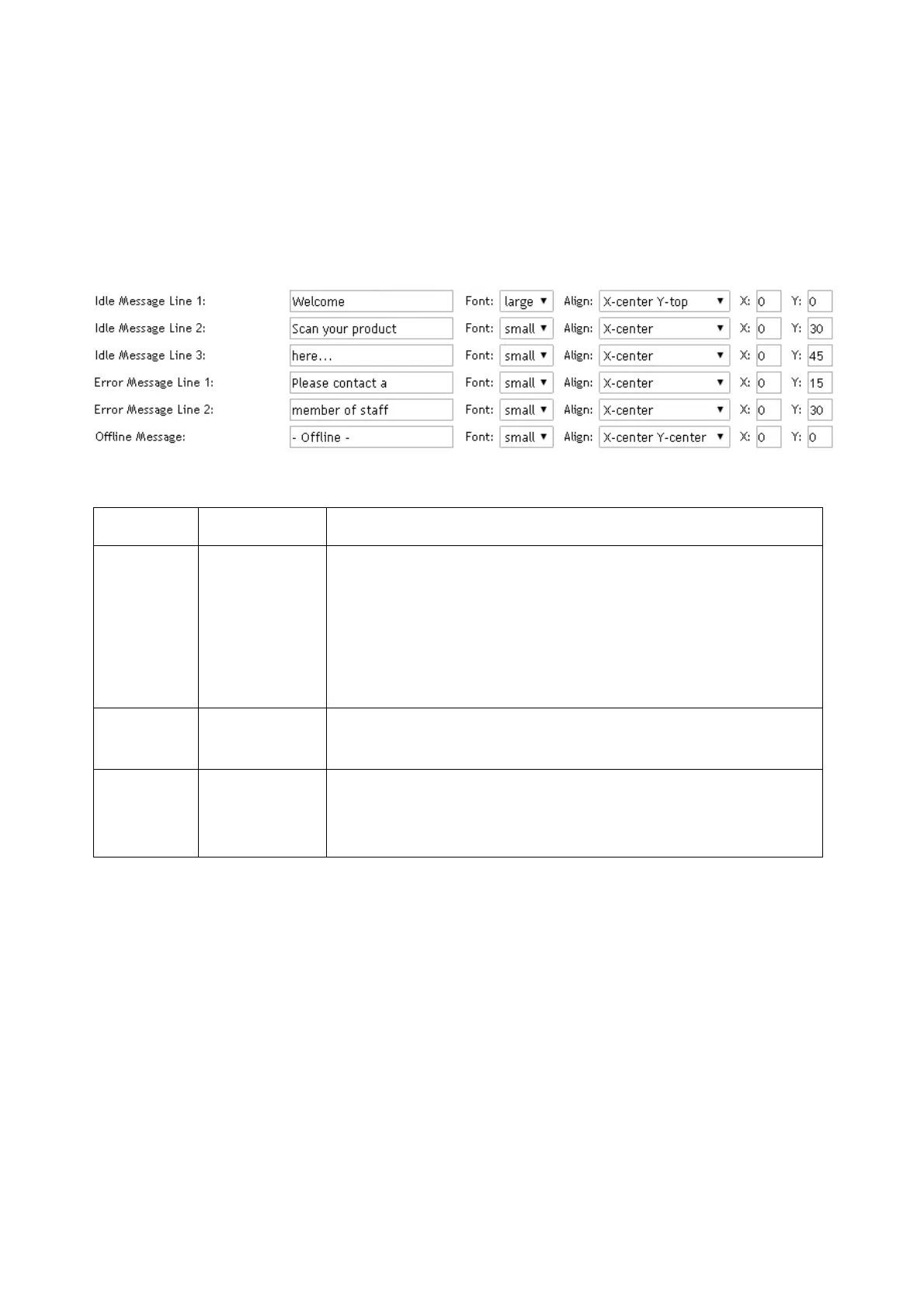
5.4.7 Messages
This section allows you to define 3 types of messages: Idle, Error and Offline.
Each message has a number of reserved lines for entering text. The attributes
font, align and XY offsets gives a certain freedom to visualize the messages.
Table with legend for message details:
Message SG-15 Mode Legend
Line[1-3] Idle These messages are displayed when for Idle Display Mode
button Text is selected (each message remains T
Alt
sec on
screen). All messages are editable with a browser.
Messages longer than the display line length are wrapped
around to the next line, empty message fields are
skipped.
Line[1-2] Error Is displayed when the server does not reply within T
Wait
second after sending the barcode request.
Line[1] Offline Shown when the SGPriceChecker service on the server is
not available
1
at start-up. The SG-15 emulation stays in
this mode until the server connection returns.
Notes:
• The number of characters you can display per line depends on the font size
and the code-page. Wrap-around of text is NOT supported so extra characters
beyond this number are not or partly displayed.
• Defining a new message string page is done with a browser, which will use the
locally defined code page of your PC or Laptop. When clicking «Accept » the
SG-15 emulation will re-map the entered string according to the selected
SG-15 code page.



 To Next Page