- 22 -
www.SCEPTRE.com
SCEPTRE E165 HD Display User Manual
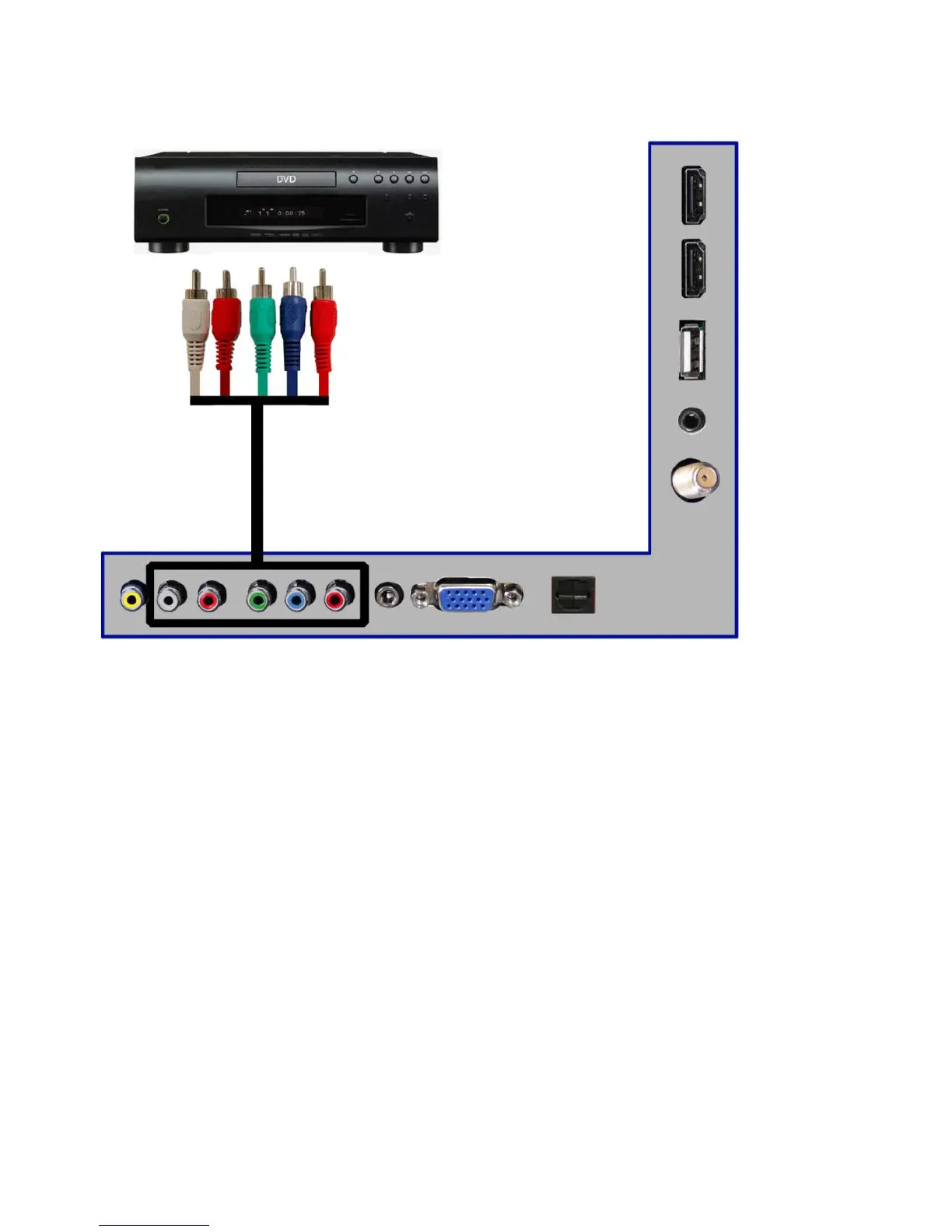
Connecting DVD Player with Component YPbPr…
1. Make sure the power of HD display and your DVD player is turned off.
2. Obtain a Component Cable. Connect the green color connector to both your DVD player
and YPbPr’s green connector port on the back of your HD display.
3. Connect the blue color connector to both your DVD player and YPbPr’s blue connector
port on the back of your HD display.
4. Connect the red color connector to both your DVD player and YPbPr’s red connector
port on the back of your HD display.
5. Obtain a RCA Audio Cable. Connect the white color connector to both your DVD player
and YPbPr’s white connector port on the back of your HD display.
6. Connect the red color connector to both your DVD player and YPbPr’s red connector
port on the back of your HD display.
7. Turn on the HD display and your DVD player.
8. Use the remote control’s source button or the source button on the display to switch to
YPbPr.
Please Note :
Sometimes DVD players will not automatically output to YPbPr. You will need
to configure your DVD player with AV connection first then switch to YPbPr.
Please reference the DVD player’s manual, to make sure the DVD player is
configured to output correctly to the display.
This source shares audio jacks with AV video.


 To Next Page