PROBLEM
Alarm sounds
too frequently
or experiencing
false alarms
RESOLUTION
Your sensitivity level is too
high (at 1 or 2) and needs
adjusted to a less sensitive
level (3, 4 or 5).
Call customer service at
1.888.805.9837 for assistance
or
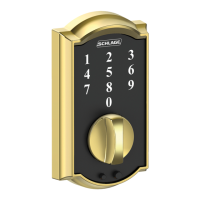
Reset yourself by:
1. Pressing and holding the
Schlage button until the
third LED ash. This will
take about 10 seconds.
2. Tabbing the Schlage button
to cycle through the ve
sensitivity levels.
3. Selecting the sensitivity
level you prefer.
The Lock with Built-in Alarm comes pre-set to
Sensitivity Level 3. The sensitivity level indicates
the level of touch or activity needed to set off
the alarm.
Important: As you cycle through the ve levels,
the alarm will beep the same number of times as
each setting level.
LOW • • • • • • • • •
Sensitivity
• • • • • • • • • HIGH
Level/Beeps
1
2
3
4
5
Troubleshooting
11


 To Next Page
 Loading...