EasyManua.ls Logo

Schleuniger 207 - Adjusting the Grippers with the Calibration Set

Default Icon
14 pages
Print Icon
To Next Page IconTo Next Page
To Previous Page IconTo Previous Page
Loading...
Adjusting
the
grippers
with
the
calibration
set
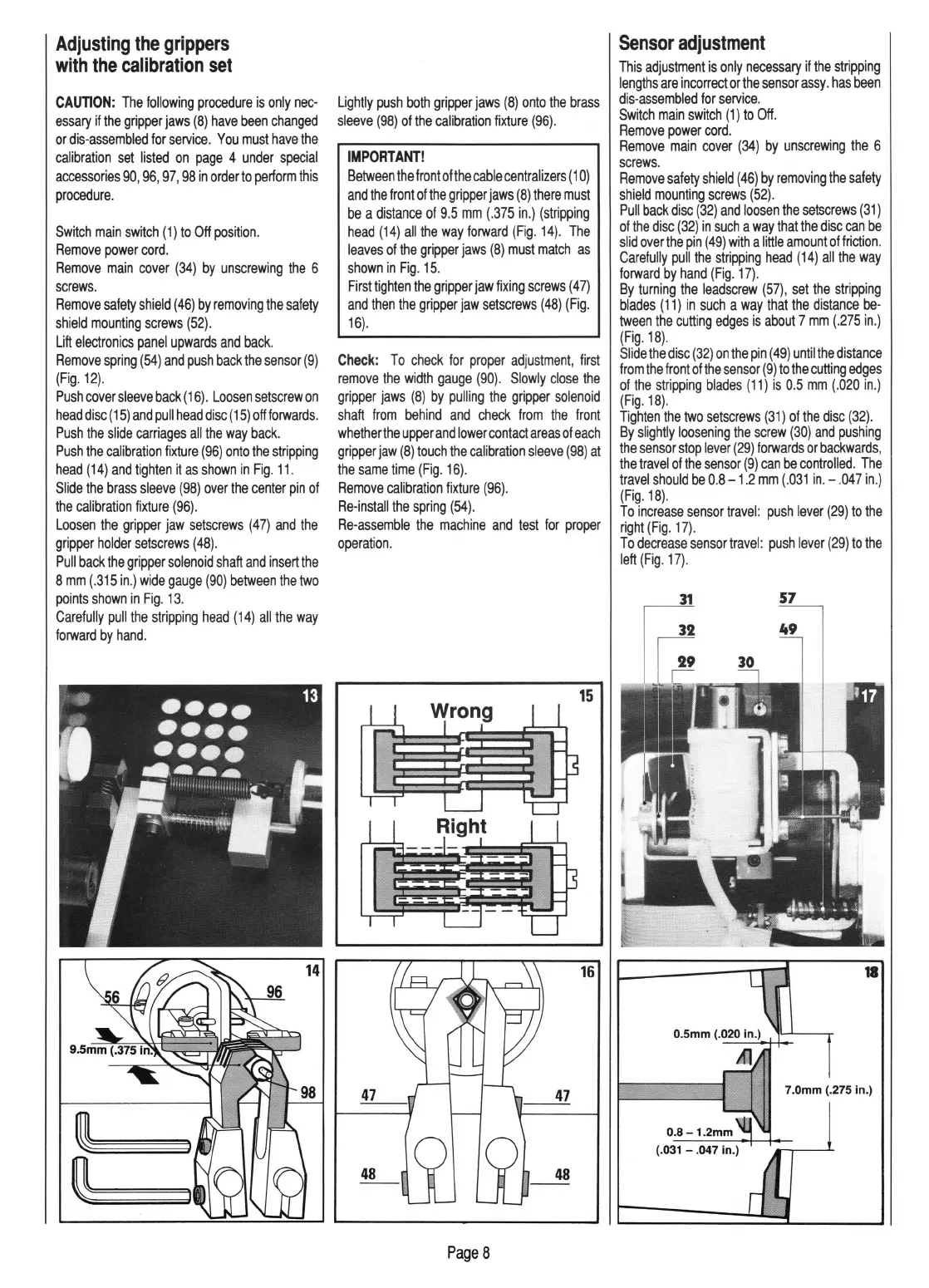
CAUTION:
The
following
procedure
is
only
nec-
essary
if
the
gripper
jaws
(8)
have
been
changed
or
dis-assembled
for
service.
You
must
have
the
calibration
set
listed
on
page
4
under
special
accessories
90,
96,
97,
98
in
order
to
perform
this
procedure
.
Switch
main
switch
(1)
to
Off
position
.
Remove
power
cord
.
Remove
main
cover
(34)
by
unscrewing
the
6
screws.
Remove
safety
shield
(
46)
by
removing
the
safety
shield
mounting
screws
(52)
.
Lift
electronics
panel
upwards
and
back.
Remove
spring
(54)
and
push
back
the
sensor
(9)
(Fig
.
12).
Push
cover
sleeve
back
(
16).
Loosen
setscrew
on
head
disc
(
15)
and
pull
head
disc
(
15)
off
forwards.
Push
the
slide
carriages
all
the
way
back.
Push
the
calibration
fixture
(96)
onto
the
stripping
head
(14)
and
tighten
it
as
shown
in
Fig.
11.
Slide
the
brass
sleeve
(98)
over
the
center
pin
of
the
calibration
fixture
(96).
Loosen
the
gripper
jaw
setscrews
(47)
and
the
gripper
holder
setscrews
(48).
Pull
back
the
gripper
solenoid
shaft
and
insert
the
8
mm
(.315
in
.)
wide
gauge
(90)
between
the
two
points
shown
in
Fig
.
13
.
Carefully
pull
the
stripping
head
(14)
all
the
way
forward
by
hand.
~~~
~~~
Lightly
push
both
gripper
jaws
(8)
onto
the
brass
sleeve
(98)
of
the
calibration
fixture
(96)
.
IMPORTANT!
Between
the
front
ofthe
cable
centralizers
( 1
0)
and
the
front
of
the
gripper
jaws
(8)
there
must
be
a
distance
of
9.5
mm
(.375
in.)
(stripping
head
(14)
all
the
way
forward
(Fig
.
14).
The
leaves
of
the
gripper
jaws
(8)
must
match
as
shown
in
Fig.
15.
First
tighten
the
gripper
jaw
fixing
screws
(47)
and
then
the
gripper
jaw
setscrews
(48)
(Fig
.
16)
.
Check:
To
check
for
proper
adjustment,
first
remove
the
width
gauge
(90).
Slowly
close
the
gripper
jaws
(8)
by
pulling
the
gripper
solenoid
shaft
from
behind
and
check
from
the
front
whether
the
upper
and
lower
contact
areas
of
each
gripper
jaw
(8)
touch
the
calibration
sleeve
(98)
at
the
same
time
(Fig.
16).
Remove
calibration
fixture
(96).
Re-install
the
spring
(54).
Re-assemble
the
machine
and
test
for
proper
operation
.
48
PageS
Sensor
adjustment
This
adjustment
is
only
necessary
if
the
stripping
lengths
are
incorrect
or
the
sensor
assy
.
has
been
dis-assembled
for
service
.
Switch
main
switch
(1)
to
Off.
Remove
power
cord
.
Remove
main
cover
(34)
by
unscrewing
the
6
screws.
Remove
safety
shield
(
46)
by
removing
the
safety
shield
mounting
screws
(52).
Pull
back
disc
(32)
and
loosen
the
setscrews
(31)
of
the
disc
(32)
in
such
a
way
that
the
disc
can
be
slid
over
the
pin
(49)
with
a
little
amount
of
friction.
Carefully
pull
the
stripping
head
(14)
all
the
way
forward
by
hand
(Fig.
17).
By
turning
the
leadscrew
(57),
set
the
stripping
blades
(11)
in
such
a
way
that
the
distance
be-
tween
the
cutting
edges
is
about
7
mm
(.275
in
.)
(Fig.18).
Slide
the
disc
(32)
on
the
pin
(49)
until
the
distance
from
the
front
of
the
sensor
(9)
to
the
cutting
edges
of
the
stripping
blades
(11)
is
0.5
mm
(.020
in
.)
(Fig.18).
Tighten
the
two
setscrews
(31)
of
the
disc
(32)
.
By
slightly
loosening
the
screw
(30)
and
pushing
the
sensor
stop
lever
(29)
forwards
or
backwards,
the
travel
of
the
sensor
(9)
can
be
controlled
.
The
travel
should
be
0.8
-1.2
mm
(.031
in.-
.047
in.)
(Fig.18).
To
increase
sensor
travel:
push
lever
(29)
to
the
right
(Fig.
17).
To
decrease
sensor
travel:
push
lever
(29)
to
the
left
(Fig.
17).
57

Related product manuals