EasyManua.ls Logo

Schleuniger 207 - Operating the Machine

Default Icon
14 pages
Print Icon
To Next Page IconTo Next Page
To Previous Page IconTo Previous Page
Loading...
Operating
the
machine
Before
starting
work
check
...
...
that
the
stripping
values
match
the
cable
.
...
that
there
is
no
debris
between
the
stripping
blades
(11)
and
the
cable
centralizers
(1
0).
...
the
cutting
edges
of
the
stripping
blades
(11)
with
a
magnifying
glass.
..
.
the
values
stored
(7)
(LED
display)
compared
with
your
program
record
sheet.
Inserting
the
cable
Insert
the
cable
to
be
stripped
through
the
gripper
jaws
(8)
onto
the
sensor
(9)
.
Make
sure
that
the
cable
is
inserted
horizontally
and
uniformly,
quickly
and
gently,
and
that
it
touches
the
sensor
lightly
in
the
middle.
As
soon
as
the
stripping
action
is
started,
the
gripper
jaws
(B)
hold
the
cable
and
you
only
need
to
hold
it
gently
(Fig.
1 ).
Failures
Switch
the
machine
off
and
re-check
the
points
listed
under
"Before
starting
work,
check
...
".
Further
possible
causes
for
failure
can
be
found
in
the
troubleshooting
section.
Safety
regulations
Never
operate
the
machine
without
the
safety
shield
(46)
in
place
.
Before
removing
or
lifting
the
main
cover
(34),
pull
out
the
power
cord.
When
leaving
the
place
of
work,
switch
the
machine
off
.
Initial
calibration
of
the
machine
Each
SCHLEUNIGER
207
is
checked
out
thor-
oughly
before
delivery.
Re-calibration
necessary
through
maintenance
work,
repairs
etc
.,
may
only
be
carried
out
by
trained
personnel.
Blade
change
and
calibration
Good
stripping
blades
(
11)
are
the
most
important
prerequisite
for
first
class
stripping
quality.
The
SCHLEUNIGER
207
is
set
up
in
such
a
way
that
the
stripping
blades
(11)
can
be
replaced
without
the
values
stored
in
memory
being
affected
.
Important:
The
following
method
is
only
possible
if
the
gripper
jaws
have
not
been
moved
from
the
factory
set
position.
If
you
have
serviced
the
grippers
in
any
way
,
you
mustfirst
re-align
them
as
described
in
the
section
<adjusting
the
grippers
with
the
calibration
set>
.
Switch
cable
no
.
switches
(P)
to
00.
Switch
step
selector
(S)
to
1.
Switch
length
switches
(L)
to
000.
Switch
diameter
switches
(D)
to
3.
00
mm
(.118
in.)
(=
0
calibration
standard)
(94).
Press
LOAD
switch
(6).
Switch
off
main
switch
(1).
Remove
safety
shield
(46)
by
loosening
the
two
safety
shield
mounting
screws
(52)
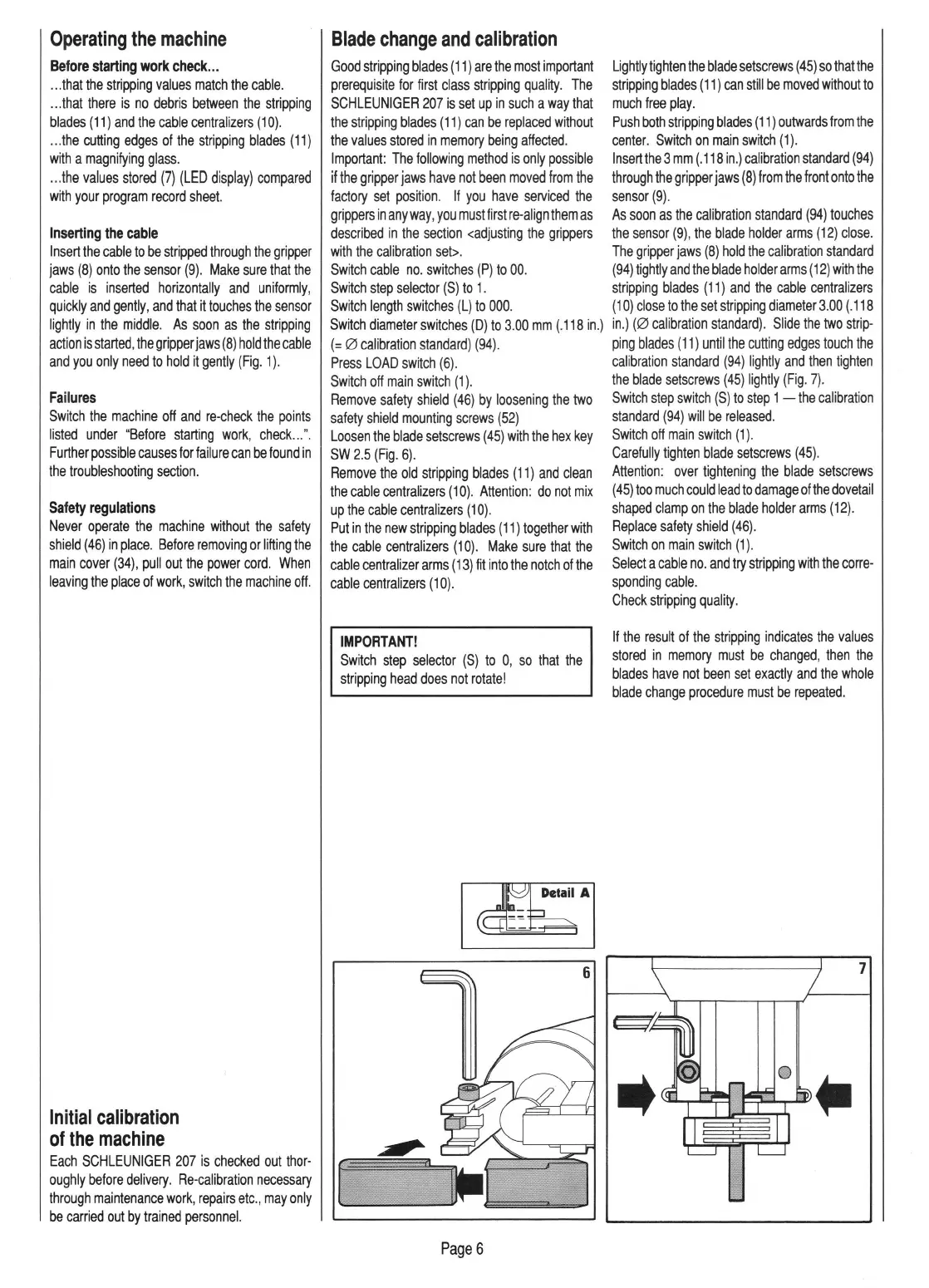
Loosen
the
blade
setscrews
(45)
with
the
hex
key
SW
2.5
(Fig.
6).
Remove
the
old
stripping
blades
(11)
and
clean
the
cable
centralizers
(1
0)
.
Attention:
do
not
mix
up
the
cable
centralizers
(10)
.
Put
in
the
new
stripping
bl
ades
(11)
together
with
the
cable
centralizers
(1
0).
Make
sure
that
the
cable
centralizer
arms
(13)
fit
into
the
notch
of
the
cable
centralizers
(10).
IMPORTANT!
Switch
step
selector
(S)
to
0,
so
that
the
stripping
head
does
not
rotate!
[
Page6
Lightly
tighten
the
blade
setscrews
(45)
so
thatthe
stripping
blades
(11)
can
still
be
moved
without
to
much
free
play.
Push
both
stripping
blades
(11)
outwards
from
the
center.
Switch
on
main
switch
(1).
lnsertthe3
mm
(.
118
in.)
calibration
standard
(94)
through
the
gripper
jaws
(8)
from
the
front
onto
the
sensor
(9)
.
As
soon
as
the
calibration
standard
(94)
touches
the
sensor
(9),
the
blade
holder
arms
(12)
close.
The
gripper
jaws
(8)
hold
the
calibration
standard
(94)
tightly
and
the
blade
holder
arms
(12)
with
the
stripping
blades
(
11)
and
the
cable
centralizers
(1
0)
close
to
the
set
stripping
diameter
3.00
(.
118
in.)
(0
calibration
standard).
Slide
the
two
st
r
ip-
ping
blades
(
11)
until
the
cutting
edges
touch
the
calibration
standard
(94)
lightly
and
then
tighten
the
blade
setscrews
(45)
lightly
(Fig
.
7)
.
Switch
step
switch
(S)
to
step
1
-the
calibration
standard
(94)
will
be
released.
Switch
off
main
switch
(1)
.
Carefully
tighten
blade
setscrews
(45)
.
Attention:
over
tightening
the
blade
setscrews
(
45)
too
much
could
lead
to
damage
of
the
dovetail
shaped
clamp
on
the
blade
holder
arms
(12).
Replace
safety
shield
(46).
Switch
on
main
switch
(1)
.
Select
a
cable
no
.
and
try
stripping
with
the
corre-
sponding
cable.
Check
stripping
quality.
If
the
result
of
the
stripping
indicates
the
values
stored
in
memory
must
be
changed,
then
the
blades
have
not
been
set
exactly
and
the
whole
blade
change
procedure
must
be
repeated
.
7

Related product manuals