EasyManua.ls Logo

Schleuniger 207 - Adjusting the Blades and Cable Centralizers with the Calibration Set

Default Icon
14 pages
Print Icon
To Next Page IconTo Next Page
To Previous Page IconTo Previous Page
Loading...
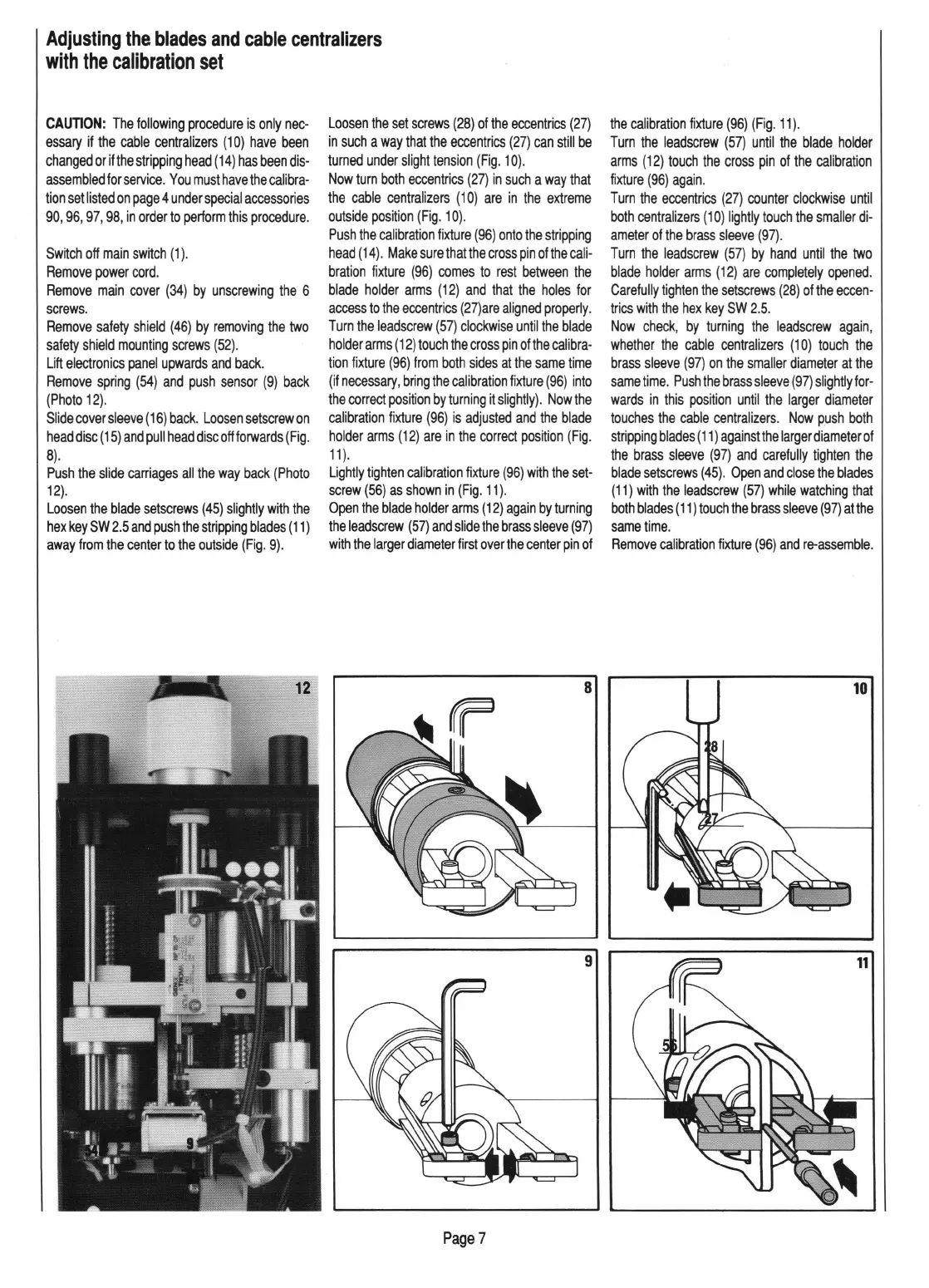
Adjusting
the
blades
and
cable
centralizers
with
the
calibration
set
CAUTION:
The
following
procedure
is
only
nec-
essary
if
the
cable
centralizers
(10)
have
been
changed
or
if
the
stripping
head
(
14)
has
been
dis-
assembled
for
service.
You
must
have
the
calibra-
tion
set
listed
on
page
4
under
special
accessories
90,
96, 97, 98,
in
order
to
perform
this
procedure.
Switch
off
main
swrtch
(1)
.
Remove
power
cord
.
Remove
main
cover
(34)
by
unscrewing
the
6
screws.
Remove
safety
shield
(46)
by
removing
the
two
safety
shield
mounting
screws
(52)
.
Lift
electronics
panel
upwards
and
back.
Remove
spring
(54)
and
push
sensor
(9)
back
(Photo
12).
Slide
cover
sleeve
(
16)
back.
Loosen
setscrew
on
head
disc
(
15)
and
pull
head
disc
off
forwards
(Fig.
8).
Push
the
slide
carriages
all
the
way
back
(Photo
12).
Loosen
the
blade
setscrews
(45)
slightly
with
the
hex
key
SW
2.5
and
push
the
stripping
blades
(
11)
away
from
the
center
to
the
outside
(Fig.
9).
Loosen
the
set
screws
(28)
of
the
eccentrics
(27)
in
such
a
way
that
the
eccentrics
(27)
can
still
be
turned
under
slight
tension
(Fig.
1
0).
Now
turn
both
eccentrics
(27)
in
such
a
way
that
the
cable
centralizers
(1
0)
are
in
the
extreme
outside
position
(Fig.
10).
Push
the
calibration
fixture
(96)
onto
the
stripping
head
(
14
).
Make
sure
thatthe
cross
pin
ofthe
cali-
bration
fixture
(96)
comes
to
rest
between
the
blade
holder
arms
(12)
and
that
the
holes
for
access
to
the
eccentrics
(27)are
aligned
properly
.
Turn
the
leadscrew
(57)
clockwise
until
the
blade
holder
arms
(
12)
touch
the
cross
pin
of
the
calibra-
tion
fixture
(96)
from
both
sides
at
the
same
time
(if
necessary,
bring
the
calibration
fixture
(96)
into
the
correct
position
by
turning
it
slightly).
Now
the
calibration
fixture
(96)
is
adjusted
and
the
blade
holder
arms
(12)
are
in
the
correct
position
(Fig
.
11).
Lightly
tighten
calibration
fixture
(96)
with
the
set
-
screw
(56)
as
shown
in
(Fig.
11
).
Open
the
blade
holder
arms
(12)
again
by
turning
the
leadscrew
(57)
and
slide
the
brass
sleeve
(97)
with
the
larger
diameter
first
over
the
center
pin
of
Page
7
the
calibration
fixture
(96)
(Fig.
11
).
Turn
the
leadscrew
(57)
until
the
blade
holder
arms
(12)
touch
the
cross
pin
of
the
calibration
fixture
(96)
again.
Turn
the
eccentrics
(27)
counter
clockwise
until
both
centralizers
(1
0)
lightly
touch
the
smaller
di-
ameter
of
the
brass
sleeve
(97).
Turn
the
leadscrew
(57)
by
hand
until
the
two
blade
holder
arms
(12)
are
completely
opened.
Carefully
tighten
the
setscrews
(28)
of
the
eccen-
trics
with
the
hex
key
SW
2.5.
Now
check,
by
turning
the
leadscrew
again,
whether
the
cable
centralizers
(10)
touch
the
brass
sleeve
(97)
on
the
smaller
diameter
at
the
same
time.
Push
the
brass
sleeve
(97)
slightly
for-
wards
in
this
position
until
the
larger
diameter
touches
the
cable
centralizers.
Now
push
both
stripping
blades
(11)
against
the
larger
diameter
of
the
brass
sleeve
(97)
and
carefully
tighten
the
blade
setscrews
(45)
.
Open
and
close
the
blades
(11)
with
the
leadscrew
(57)
while
watching
that
both
blades
(
11)
touch
the
brass
sleeve
(97)
at
the
same
time.
Remove
calibration
fixture
(96)
and
re-assemble.
10

Related product manuals