14
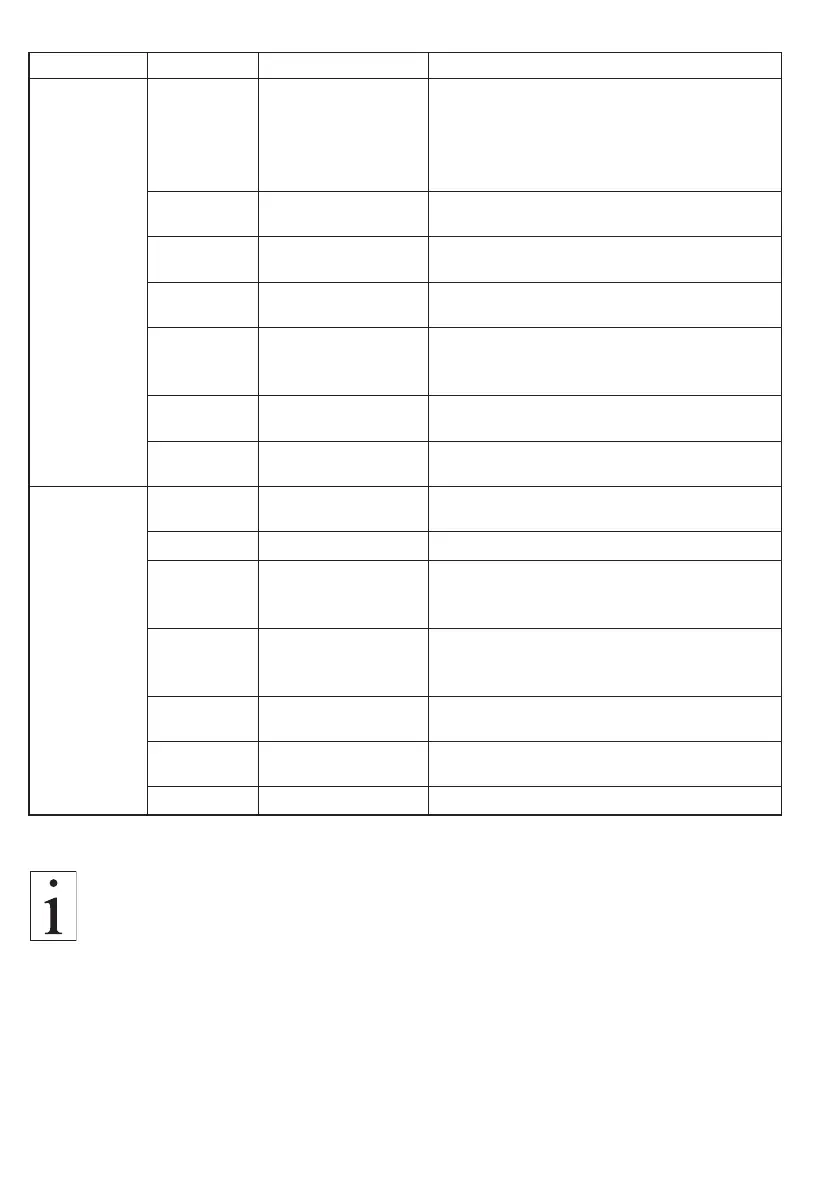
Main Menu Submenu Settings Menu Description
System
Language
[English],
[Geman],
[Spanish],
[french],
[Portuguese]
Select between five user languages.
Lock [ON], [OFF]
If the lock is activated, no gain and zero
adjustment can be performed.
Background [white], [black]
A white or black display background can
be adjusted
Analog
Damp
[0] - [25]
For adjusting a damping factor for the
analog interface.
Alarm delay [0] - [30]
Time period for which the measured value
must be outside the limit values to trigger
an alarm.
Analog
Adjustment
[-1500] - [+1500]
[+100]
Chapter 4.1.1
Faktory
Reset
[No], [Yes] Reset to the factory settings.
Interface
RS-422
adress
[0] - [24]; [1] Chapter 3.4.3
CAN-Bus ID [Hexadecimal] To set an address for the CAN bus.
CAN
Baudrate
[125K_550K] to
[1000K_8M]
[250K_1M]
It can be selected between 8 different
baud rates.
CAN Mode
[CAN 2.0A/b],
[CAN FD]
[CAN FD-BRS]
It can be selected between 3 types.
CAN Frame
[Standard],
[Extended]
For adjusting the CAN-bus frame type.
Message
Timer
[0] - [30]
For setting the time period in which data
is sent.
CAN Status — For readout of error messages.
As the CAN bus interface is optional, the CAN bus setting
options are not displayed for displays without CAN bus.
3.3 Instrument settings (cont.)



 To Next Page