SC2 Motorcycle Bluetooth
®
Communication System with Mesh Intercom™ | 19
4 PAIRING THE HEADSET WITH OTHER BLUETOOTH DEVICES
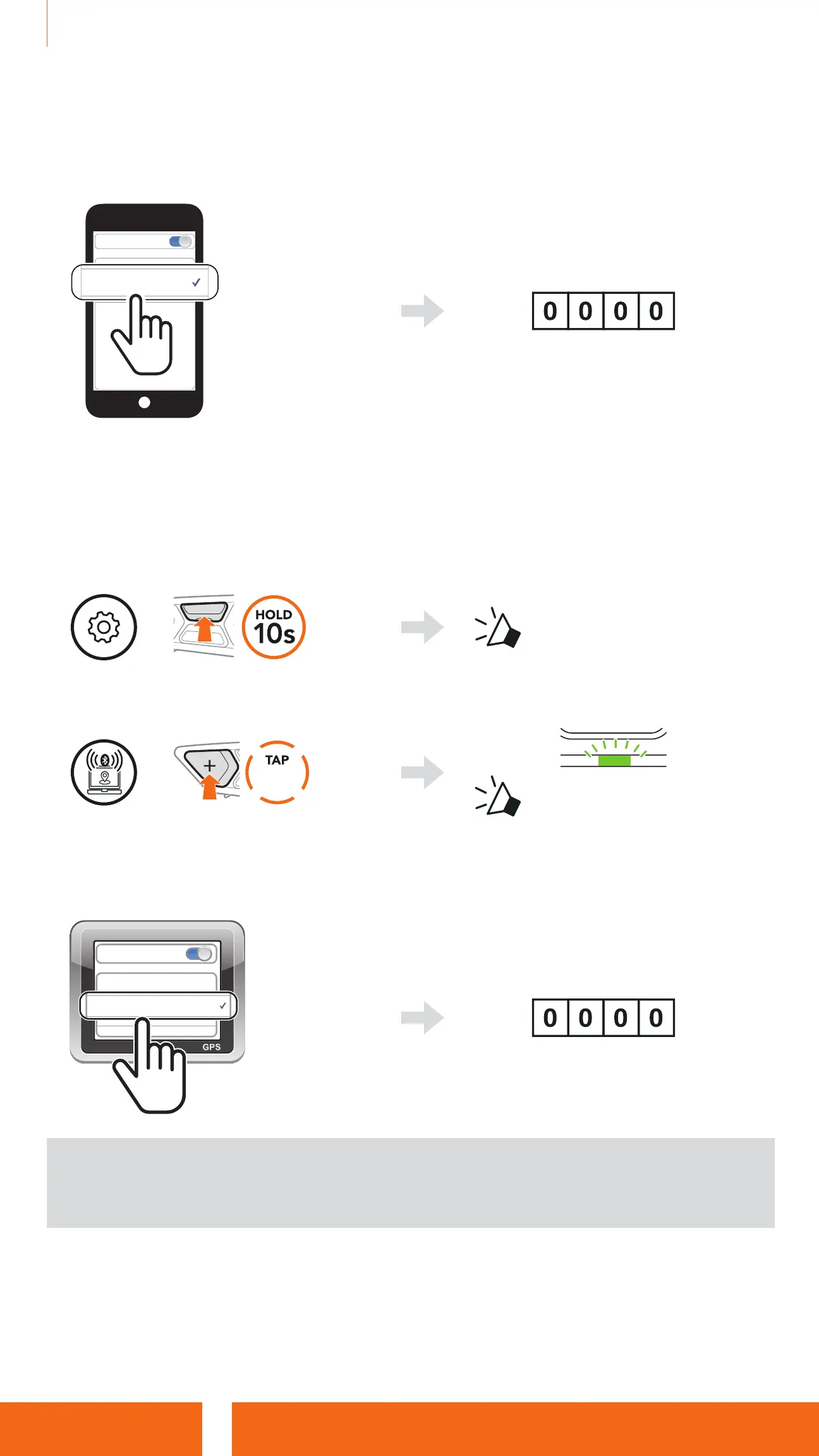
3. Select SC2 in the list of Bluetooth devices detected.
If your mobile phone asks for a PIN, enter 0000.
Device B
Pi
Bluetooth
PIN =
4.4 GPS Pairing
1. Press and hold the Center Button for 10 seconds.
=
“
Conguration menu
”
2. Tap the (+) Button five times.
=
5x
Blinking
“GPS pairing”
3. Select SC2 in the list of Bluetooth devices detected.
If your device asks for a PIN, enter 0000.
Device B
Pi
Bluetooth
PIN =
Note: If you pair your GPS device via GPS Pairing, its instruction will
not interrupt your Mesh Intercom conversations, but overlay with them.
Bluetooth intercom conversations will be interrupted by GPS instructions.


 To Next Page