SC2 Motorcycle Bluetooth
®
Communication System with Mesh Intercom™ | 27
7 MESH INTERCOM
7.3 Using the Mesh in Open Mesh
When Mesh Intercom is enabled, the headset will be in Open Mesh (default:
channel 1) initially.
7.3.1 Channel Setting (Default: Channel 1)
If the Open Mesh communication experiences interference because other
groups are also using channel 1 (default), change the channel. You can select
from channels 1 to 9.
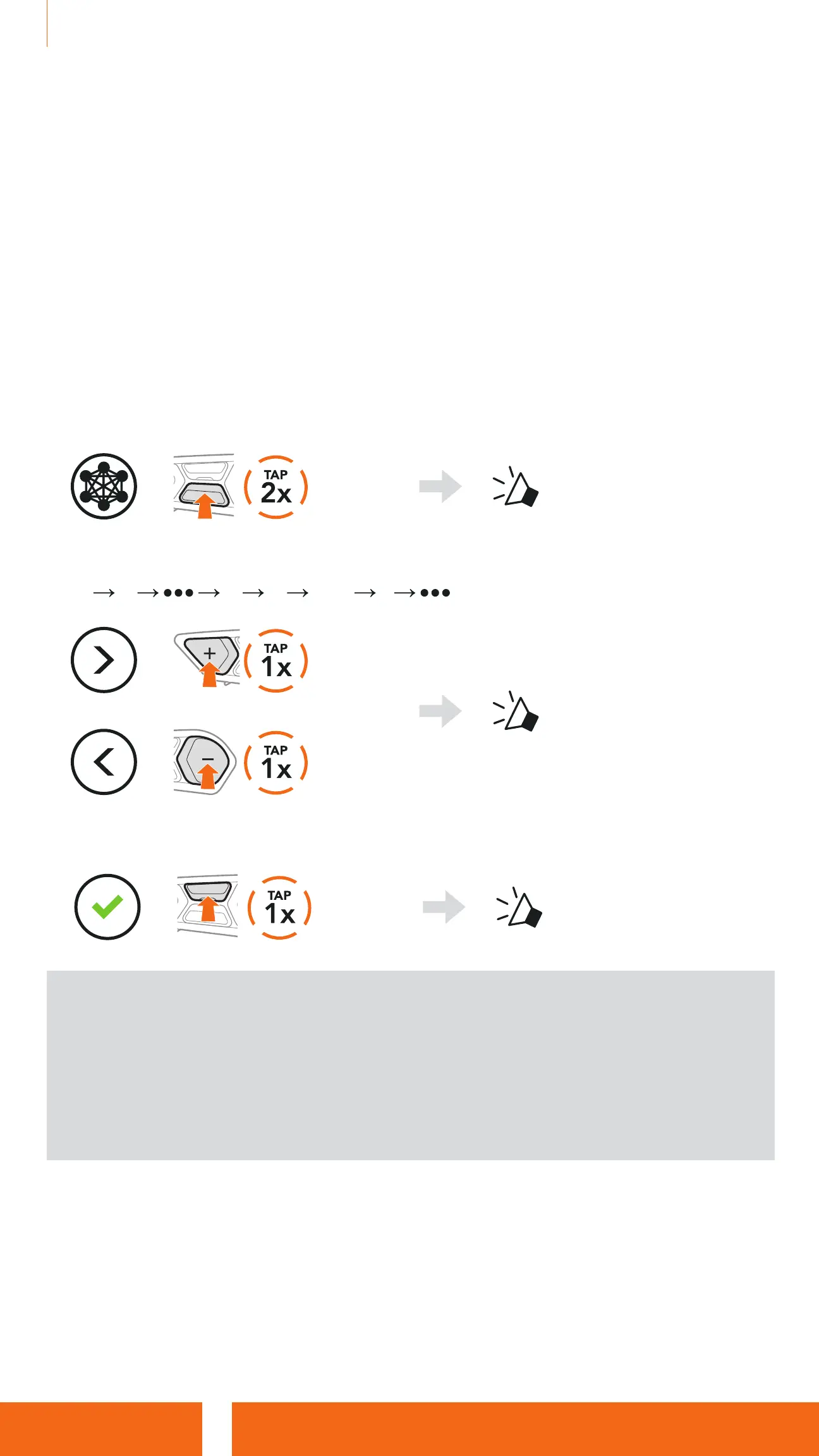
1. Double tap the Mesh Intercom Button.
=
“Channel setting, 1”
2. Tap the (+) Button or the (-) Button to navigate between channels.
(1
2 8 9 Exit 1 )
=
or
=
“#”
3. Tap the Center Button to save the channel.
=
“ Channel is set,
Channel #”
Note:
•
Channel Setting always starts with channel 1.
•
If you do not press any button for approximately 10 seconds in a specific
channel, the channel is automatically saved.
•
The channel will be remembered even if you turn off the headset.
•
You can use the SCHUBERTH SC2 App to change the channel.


 To Next Page