5.2-30
005.050.01-EN
13. PUTTING THE CABLE REMOTE CON-
TROL INTO OPERATION
– Install the cable link between the transmitter
and the machine.
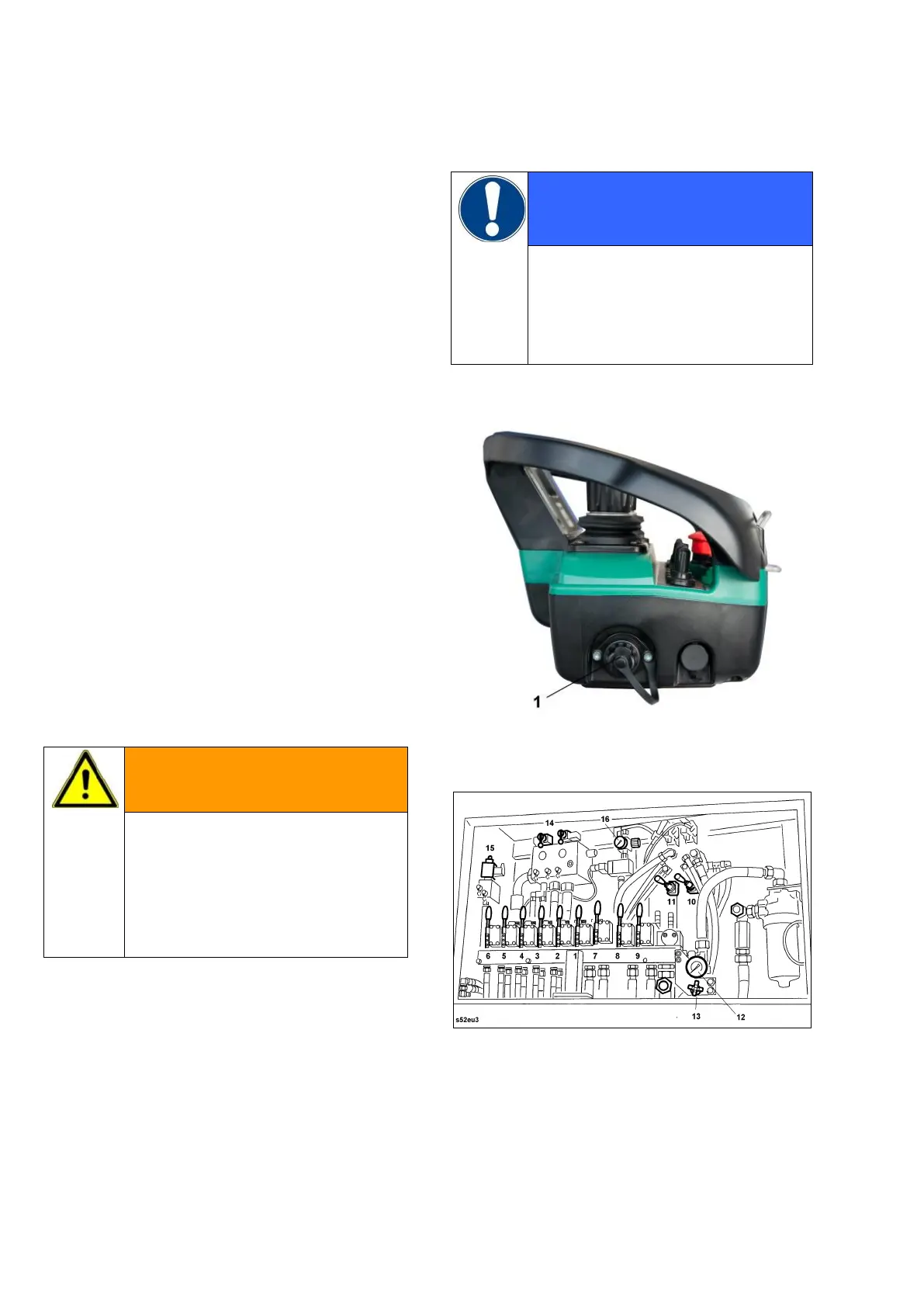
The socket for the connection of the trans-
mitter 1 (Fig. 1) is located on the sidewall of
the housing.
The corresponding socket at the machine is
located in the control cabinet of the hydraulic
emergency control (example, Fig. 2).
– Lead the cable from below into the cabinet
and connect it.
– Close the cover over the emergency control
block and lock it.
– Put the system into operation as described
under 12.
The remote control function screen in the
VECTOR menu displays the cable control
code:
Activated control: cable control
Danger in case of unauthorized
actuation of the emergency con-
trol elements.
The cover over the emergency
control unit must be closed and
locked up.
For cable control it is not neces-
sary to have a battery cassette in
the transmitter.
If left in the transmitter, the battery
will, however, be recharged.
Fig. 1
Fig. 2


 To Next Page