5.2-31
005.050.01-EN
14. OPERATION
When the system is ready for operation, all im-
plemented functions can be executed via re-
mote control.
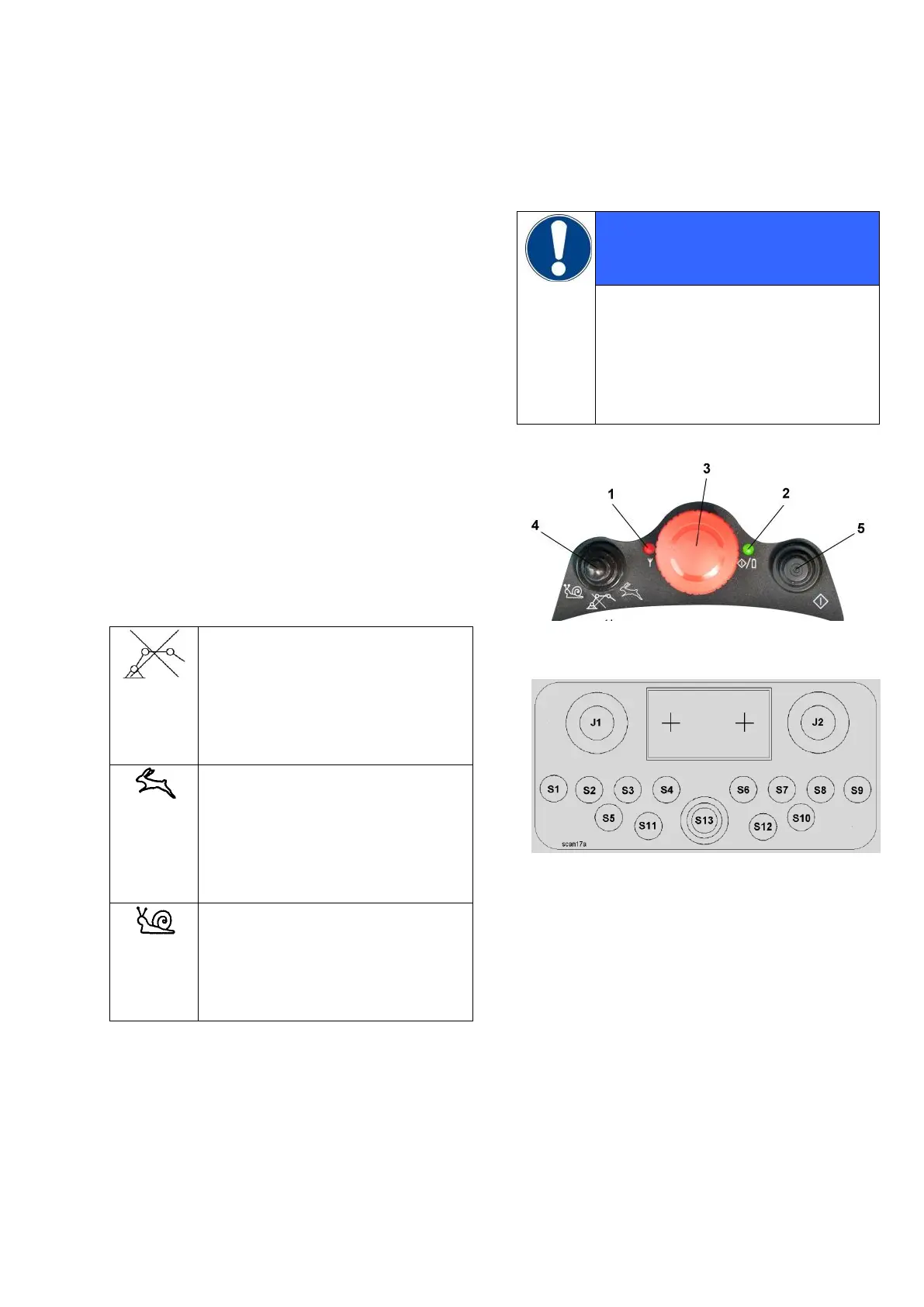
When no switch is operated, LEDs 1+2 (Fig. 1)
are lit up green and indicate that the system is
ready for operation (basic mode).
When control commands are being transmitted
LED 1 flashes green. The machine executes the
selected functions.
After resetting of all switches to "0" the trans-
mitter is again in the basic mode.
For further display combinations of LEDs 1+2
see chapter 11.
14.1 SELECTING THE BOOM SPEED
No boom movements are possi-
ble when selector switch 4
(Fig. 1) is in center position.
This is important, for instance, if
inadvertent movements of the
boom must be prevented.
In the "Rabbit" position, all boom
movements up to the maximum
speed of 100 % can be controlled
proportionally.
This position is provided for set-
up and take-down of the boom.
In the "Snail" position, the boom
speed is reduced in all cases by
50 %. This position is provided for
placing the boom working opera-
tions.
For safety reasons, both joysticks
must be in neutral position when
switch S 11 (Fig. 2) is switched over.
If this is not the case, diode 2 is lit
up red and the buzzer in the trans-
mitter sounds.
Fig. 1
Fig. 2


 To Next Page