SciAps X-550 Pb QuickStart Guide
17
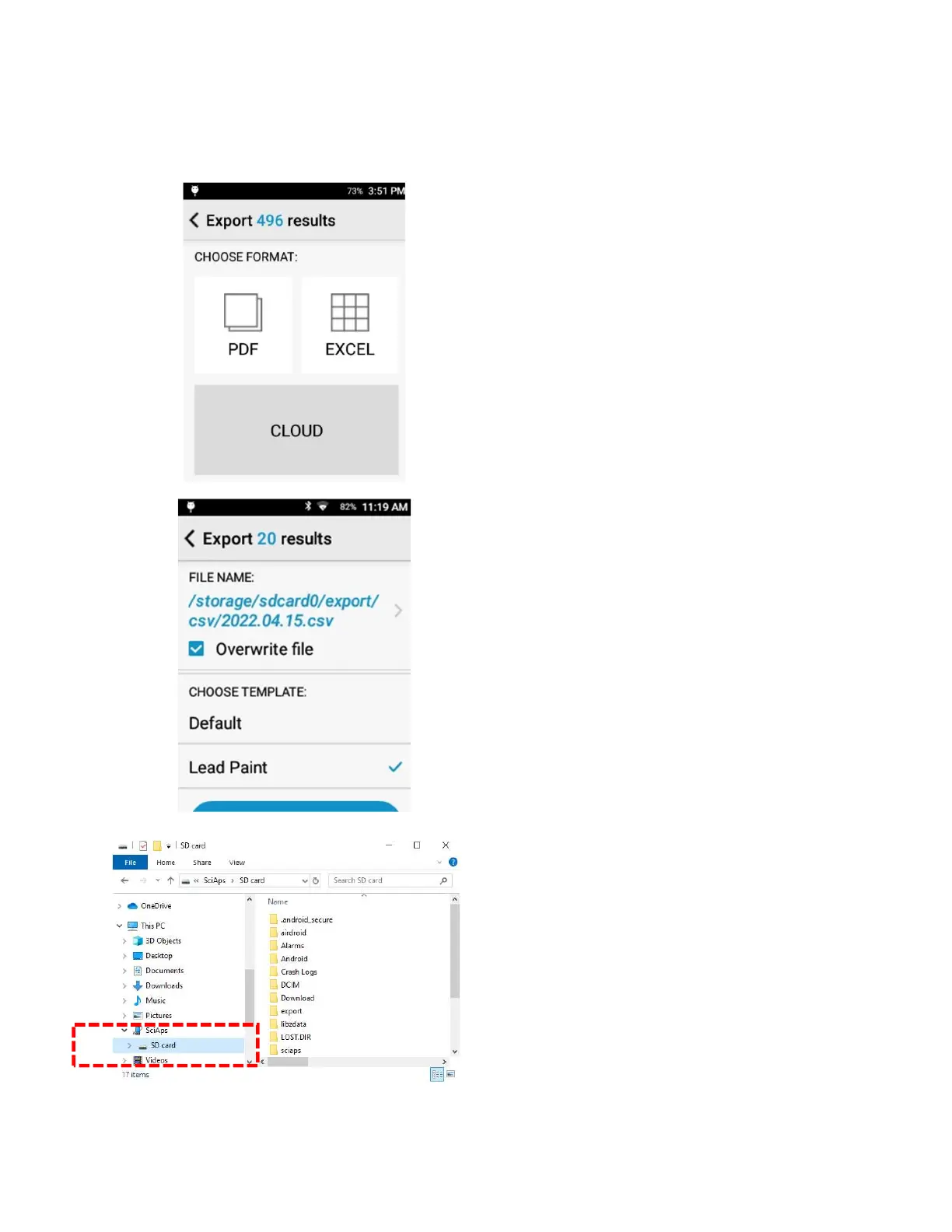
Tap either PDF or EXCEL to select the desired
export format.
Choose Excel
Test results will export to SD card/export/csv.
Or tap the filename to change the export
location.
Analyzer may have a Lead Paint export template
configured. User can modify this in Templates
Setup
Tap Start Export
The X-550 Pb uses an embedded SD card to store
test results.
The SD Card can be accessed by connecting the
analyzer to a computer using the micro-USB
cable. Once connected, the analyzer’s SD Card
will show as a new drive from the computer’s file
explorer.
Navigate to the export location selected at time
of export (default export location is SD
card\export). Drag the exported files over from
the SD Card to the desktop to save copies locally
on the computer. Drag the exported files over
from the SD Card to the desktop to save copies
locally on the computer.


 To Next Page