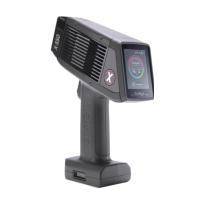
SciAps X-550 Pb QuickStart Guide
2
Contents
............................................................................................................. 1
Contents 2
1. Powering up the unit................................................................................................ 3
Inserting the battery ................................................................................................................ 3
Turning on the unit.................................................................................................................. 4
Wrist Strap ............................................................................................................................. 4
Analyzer ports ........................................................................................................................ 4
2. Logging in ............................................................................................................... 5
3. Calibrating the Analyzer .......................................................................................... 7
4. Taking a Test .......................................................................................................... 9
5. Looking at Results ..................................................................................................10
5.1 Positive and Negative results ...........................................................................................10
5.2 Depth results ...................................................................................................................10
6. Test Screen ............................................................................................................11
6.1 Photo icon .......................................................................................................................11
6.2 Test Mode .......................................................................................................................11
7. Menu Options .........................................................................................................12
7.1 Beam Settings .................................................................................................................12
7.2 Display Preferences ........................................................................................................12
7.3 Test Info ..........................................................................................................................13
7.4 Classification Level ..........................................................................................................14
7.5 Test Mode .......................................................................................................................14
7.6 PCS Cal Check................................................................................................................15
7.7 Energy Calibration ...........................................................................................................15
8. Exporting tests .......................................................................................................16
9. Turning off the Unit .................................................................................................18
10. How to safely use SciAps XRF instruments ............................................................19


 To Next Page