SciAps X-550 Pb QuickStart Guide
8
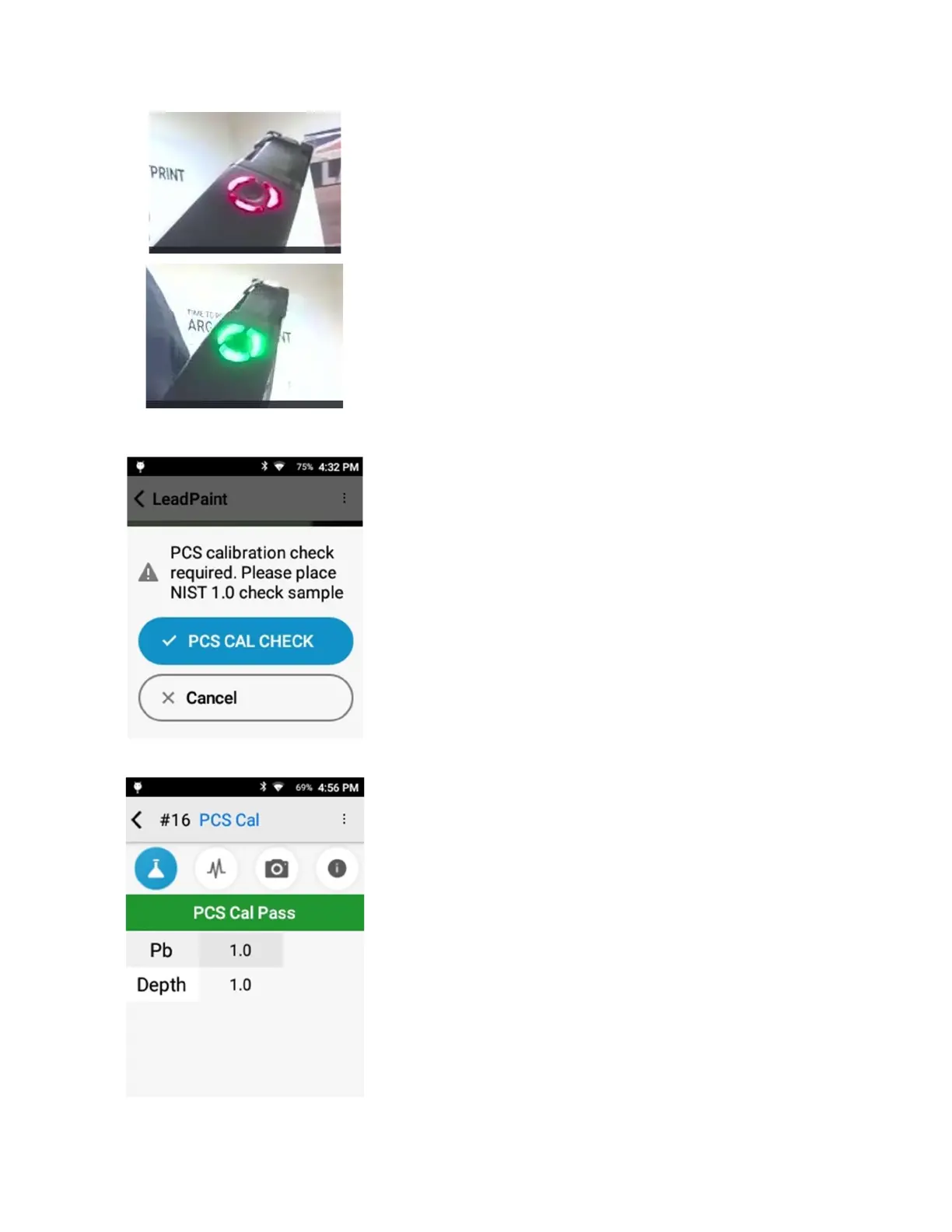
blinking red.
When the tube is not energized, it is green.
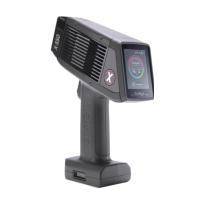
When the clip calibration is successful, the PCS Cal Check screen
appears.
Remove the clip from the front of the aperture.
Next, perform the 1.0 lead paint standard check. Place the
analyzer window on the red square of your lead paint
calibration check block. The square must cover the window.
User starts test by pressing PCS Cal Check or pulling trigger. A
second trigger pull before set test time has elapsed will end the
test.
The test takes 10 seconds.
At end of test, the screen will give the lead paint reading (top
left), which will include lead, the value, and whether it is a PCS
Cal Check test. If the Pb result is not within 0.8 – 1.2, the
software will indicate the instrument calibration has failed.
A passing calibration means the instrument is ready for use.
If the calibration fails, an error message will be displayed.
Confirm the standard is positioned correctly in front of the
window and retry the calibration. PCS Cal Check must pass
before user can take tests in Lead Paint Mode.
If the calibration continues to fail, please contact SciAps
technical support at +1 339-927-9455


 To Next Page