KeyPad service manual
Rev.1.1
1.5 Controller Physical Description
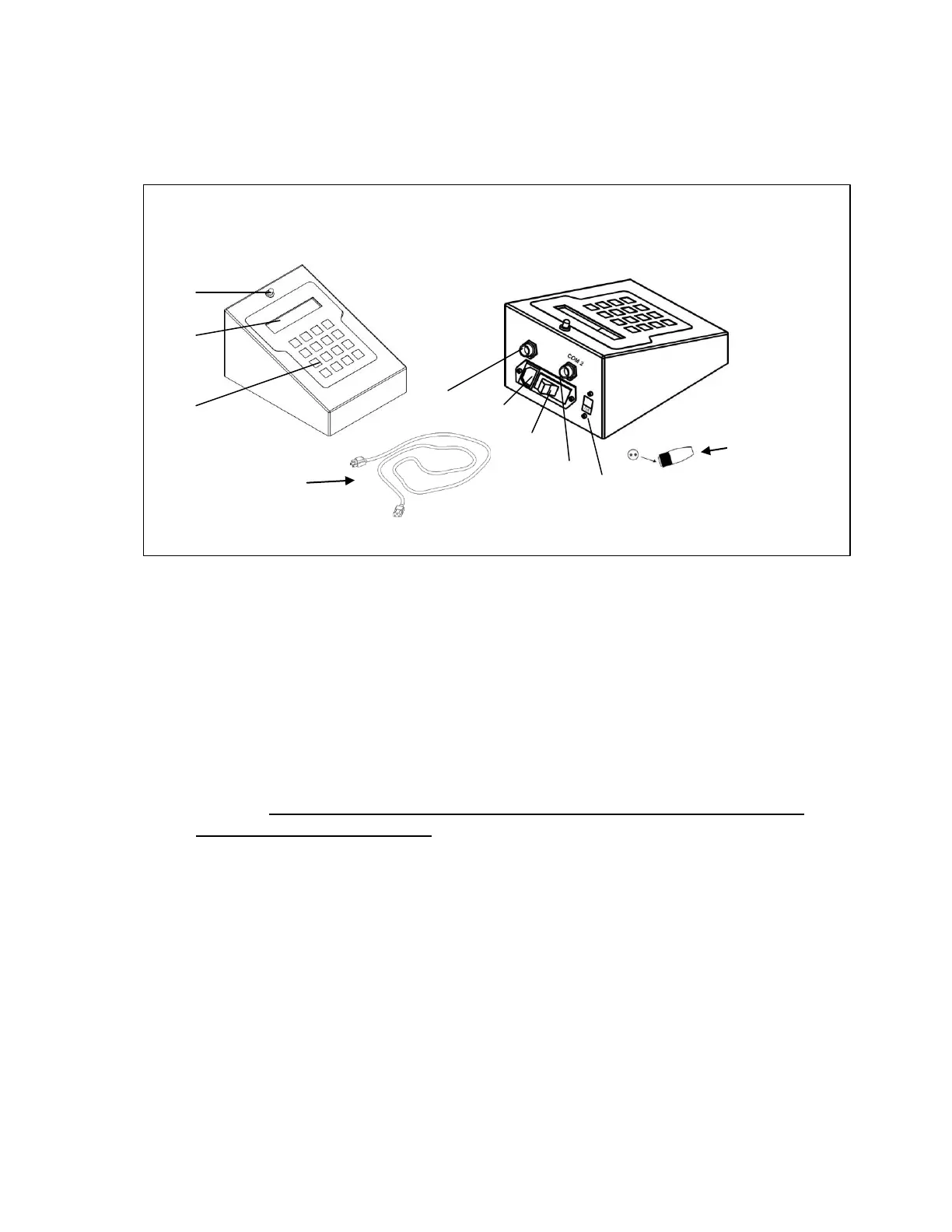
Figure 2: DigiPREP KeyPad controller physical diagram
1. LED – Visible indication that DigiPREP KeyPad Controller is powered-up.
2. Digital Display Screen (LCD)
3. KeyPad – Input all data into controller.
4. Cable Connection – Connection port for the blocks umbilical cable.
5. Power Cord Receptacle – Receives the female end of the power cord.
6. Power switch – On/Off switch with circuit breaker.
7. DigiSET Connector (COM2) – connection port for DigiSET. DigiSET will
automatically shut off the digestion block when a pre-set sample volume is
reached. DigiSET dongle must be installed to run any DigiPREP block
without the DigiSET option.
8. Voltage selector switch – Selects appropriate voltage (115V or 230V).
I.E.: If 115 V is visible then 115 V has been selected.



 To Next Page