34
4. DECO Dive
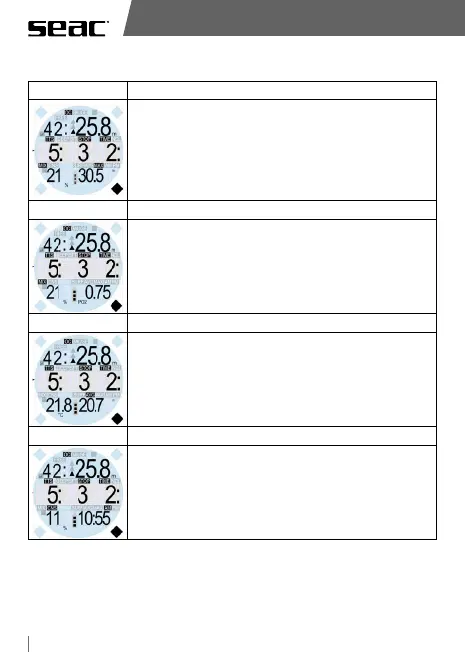
Screen 1 Data displayed:
LAYOUT MODALITA' OC PRELIMINARE
4) DECO
6) CAMBIO MIX
Note:
1) Quando è possibile passare alla Best Mix,
il campo in basso a sinistra dove viene di
norma visualizzata la miscela attualmente
in uso, inizia a lampeggiare.
Solo durante la fase lampeggiante è
possibile accedere al menu cambio miscela.
Dive time – current depth
TTS (total time to surface) – first stop depth – DECO time
of the first stop.
Oxygen percentage of the current mix – Maximum depth
reached
Screen 2
LAYOUT MODALITA' OC PRELIMINARE
4) DECO
6) CAMBIO MIX
Note:
1) Quando è possibile passare alla Best Mix,
il campo in basso a sinistra dove viene di
norma visualizzata la miscela attualmente
in uso, inizia a lampeggiare.
Solo durante la fase lampeggiante è
possibile accedere al menu cambio miscela.
Dive time – current depth
TTS (total time to surface) – first stop depth – DECO time
of the first stop.
Oxygen percentage of the current mix – PpO
2
Screen 3
LAYOUT MODALITA' OC PRELIMINARE
4) DECO
6) CAMBIO MIX
Note:
1) Quando è possibile passare alla Best Mix,
il campo in basso a sinistra dove viene di
norma visualizzata la miscela attualmente
in uso, inizia a lampeggiare.
Solo durante la fase lampeggiante è
possibile accedere al menu cambio miscela.
Dive time – current depth
TTS (total time to surface) – first stop depth – DECO time
of the first stop.
Current temperature – Average depth
Screen 4
LAYOUT MODALITA' OC PRELIMINARE
4) DECO
6) CAMBIO MIX
Note:
1) Quando è possibile passare alla Best Mix,
il campo in basso a sinistra dove viene di
norma visualizzata la miscela attualmente
in uso, inizia a lampeggiare.
Solo durante la fase lampeggiante è
possibile accedere al menu cambio miscela.
Dive time – current depth
NDL time
% value of CNS O
2
- Current time



 To Next Page