MiniWarden Manual 530-487-5007 13
Handy Menu
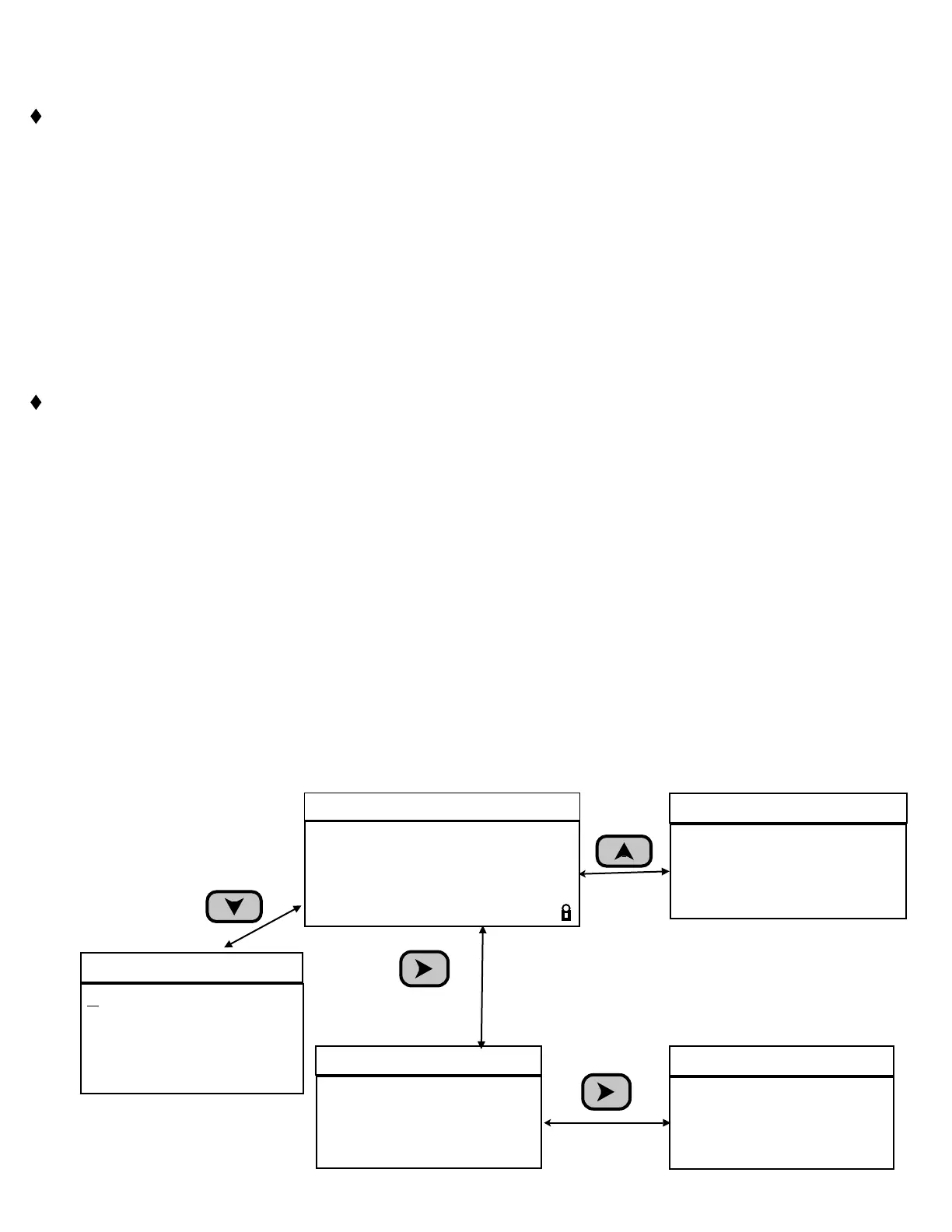
MiniWarden has 2 Menus (Handy and the Main Menu) that are all accessible directly from the Default
Readings Screen. Only the Handy is NOT password protected.
Handy Menu: Press Down Arrow or Enter from the default readings screen to access the handy menu.
❑ Enter Password: Allows for the entry of a password if MiniWarden has been security enabled.
❑ Last 7 Days Data: Cycle through the last 7 day noon-time data measurements.
❑ Enter Service Pin (Advanced
mode): Service Technician can be assigned a Pin Code to enter when
servicing the pool. This feature only applies when MiniWarden is Communication Enabled.
❑ Enter
Measurements: The following real pool measurements (PPM, pH, ALK, Hard and CYA) can be
manually entered. If MiniWarden is communication enabled then the data will be sent / stored at
www.poolwarden.com. Entering these manual measurements will also enable the Langlier Index
Adjustment in the System Menu in advanced mode. See Langlier pH in the System Menu for more
information.
❑ Relay Information:
Displays relay type, Length of time on for day and month, Number of times relay
has been turned on for the day. Enter 0 to clear the timers for the selected relay. Press the right and
left arrow to cycle through the relays.
Startup Screen: Press the Up Arrow from the readings screen to access the startup screen that shows
the software version and serial number on the fourth line and the current time and date on the third line..
Alarm Menu / Screen: Press the Right Arrow from the readings screen to access the alarm menu. The
alarm screen shows all pending alarms even if OFF. The alarm conditions are set up in the Relay Setup
Menu.
❑ Langlier Index (Advanced mode): Press the Right Arrow from the “Alarm Menu” to display the
Langlier index. This screen only displays if the ALK, Hard and CYA have been entered in the “Handy
Menu”. The calculation uses the three manually entered measurements and the current measurement
for pH and temperature.
Set Point Screen: Pressing 9 from the readings screen will show current set-points.
TrueDPD Operation (Advanced mode): Pressing 6 from the readings screen will show the last
measurement cycle information from the TrueDPD if it is enabled in the “System Menu”.
Non-Password Protected Menus and Screens
Handy Menu
Enter Password
Last 7 Days Data
Enter Service Pin
Enter Measurements
Relay Information
Active Alarms
On If ORP < 650
On If Temp < 78.0
Active Alarm
Press
Right Arrow
ORP pH Tf Flow
681 7.7 75 ON a
Rly ↑↓
Langlier Sat Index
1=0.8 Scale
Langlier Index
Press
Right Arrow
Startup Screen
MiniWarden Advanced
Pool/Spa Controller
03/26/15 08:18:30
SN:750061 03/18/15
Press
Up Arrow
Default Readings Screen
m
v
Press
Down Arrow


 To Next Page