
 Need help?
Do you have a question about the Seaside MINI WARDEN and is the answer not in the manual?
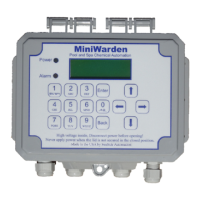
Lists and describes the main components of the MiniWarden system.
Details the electrical ratings and limits for the MiniWarden unit.
Lists available models and optional accessories for the MiniWarden.
Lists the safety and performance certifications the MiniWarden holds.
Provides criteria for selecting a suitable mounting location for the MiniWarden.
Explains how to connect the flow cell to the circulation plumbing system.
Details how to connect sensor wires to the controller's display board.
Explains how to select the correct input voltage (110 or 220 VAC).
Guides on connecting chemical feed pumps and solenoid valves to the relays.
Explains the function of each button on the MiniWarden keypad.
Details the layout and meaning of information shown on the main display.
Guides on switching between Simple and Advanced operating modes.
Lists functions like Enter Password, Last 7 Days Data, and Relay Information.
Illustrates how to navigate between different screens and menus.
Outlines the features supported and not supported in Simple Mode.
Shows the menu flow for accessing settings in Simple Mode.
Explains how to set the desired ORP level for control.
Explains how to set the desired pH level for control.
Details the process for calibrating pH, ORP, and Temperature sensors.
Describes how to manually control relays for feeding chemicals.
Explains how to set and understand alarm conditions for pH and ORP.
Explains ORP and pH spread settings for Time Proportional Control (TPC).
Defines the cycle time for chemical feed operations.
Selects whether the controller manages acid or base for pH adjustment.
Protection setting for sanitizer control based on pH levels.
Sets time limits to prevent excessive chemical feeding.
Instructions for setting the system's current time and date.
Details how to set a password for menu access.
Explains how to access the Main Menu for advanced configurations.
Details system settings like time, date, units, and calibration.
Describes access to and viewing of recorded operational data.
Covers network setup and server configuration for remote access.
Explains how to configure user access levels and passwords.
Allows selection of control types for ORP and pH relays.
Sets the Date, Time, and Day of the Week for the system.
Guides on setting up user access levels and passwords.
Sets the control type for each relay (e.g., Liquid Chlorine, Acid).
Configures set-points and alarm limits for pH and ORP relays.
Sets the duration for manual relay activation.
Explains proportional feed percentage for reducing overshoot.
Sets the ORP setpoint to trigger the relay activation.
Implements pH lockout to prevent chlorine overfeed.
Sets a delay before the relay activates to stabilize readings.
Defines the total duration the relay will be ON.
Sets the minimum time the relay remains OFF for mixing.
Prevents two relays from being active simultaneously.
Turns off the ORP relay if no flow is detected.
Detects broken feed tubes and stops overfeeding based on setpoint.
Sets the maximum daily feed time to prevent chemical overfeeding.
Sets the duration for manual relay activation.
Explains proportional feed percentage for reducing overshoot.
Sets the pH setpoint to trigger the relay activation for acid control.
Sets a delay before the relay activates to stabilize readings.
Defines the total duration the relay will be ON.
Sets the minimum time the relay remains OFF for mixing.
Prevents the pH relay from activating when the ORP relay is on.
Turns off the pH relay if no flow is detected.
Detects overfeeding based on setpoint and shuts down the relay.
Sets the maximum daily feed time to prevent chemical overfeeding.
Triggers alarm when ORP reading exceeds 800.
Triggers alarm when ORP reading falls below 600.
Triggers alarm when pH reading exceeds 8.0.
Triggers alarm when pH reading falls below 7.0.
Triggers alarm if temperature exceeds a threshold.
Triggers alarm if temperature falls below a threshold.
Triggers alarm if no flow is detected by the flow switch.
Triggers alarm when an overfeed condition is met.
Sets a delay before an alarm condition triggers.
Defines how alarm values are interpreted (e.g., Standard vs. ORP %).
Allows manual turning of relays ON or OFF for servicing.
Details the process for calibrating pH, ORP, and Temperature sensors.
Temporarily disables chemical feeders for safe servicing.
Resets overfeed timers to clear alarms or re-enable relays.
Provides access to and viewing of the MiniWarden's recorded data.
Explains how to scroll and jump through recorded data rows.
Sets the time interval for recording operational data.
Option to clear all recorded internal data.
Configures system settings like time, date, units, and daylight savings.
Adjusts pH set-point based on Langlier Index for water balance.
Information on the optional TrueDPD sensor for chlorine measurement.
Sets the measurement cycle time for the TrueDPD sensor.
Enables or disables calibration for the ORP sensor.
Allows selection between LCD and VFD display types.
Enables a shortcut to the Service menu from the main screen.
Restores all settings to original factory defaults.
Guides on how to clean the MiniWarden enclosure and display window.
Details how to clean and maintain the pH and ORP sensors.
Information on when and how to replace ORP and pH sensors.
Instructions for storing sensors when not in use.
Advises on protecting sensors and the unit from freezing conditions.
Addresses the problem of flow not being detected by the sensor.
Guides on checking alarm conditions when readings appear normal.
Helps diagnose and fix inaccurate ORP and pH sensor readings.
Troubleshoots why chemical feeders are not activating.
Explains ORP sensor behavior variations due to water chemistry.
Provides instructions for password recovery if forgotten.
Provides phone numbers and email for technical support and sales.
Details the warranty period for the controller, sensors, and other components.
Lists conditions and damages not covered by the warranty.
Explains the process for returning defective parts and filing claims.
 General
| Brand | Seaside |
|---|---|
| Model | MINI WARDEN |
| Category | Controller |
| Language | English |

 To Next Page