MiniWarden Manual 530-487-5007 28
ADVANCED FEATURES
The rest of this manual will be dedicated to all of the Advanced Menus & Features which make MiniWarden
one of the most versatile chemical controllers in the world. Please review each section carefully to
understand how each menu item may help your organization. Simply press the Back button from the
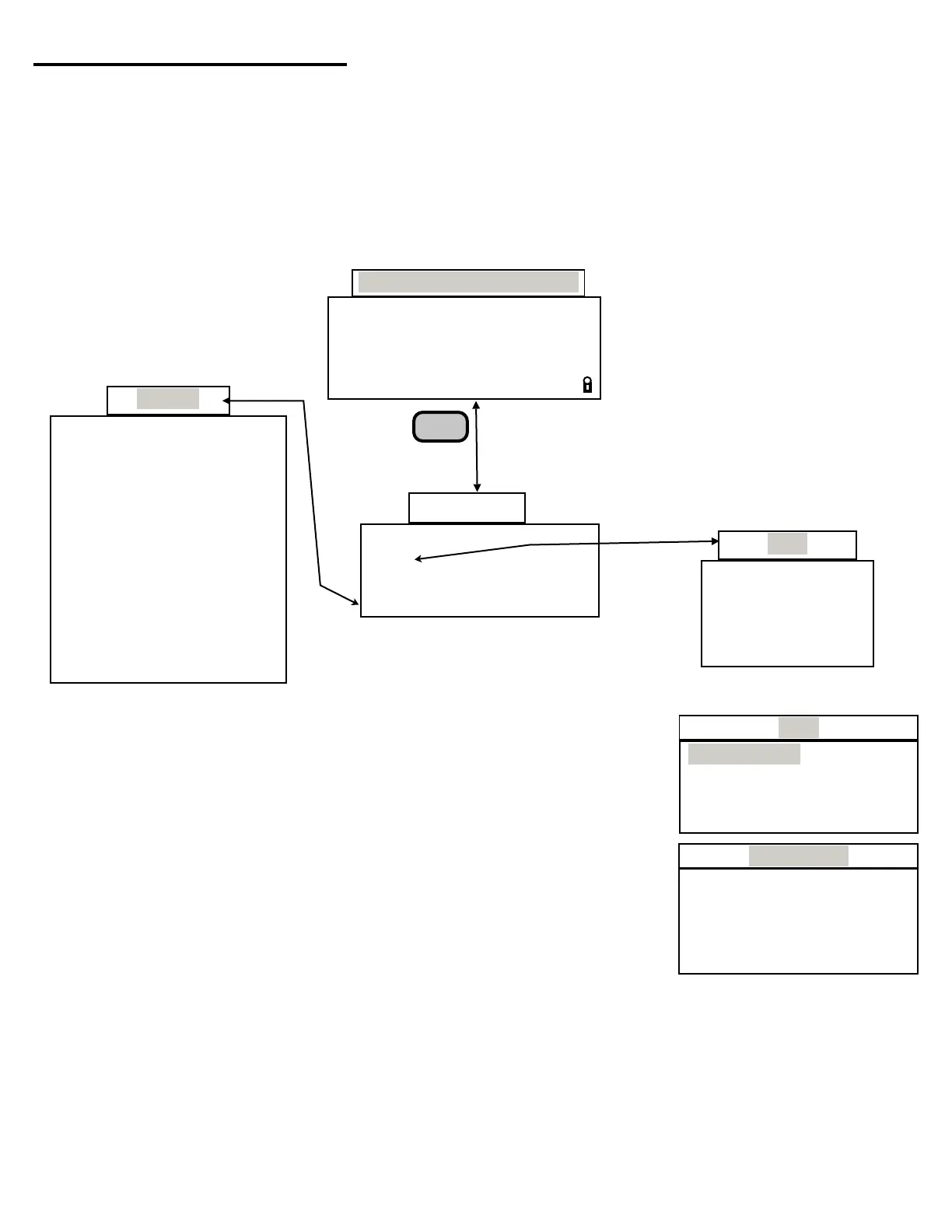
Default Readings Screen to gain access to the “Main Menu”. From the “Main Menu” simply use the Up &
Down Arrows to navigate to each sub menu item and press enter to go to that sub menu or selection.
Accessing the Main Menu can be password protected and can be dependent on a security level if
PoolWarden is security enabled in the “Security Setup” menu which was covered in the “PROGRAMMING
- GETTING STARTED” section of this manual.
ADVANCED
MENU TREE 3
Press
Back Key
Back
System
Data
Go To Data
Interval
Clear Data
Used
ORP pH Tf Flow
681 7.7 75 ON a
OFF
Rly ↑↓
Default Readings Screen
Data Menu
This menu provides access to MiniWarden’s internally recorded data. The
data can be displayed visually on screen. Please note that this screen will
only display readings, pH, ORP, Temp, Flow Status and Alarm Status. The
internal memory has the ability to record 8,192 rows of data. Once the
maximum memory has been reached, any new data will record over the
oldest data. To access “Data Recording” simply press the Back button from
the default readings screen and scroll down to “Data Recording” and press
Enter and select “Go To Data”.
Go To Data: Before entering the actual Data a “Data Help” screen is
displayed that provides a brief summary of the tips on how to scroll
through the rows of recorded data.
❑ 0 Toggle line4: Pressing the Zero 0 button toggles line 4 on the
display screen between the relay status for each reading and the
Date, Time & Data Record Number.
m
v
Time: 12:36:17
Date: 03/27/15
Day : Friday
Units: English
Daylight Savings No
Langlier pH +/-0.2
TrueDPD Free Cl OFF
TrueDPD Cycle:10 min
ORP Cal: Enabled
Service QuickJmp On
Display Type: LCD
Factory Defaults
Data
Go To Data
Data Help ↑+big
0 Toggle line4 > +1
#*10 Big Jump < -1
Back -> Quit ↓-big
Go To Data
Interval: 00:01:00
Clear Data:
Used: 0/8192 o
❑ #*10 Big Jump: This is the “Big Jump” by a factor of 10. If you press any number 1 through 9 and
then the Up or Down Arrow it will jump through the data by a factor of 10 times that number.
Example: If you press 8 then the up arrow it will jump forward through 80 rows (8 x 10 = 80) of data.
If you press 7 then the down arrow it will jump backward through 70 rows (7 x 10 = 70).
❑ Back - > Quit: Exit the Data and bring you back to the Data Recording screen.
Service LAN
Data Security
Relays Relay Type
System
Main Menu


 To Next Page