281If and when
How to jump start: description
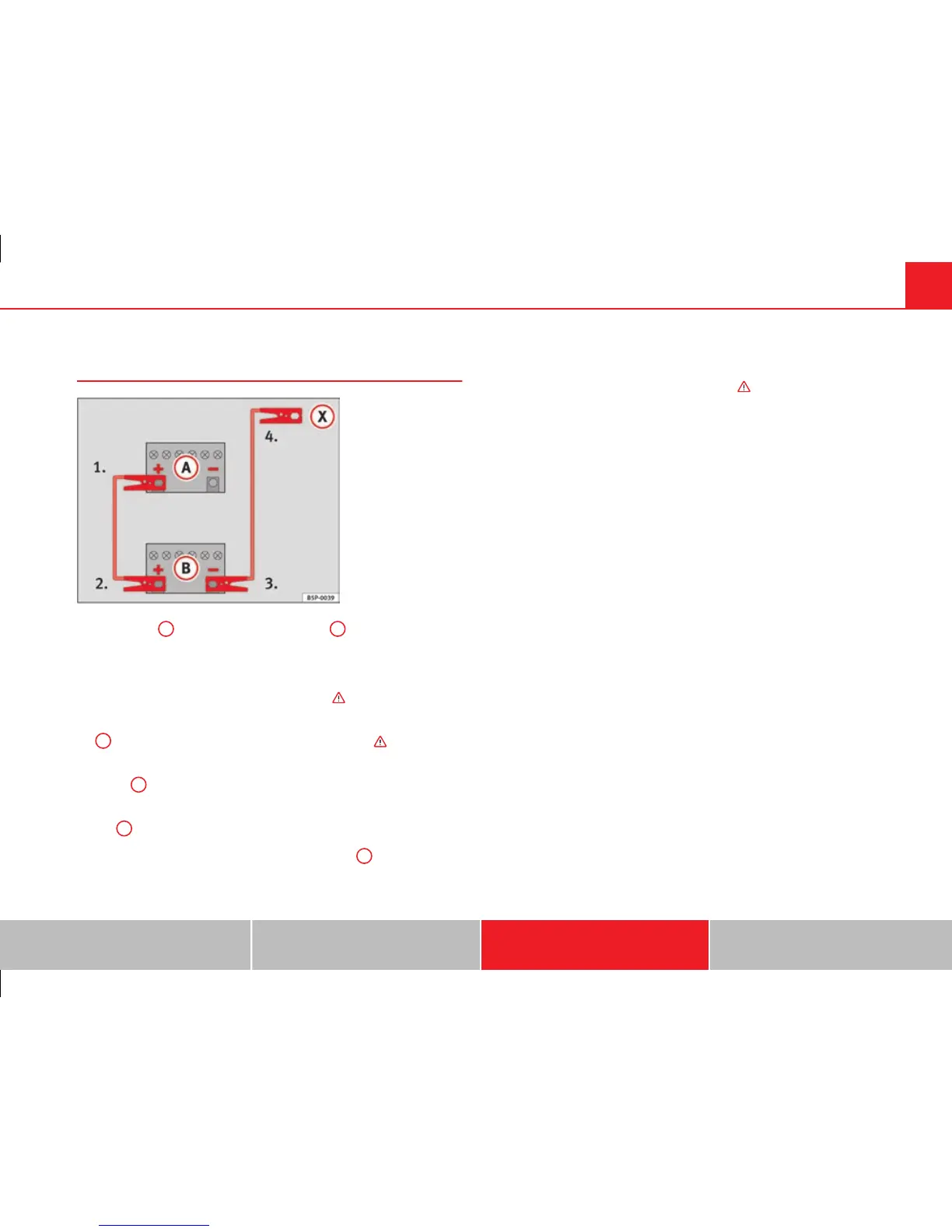
Fig. 226 How to connect
the jump leads
On ⇒ fig. 226
A
shows the flat battery and
B
the charged bat-
tery.
Jump lead terminal connections
– Switch off the ignition of both vehicles ⇒
.
1. Connect one end of the red jump lead to the positive ⇒ fig. 226
+
terminal of the vehicle with the flat battery ⇒ .
2. Connect the other end of the red jump lead to the positive ter-
minal
+
in the vehicle providing assistance.
3. Connect one end of the black jump lead to the negative termi-
nal
-
on the battery of the vehicle providing assistance.
4. Connect the other end of the black jump lead
X
to a solid met-
al component which is bolted on to the engine block, or onto
the engine block itself of the vehicle with the flat battery. Do not
connect it to a point near the battery ⇒
.
5. Position the leads in such a way that they cannot come into
contact with any moving parts in the engine compartment.
Starting
6. Start the engine of the vehicle with the boosting battery and let
it run at idling speed.
7. Start the engine of the vehicle with the flat battery and wait one
or two minutes until the engine is running.
Removing the jump leads
8. Before you remove the jump leads, switch off the headlights (if
they are switched on).
9. Turn on the heater blower and heated rear window in the vehi-
cle with the flat battery. This helps minimise voltage peaks
which are generated when the leads are disconnected.
10. When the engine is running, disconnect the leads in reverse
order to the details given above.
Connect the battery clamps so they have good metal-to-metal contact with
the battery terminals.
If the engine fails to start, switch off the starter after about 10 seconds and
try again after about half a minute.
Safety First Operating Instructions Practical Tips Technical Specifications



 To Next Page