Seats and storage compartments 149
Safety First Operating Instructions Practical Tips Technical Specifications
Note
It is advisable to secure the items by means of a strap secured to the
fastening rings on the left and the right hand side.
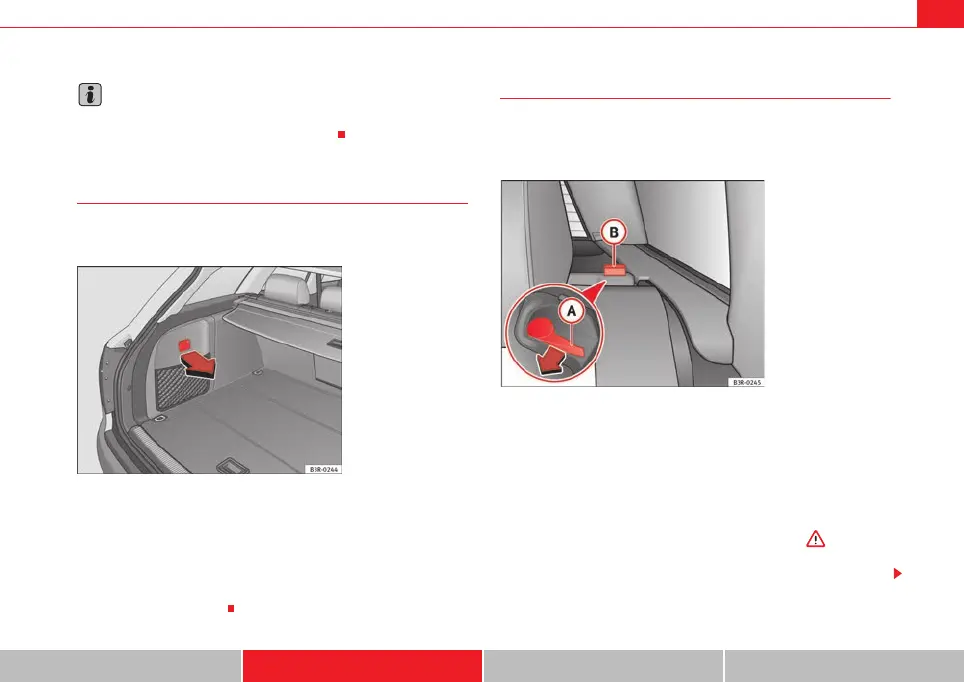
Side storage compartment
The CD-ROM player for the navigation system* is located in
the left side compartment of the luggage compartment.
– To open the storage compartment, pull the handle
forwards⇒ fig. 126.
CD-ROM player for navigation system*
The CD-ROM player for the navigation system is located in this storage
compartment in the luggage compartment. Separate operating instructions
are enclosed for this system.
Extending the luggage compartment
The two sections of the backrest can be folded forwards either
together or separately to increase the capacity of the luggage
compartment.
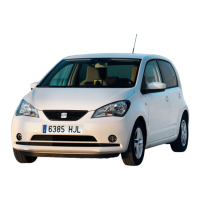
Folding the backrest forwards
– Press the release lever ⇒ fig. 127 in the direction indicated
by the arrow.
–Fold down the backrest.
Returning the backrest to its upright position
– Push the backrest up until it engages securely ⇒ . The red
marking on the tab should no longer be visible when the
backrest is properly secured.
Fig. 126 Luggage
compartment: Side trim
with closed storage
compartment
Fig. 127 Backrest release
lever
A
B
ExeoST_EN.book Seite 149 Freitag, 3. September 2010 11:41 11



 To Next Page