Model 701 19
GB
3. Before you start…
Unpacking
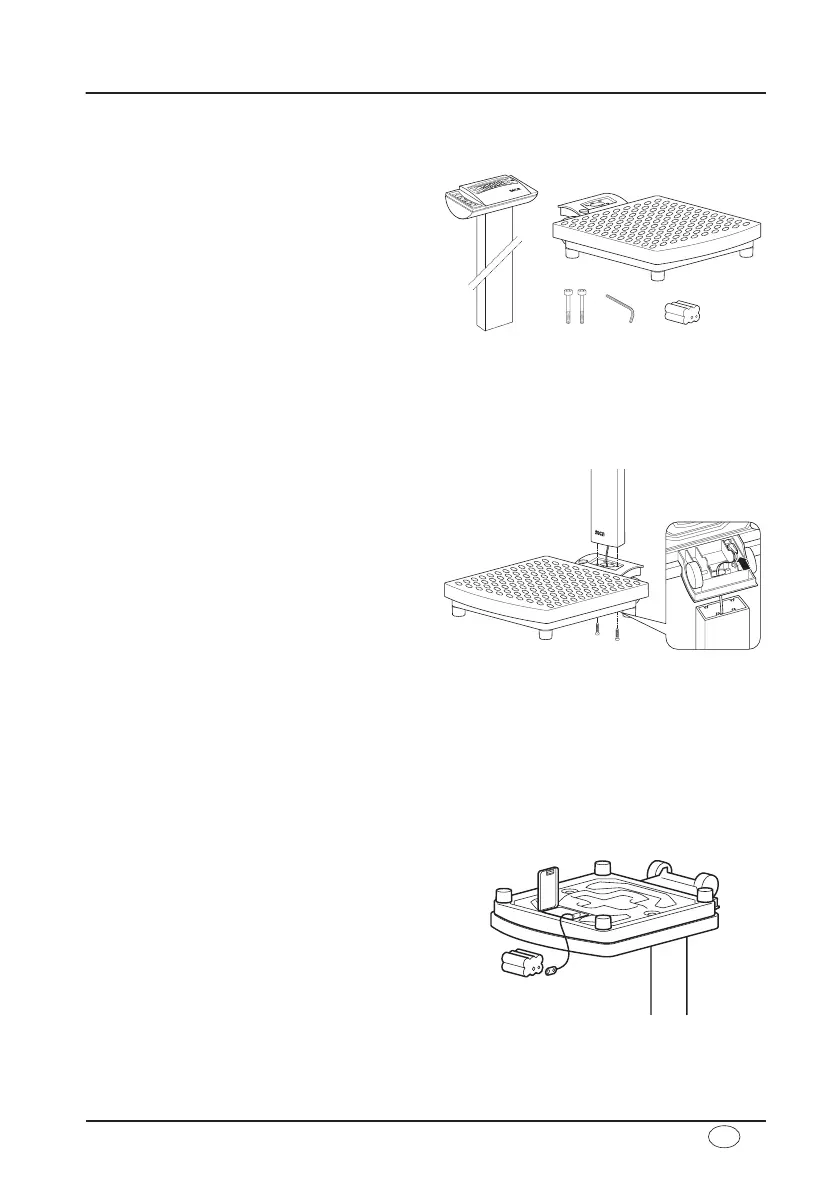
The scope of supply includes:
• Weighing platform
• Column with display head
• 2 M6 x 45 screws
• 1 WAF 5 Allen key
• 1 set of operating instructions
seca 701:
• Battery holder containing 6 mignon-
type AA 1.5 V batteries
seca 7017021904 / -994:
• 1 seca mains unit
Fitting the column
The column and display head are fitted to the weighing platform.
– Guide the connecting cable through the
opening.
– Place the column in the recess. The dis-
play should be legible for people stand-
ing on the scale.
– Screw the column to the weighing plat-
form from underneath.
If necessary, lay the scale carefully on
its side to tighten up the screws.
– Connect the plug of the connecting
cable to the rear of the scale.
– Then place the scale upright again.
Power supply
seca 701: The scale is powered exclusively by batteries.
seca 7017021904 / -994: The scale is powered by a mains unit or by batteries.
The LC display has a low power consumption – 16.000 weighing operations can be per-
formed with one set of batteries.
– Carefully turn over the scale so that the
base of the scale is accessible.
– Push the battery compartment closure
towards “Battery” and open the cover.
– Connect the cable to the holder and
batteries.
– Place the holder in the battery compart-
ment.
– Close the cover and then turn the scale
back up the right way.
Note: the scale is prepared for use with a seca mains unit which is available as
an accessory.



 To Next Page