40 • seca 874 +
6.1 Switching the device on and off
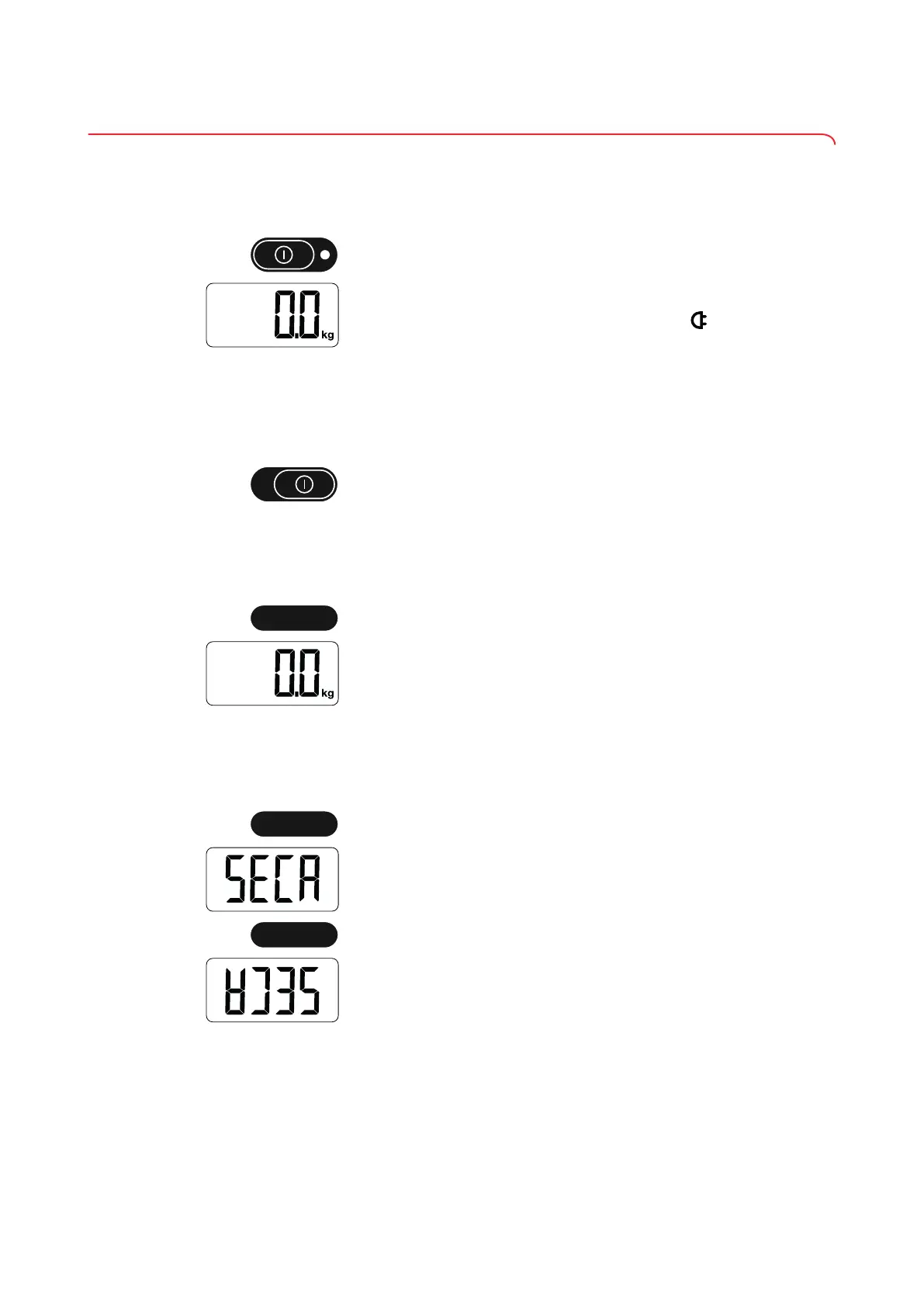
Switching on the device
✓
The scale has no load.
► Set the ON/OFF switch to “ON” position.
ð The scale is operational when 0.0 appears in the display.
ð If the scale is operated with a power supply unit, the symbol appears in
the display.
NOTE
The display switches off automatically after a short time if there is no
load on the scale (when operated with batteries only).
Switching off the device
► Set the ON/OFF switch to “OFF” position.
NOTE
Switch off the device before transporting it so that the TARE key is not
accidentally pressed during transport, so wasting power.
Switching on the display (standby)
► Briefly press the TARE key.
ð The scale is operational when 0.0 appears in the display.
NOTE
The display switches off automatically after a short time if there is no
load on the scale (when operated with batteries only).
Rotating the display
✓
Device is switched on
1. Press and hold the TARE key (5 seconds).
ð The SECA display flashes.
2. Briefly press the TARE key.
ð The display rotates.
ð After 5 seconds of inactivity, 0.0 appears and the display remains in this
position.
NOTE
If you briefly press the key again during these 5 seconds, the display
will rotate back.
17-10-06-648-100b_2024-05S


 To Next Page