46 • seca 874 +
CAUTION!
Personal injury
If you find faults or deviations during the function check which you are
unable to remedy with the aid of the “Troubleshooting” section in this
document, you must not use the device.
► Have the device repaired by seca Service or an authorized service
partner.
► Follow the section entitled “Servicing” in this document.
9 TROUBLESHOOTING
If faults occur when operating the device, first attempt to remedy them yourself
using the following table. If the fault persists, contact seca Service or an autho-
rized service partner.
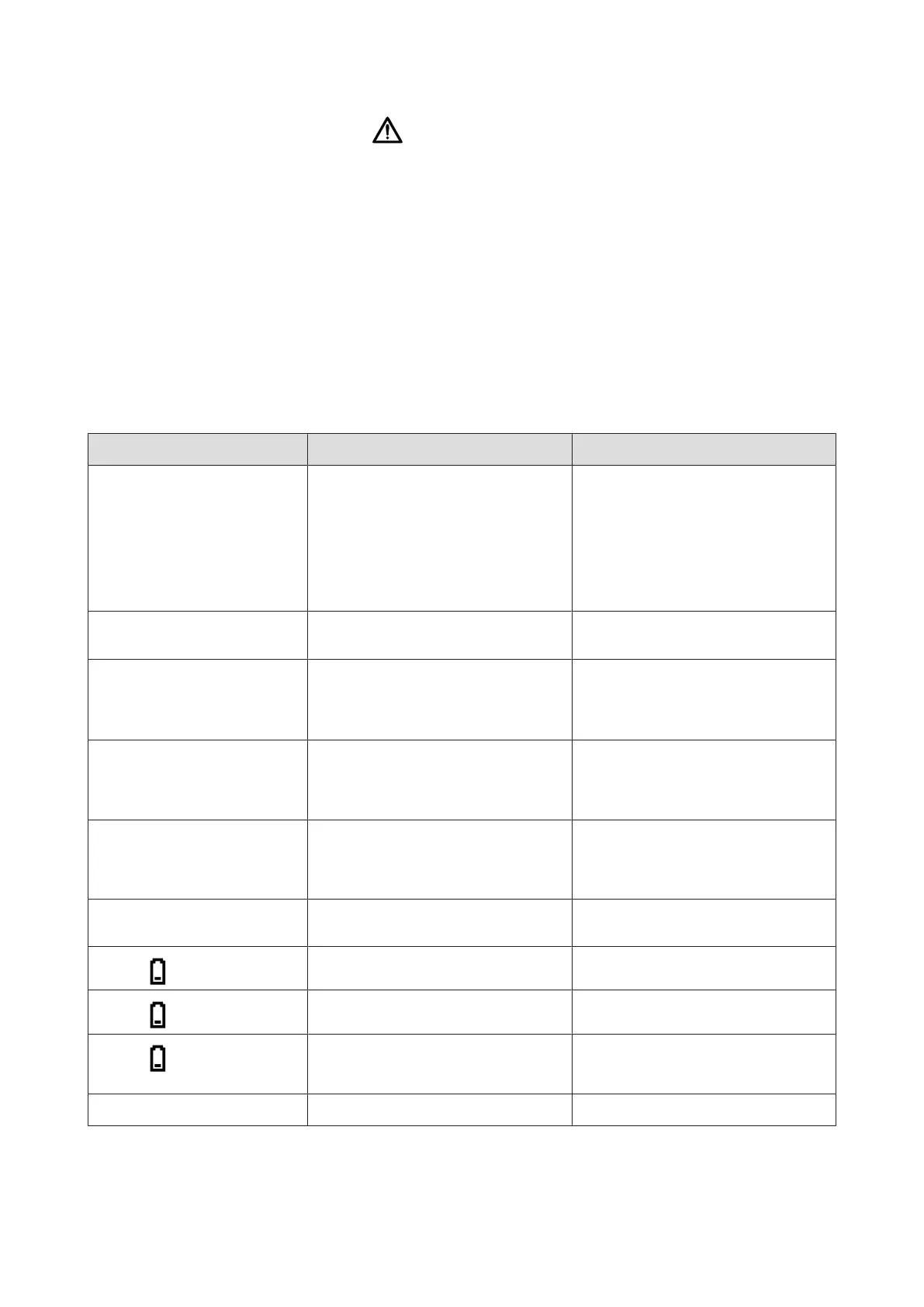
Fault Cause Remedy
Display is blank
• Scale is switched off
• Scale is on standby mode
• Scale is not supplied with power (bat-
teries or power supply unit)
• Check that the scale is switched on
• If the scale is on standby mode, press
the TARE key
• Check that batteries are inserted (cor-
rectly) or that a power supply unit is
connected
Scale switches itself on, e.g.
during transport
TARE key pressed
Set the On/off switch to “OFF” when
transporting
The scale displays a weight after
transport or a battery replace-
ment although no load has been
placed on it
Scale has determined an incorrect zero
point
Switch off the scale, then switch it back
on again
0.0 flashes before weighing
Scale had load on it before being
switched on
• Remove the load from the scale
• Switch off the scale, then switch it
back on again
---- displayed before weighing
Scale had load on it before being
switched on
• Remove the load from the scale
• Switch off the scale, then switch it
back on again
Single segment is illuminated
continuously or not at all
Display faulty Inform seca Service
Display: lit continuously
Battery voltage is dropping Replace the batteries
Display: flashing slowly
Battery voltage is very low Replace the batteries
Display: flashing quickly (for 3
seconds), device switches off
Batteries discharged Replace the batteries
Display: StOP
Maximum capacity exceeded Remove the load from the scale
17-10-06-648-100b_2024-05S


 To Next Page