17
CARD READER/WRITER
7
7-1 SETTING DEDICATED CARDS
When the product has run out of cards, a message will appear on screen. Carry out the following procedure to refi ll the cards.
1
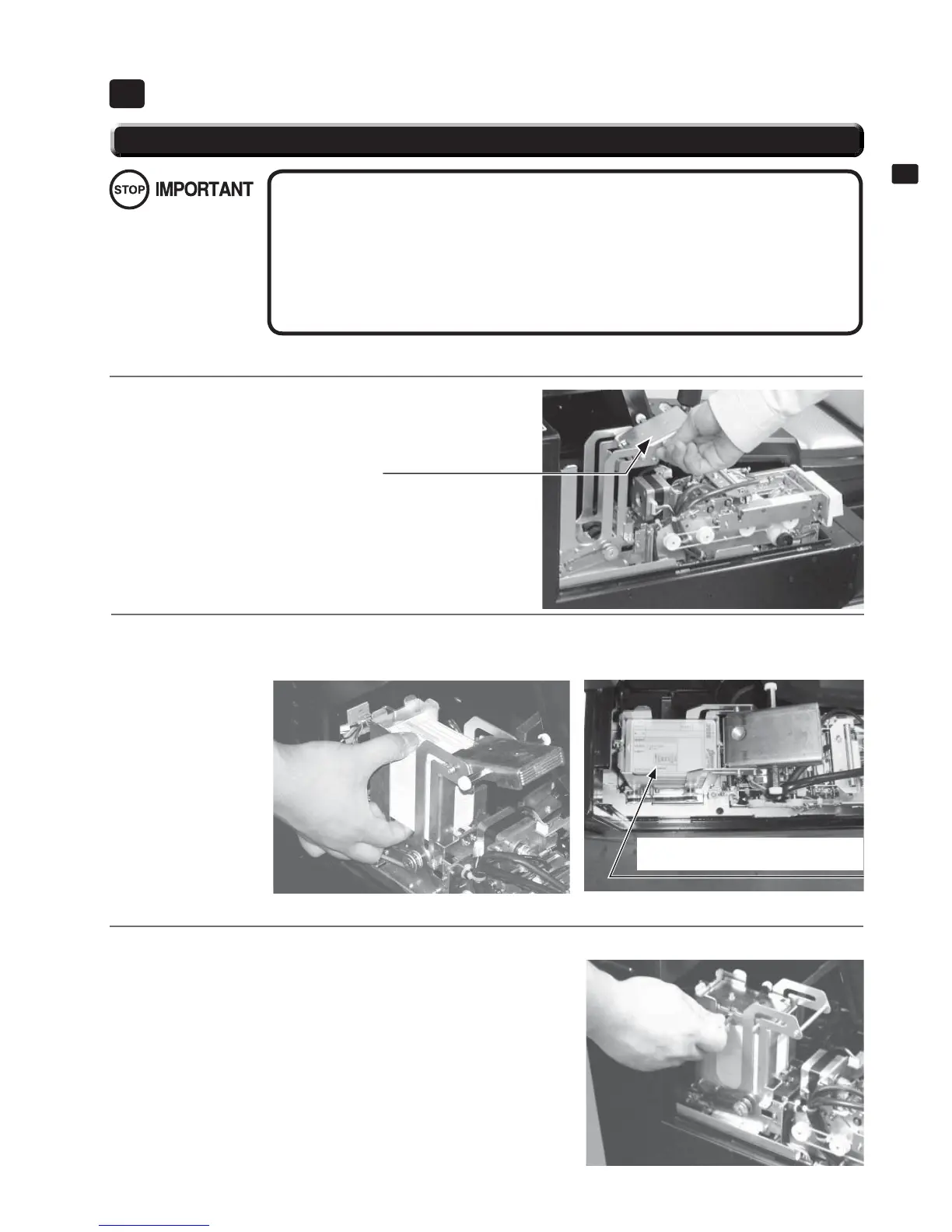
Remove the truss screws then open IC card reader door.
Lift the dispenser retainer as shown in the diagram.
CARD READER/WRITER7
● Be sure to use dedicated cards available for this product. Use of ones other than such
dedicated cards may cause a malfunction or failure of the machine.
● Be sure to set the specifi ed number of card in the specifi ed orientation by using the
specifi ed procedure. Wrong setting of the cards may cause the machine to fail.
● Set virgin cards taken out from a container that was unpacked immediately before use.
Do not include a corrugated, bent, or used card in the card deck.
● You can refi ll the cards while the product is operating. Take care not to touch anything
other than the loading area.
7-1 FIG. 01
RETAINER
2
Refi ll the Initial D 4 IC cards. Place the cards in the orientation shown in the diagram, loosen them, and load
100 cards. Do not load more than 101 cards, as this may result in damage to the product or malfunction.
7-1 FIG. 02
7-1 FIG. 03
Ensure that the cards are
loaded in the correct orientation.
3
Replace the retainer over the refi lled cards. Carry out steps 1 in reverse order and replace and lock the cover,
then fi x it in place with the truss screws.
7-1 FIG. 04


 To Next Page