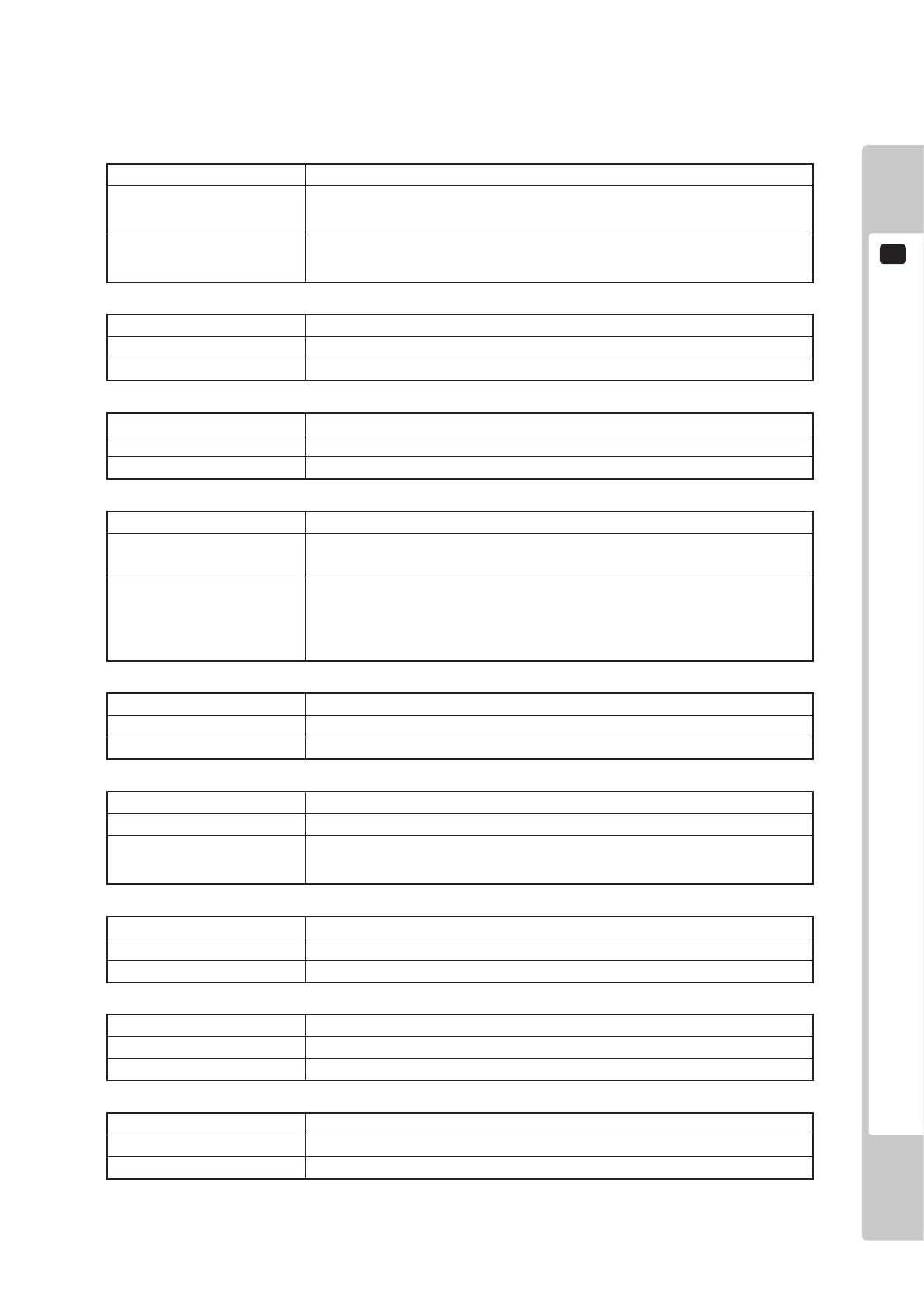
ERROR CODES DISPLAY
5
25
DISPLAY Graphic Card Not Found.
CAUSE
The game disk does not support the LINDBERGH RED, or the LINDBERGH
RED board’s graphics card cannot be found.
COUNTERMEASURES
Verify that the game disk is compatible with the LINDBERGH RED. If it is,
send the LINDBERGH RED board in for repair with the key chip still in place.
Error 7
DISPLAY System Memory Not Enough.
CAUSE The LINDBERGH RED board does not have enough memory.
COUNTERMEASURES Send the LINDBERGH RED board in for repair with the key chip still in place.
Error 9
DISPLAY Unexpected Game Program Failure.
CAUSE The game program crashed due to an unexpected error.
COUNTERMEASURES Turn the power off and then restart.
Error 10
DISPLAY JVS I/O board is not connected to main board.
CAUSE
(1) The I/O board is not connected.
(2) Unreliable connection between the main board and the I/O board.
COUNTERMEASURES
(1) Connect the I/O board to the main board. Verify that the power cable is
connected to I/O board.
(2) Reconnect or replace the JVS cable that connects the I/O board to the main
board.
Error 11
DISPLAY JVS I/O board does not fulll the game spec.
CAUSE The correct I/O board is not connected.
COUNTERMEASURES Use an I/O board that provides the proper input/output for the game.
Error 12
DISPLAY Game Program Not Found.
CAUSE The key chip is not connected.
COUNTERMEASURES
Check that the key chip is connected correctly. Check that the key chip from a
different system is not inserted.
Error 15
DISPLAY Game Program Not Found on Game Disk.
CAUSE There is no program image on the game disk.
COUNTERMEASURES Check that a game disk corresponding to the key chip is inserted into the drive.
Error 21
DISPLAY Game Program Not Found on Device.
CAUSE There is no game image on the game installer device.
COUNTERMEASURES Perform a reinstall from the game disk.
Error 22
DISPLAY DVD Drive Not Found.
CAUSE The DVD drive cannot be found.
COUNTERMEASURES Connect the DVD drive.
Error 24




 To Next Page