Saving Your Game*
THe OPTION button
become* available on the
Control Pond when the drive
is empty or o CD-ROM
game
is
in the drive Use
this button to formal the
SEGA CD's
inlernal
back up
memory, lo
save gomes, and to copy gomes to
ond Irom the SEGA-CD's internal memory,
if your CD-ROM
software
has o
Save feature (often available
in sports gome* and
rale ploying game*),
you
can save your
current
game
to the SEGA-CD*s
internal memory. Later,
you
con load ihe
*aved
gome
and continue playing
from where
you
left off
See page
1 9 for details on
using the OPTION feature
Ending a Session
1 - Open
the disc tray
by
moving the
hand cursor to EJECT and pre**ing
Button A or
C
The EJECT
button change* lo CLOSE
%
Remove the disc.
3. Clove
the (ray
by
pre«irg Button A
or
C
4*
Turn off the Gcne*is
Note: If
the power is turned off when the
dive
Iray is
open (such
o*
during
an
electrical failure), turn the Genesis
power switch OFF Male
*ure
the electricity is on. and then turn
the Genets power switch ON
The iray will clo*e automatically.
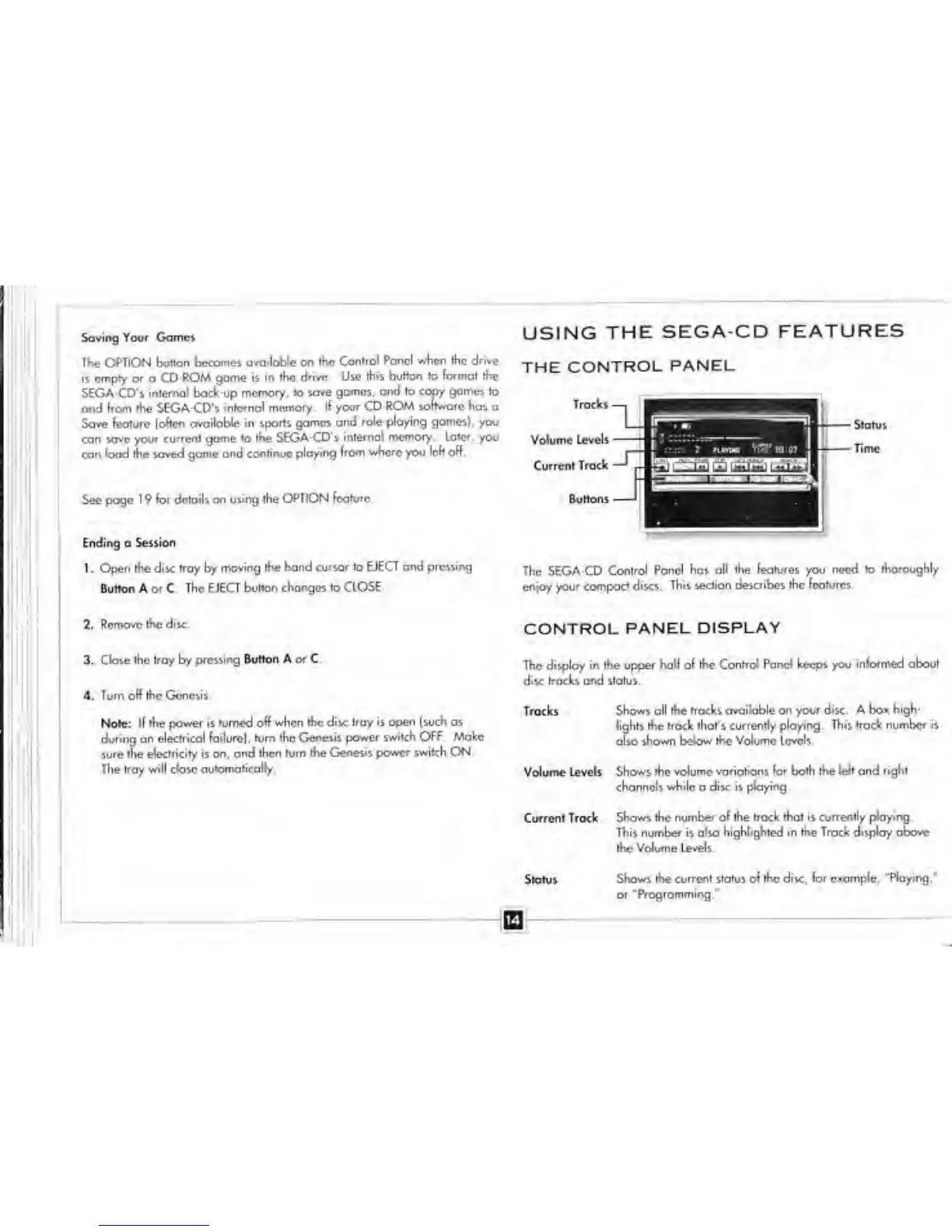
USING
THE
SEGA-CD FEATURES
THE
CONTROL
PANEL
The SEGA-CD
Control Poncl has
all
the
features
you
need
to
thoroughly
enjoy
your compact disc*.
This section de*cribe* the feature*.
CONTROL PANEL DISPLAY
The display
in the upper hall of the Control Pand keeps you
informed about
diic
tracks and
status
Troclcs Show* oil the tracks
avoilable on your rJsc A box high-
lights
the track that's currently playing. This trod number i*
also
shown below the Volume level*
Volume Levels
Shows the volume variations far both the
left
and
right
channels while a disc i*
playing
Current Trock Show* the
number of
the
track that is currently playing.
This number i*
also highlighted in the Track display above
the
Volume Levels.
Status
Shaw* the current statu* t>i the disc, for example,
"Raying/
or
^Programming"


 To Next Page