CONNECTING
YOUR
SYSTEM
Make
sure your Genesis syitem is set up
and
operating properly before
connecting your SEGA CD,
(Please
see
your Sega Gemsfr
/nifrudw Alarwaf
lor detail*)
Then follow these steps to
connect your SEGACD to your
Go
n
CMS
1 -
Unplug the Gencys from its AC
adopter
2.
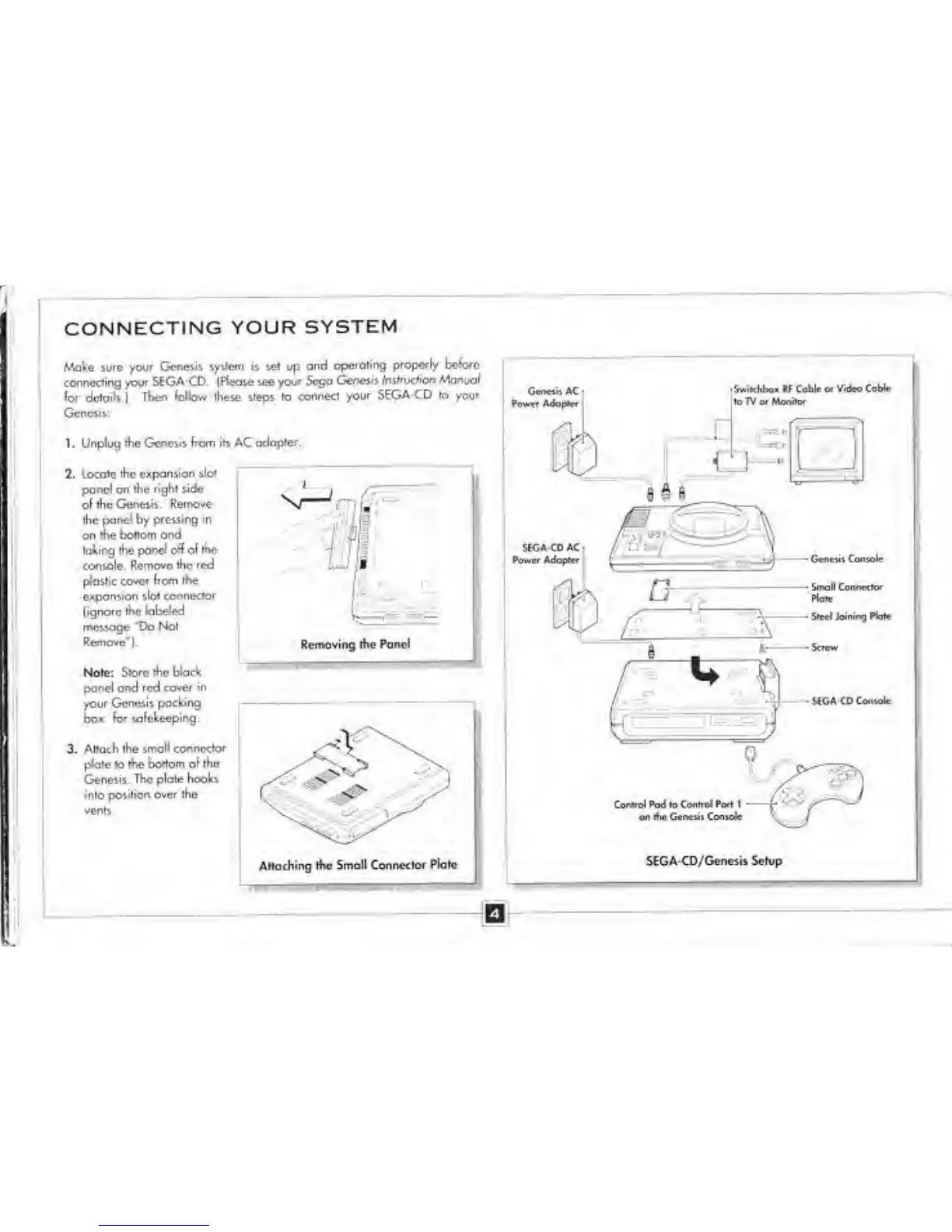
Locole the expansion
sloi
pond on the nghl side
ol the
Genesis Remove
the
panel
by
pressing in
on
rhe bottom and
IcAir^theponcloffoltHe
console Remove the red
plastic cover from the
expansion slot
connector
(ignore the
labeled
message *Do
Not
Remove*).
Note: Store me black
panel and red
cover in
your Genesis
packing
DO*
afekeeping.
3-
Attach the small connector
plate io the bottom ol the
Genesis. The plate hooks
into position
over the
vents
Attaching the Small Connector
Plate
SEGA-CD/Genesis Setup


 To Next Page