EasyManua.ls Logo

Sega SEGA-CD - Set Prog; To Set the Track Order; To Insert Tracks in the Tracks Set Line; To Close the Set Program Menu

Sega SEGA-CD
28 pages
Print Icon
To Next Page IconTo Next Page
To Previous Page IconTo Previous Page
Loading...
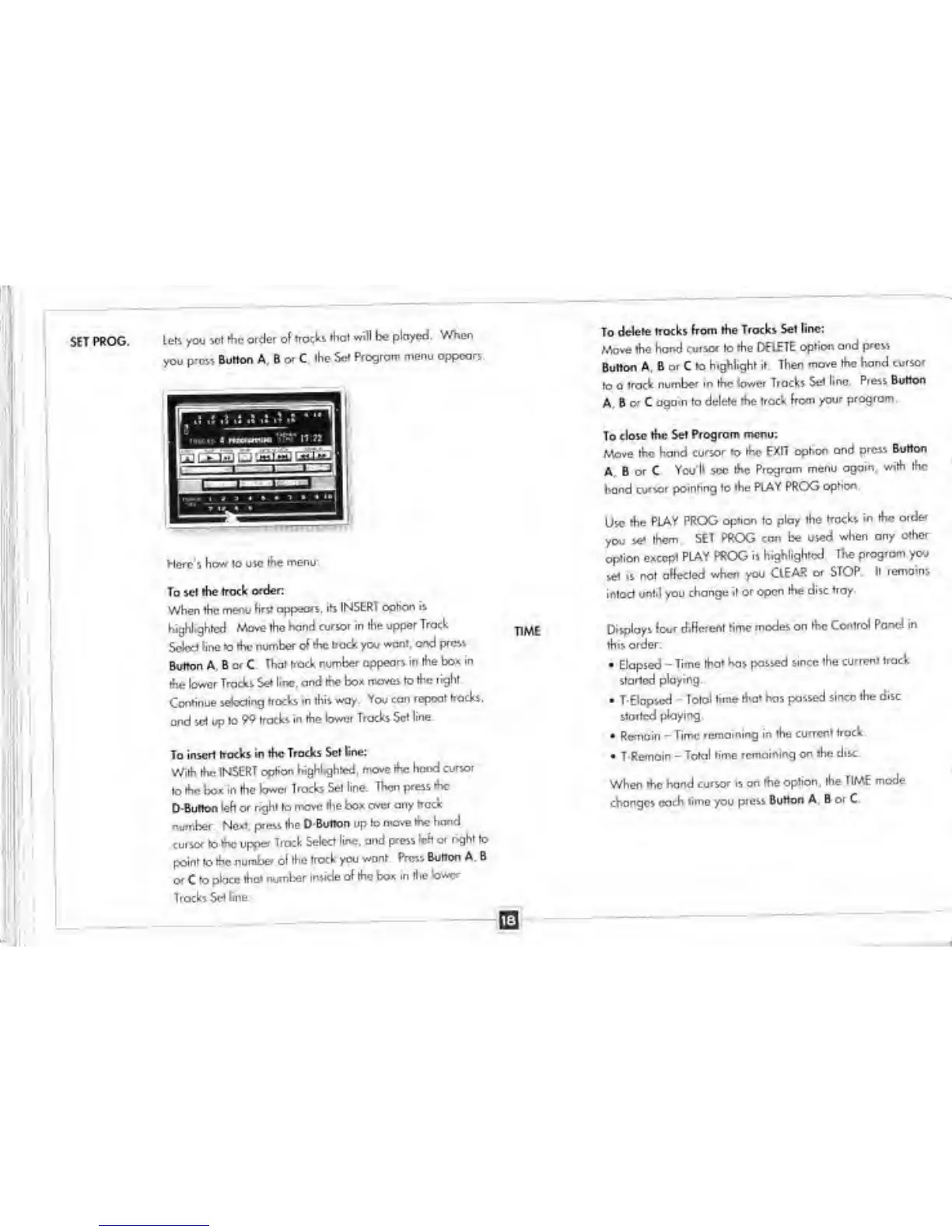
SET PROG.
Lels you
set the
order or trocks
(hoi will be
ployed.
When
you pro*
Button A, B
or C,
ihe Set
Progrom menu
oppcars.
Here's
how 10
use
the
menu:
To set the
trade order
When
the
menu first
appears, its
INSERT option is
highlighted. Mow*
the hand
cursor in the
upper Track
Select
line lo the
number of the
hock
you
want, and press
Button A . B
or
C
That
frock number
appears in
the box in
the lower Tracks
Set line, and
the box
moves to the
right
Continue
selecting
tracks
in
this
way. You con
repeat
tracks,
and set up ta
99 tracks
in the lower
Tracks Scl line.
To insert track
in the Tracks
Set tne:
With the
INSERT option
highlighted,
move the
hand cursor
to the box in
Ihe lower
Trocks Set line.
Then
press the
D
Button left or
right
to
move
the box over any
track
number
Next, press
the
O-Button
up
lo
move the hand
cursor to the upper
Track
Select line, and
press leh or
right to
point to the
number ol the
trock you
wont rVcsi
Burton A B
or
C
to pbee
that number
inside of
the box in (he
low
Trocks Set
line.
To delete
trocks from
the Trocks Set
line;
Move the hor>d
cursor
lo
the DELETE
option and
press
Button A. B or C
to highlight it
Then
move the hand
cursor
to a
track
number in the lower
Tracks
Set line Press
Button
A,
8
or
C
again
to
delete
the
track
from
your
program.
To close
the Set
Program menu:
Move the hand
cursor
to
the EXIT
option ond
press
Burton
A. B
or C
You'll
sec
the
Program menu
ogain,
with the
hand cursor
pointing to the
PLAY PROG
option.
Use
the
PLAY PROG
option to ploy the
tracks
in the
order
you
set them
SET PROG con be used
when
any
other
option
except
PLAY PROG is
highlighted
The program you
vet
is no!
affected when you
CIEAR
or STOP H
remains
intoct until you
change it
or open the
disc troy.
Displays
four different
time modes
on the
Control Pond in
this
order:
•
Elapsed
-
Time
that has passed
since the
current track
started
ploying.
•
T-Elapscd
-
Tolol time
that has passed
since the
disc
started
playing.
•
Remain
-
Time
remaining in the
current track.
•
T
Remoin
-
Total
time
remaining on the disc
When the hand
cursor is on
the option,
the TIME mode
changes
each time
you
press
Button A. B
or
C.