Internet Connection
You can connect this unit to the Internet whenever necessary, using a Wi-Fi
connection (if available) or 3G/4G network (3G/4G dongle is sold separately). You
can browse the web, download apps via Google Play, play online games, etc. The
possibilities are endless with the Internet in your car.
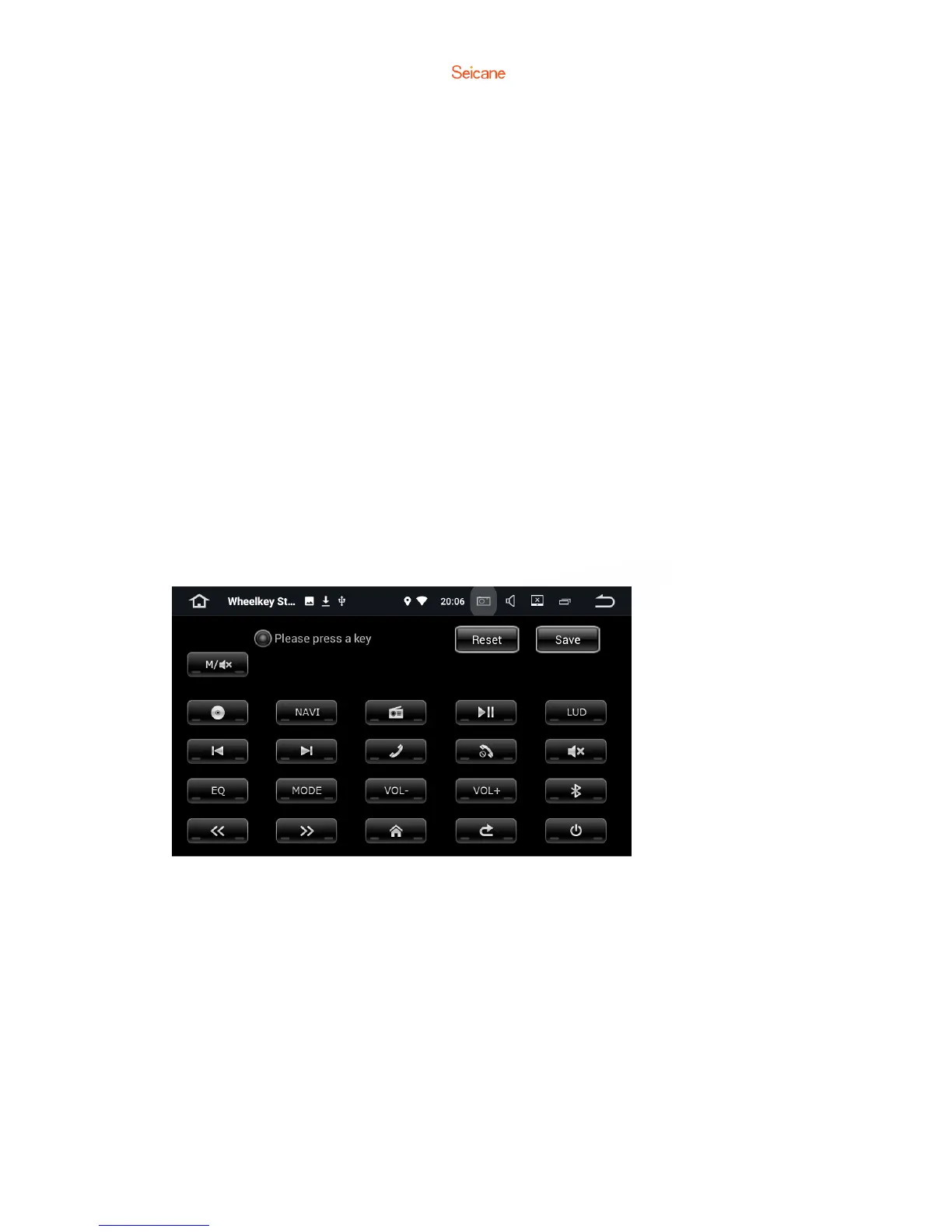
Steering Wheel Control Key Learning
① Confirm whether the car radio main interface has the steering wheel control function icon
display.
② If there is the steering wheel control function icon, click it to enter the steering wheel
learning interface directly.
③ First long press (around 3 seconds) the key to be learned by the steering wheel, until the
function key is automatically displayed, then select the desired function key.
④ Repeat step ③ until all desired keys are learned, then touch the upper right corner to save
the setting.
If there is no steering wheel control key icon on the car radio main interface, then you should:
① Enter password 【126】, enter the factory setting interface.
② Click 【other】, and find the steering wheel control setting.
③ Change steering wheel control learning’s status from【Reject】to【Allow】.
④ Touch 【Apply】, then touch 【Export】, finally touch【Exit】. By doing so, the navigation unit
will restart immediately.
⑤ If the car radio doesn’t restart, then the setting won’t take effect. And you should check all
the above steps.


 To Next Page