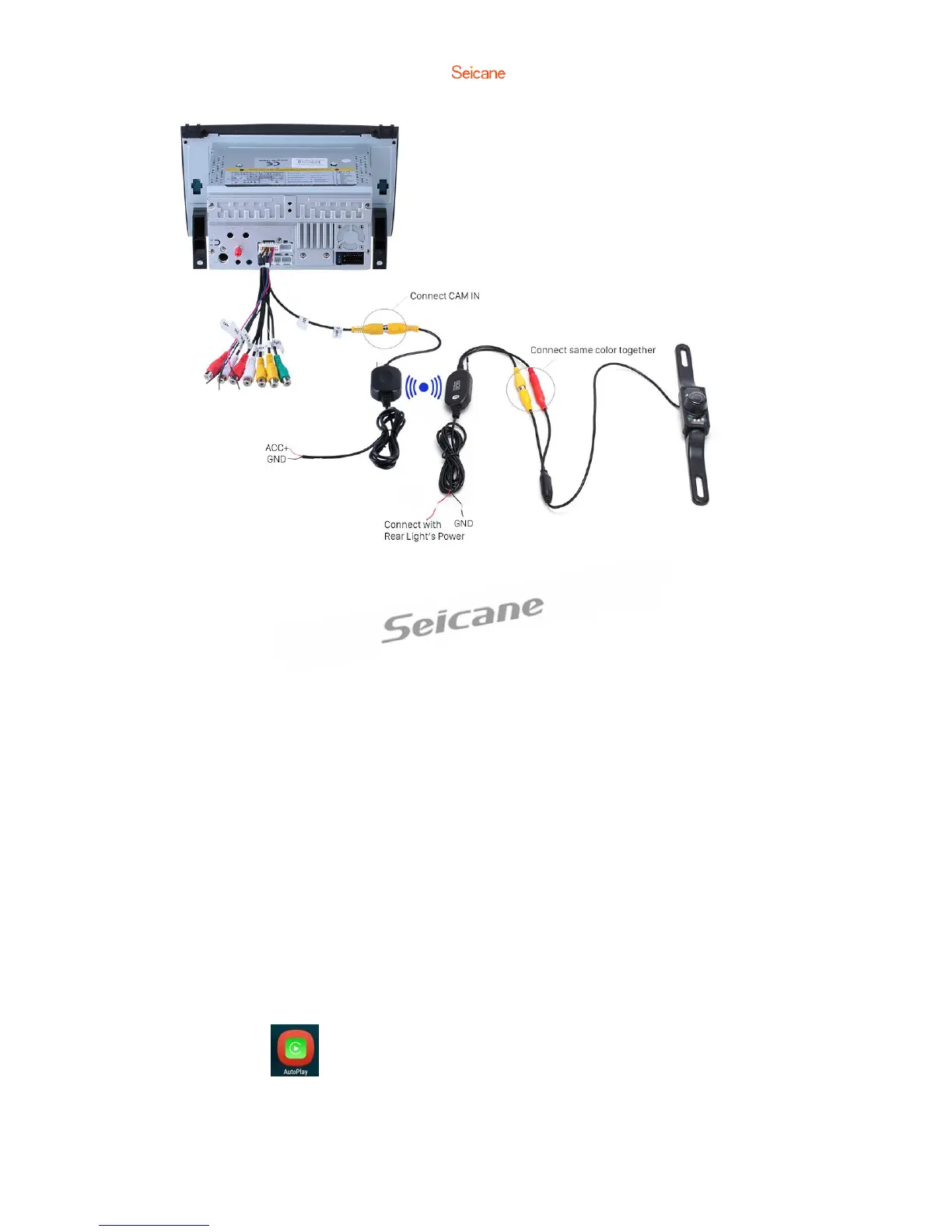
If you still can’t get reversing camera image at reverse gear after installing your
wireless camera according to the above way, please find and connect the brown
“CCD AV IN”cable (or REVERSE cable in the supplied power harness) to + positive of
your reverse lamp.
Carplay USB Dongle (Optional)
This unit can support Carplay USB dongle. The Carplay USB dongle (which is sold
separately) can support original car voice control and car screen touch. With a
Carplay USB dongle connected to this product, you can freely enjoy your phone
Carplay function in your car.
To add a Carplay USB dongle to this product, you should:
a. Install an App (pre-installed) in your car radio.
b. Enter the App and then connect this Carplay USB dongle to the car radio’s USB
input.
c. Make sure that the host connection is successful.
d. Then connect the mobile phone to the Carplay USB dongle via the phone’s USB
data cable. Finally, you can freely enjoy your phone carplay function in your car.
You can click into Carplay after connecting. You can play music and make the
phone call through your mobile phone, and use the map in your mobile phone, etc.



 To Next Page