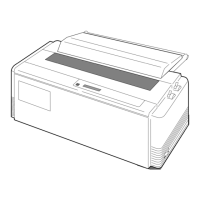
Features
❏ Wide selection of paper size
• Single cut sheet papers A3, A4, B4, B5, Letter, Legal
• Fanfold continuous paper 5 - 16 inch wide paper
• Multi-part paper Original plus 6 copies
(total clearance: 0.41mm (0.016”)
Double, triple, or quadruple strikes to strengthen the copy quality
(Multipart mode)
• Labeling paper Label peel-proof capability
❏ Many variations of font types and character spacings
• 2 resident fonts Roman and Sans serif
• 6 character spacings 10, 12, 15, 17.1, 20 characters per inch (CPI), and proportional
characters
❏ Easy operation
• User programmable files give an instant switch to different interface configuration.
❏ Superb compatibility and connectability
• Compatible to major printer emulations, IBM and Epson printers.
• Communication protocols adjustable to any computer.
• Interface connections provided for parallel and RS-232C.
• Parallel and serial interface are switched automatically, when "AUTO" setting is selected.
3
1. Introduction
1. Introduction


 To Next Page