69
❏ IBM mode
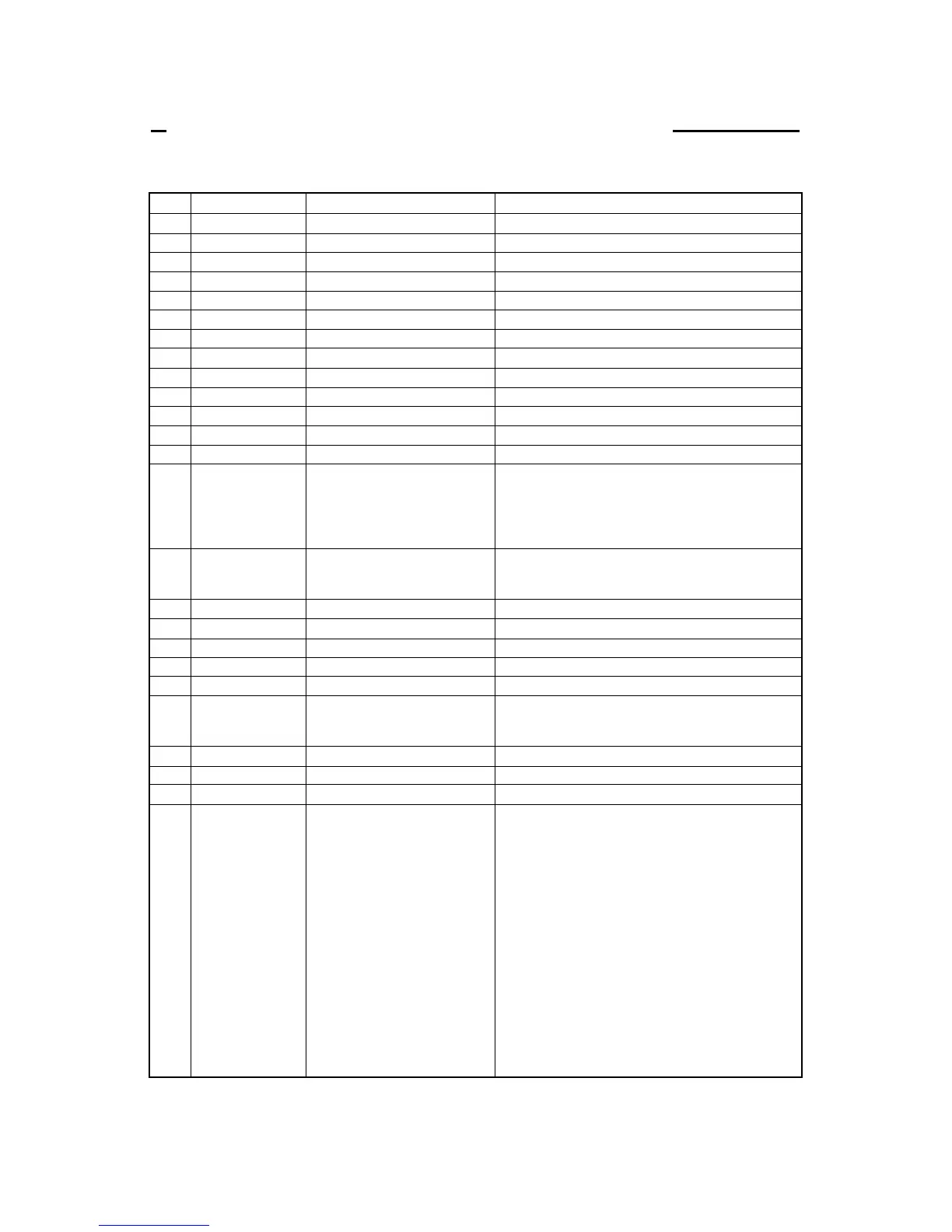
ITEM SYMBOL Hexadecimal & Decimal FUNCTION
[1] BEL [07] H [7] D Activates the alarm.
[2] BS [08] H [8] D Backspace one character.
[3] HT [09] H [9] D Moves to next horizontal tab.
[4] LF [0A] H [10] D Linefeeds after printing.
[5] VT [0B ]H [11] D Linefeeds to next vertical tab position after printing.
[6] FF [0C] H [12] D Form feeds after printing.
[7] CR [0D] H [13] D Carriage return after printing.
[8] SO [0E] H [14] D Sets double width character mode for 1 line.
[9] SI [0F] H [15] D Sets condensed character mode.
[10] DC1 [11] H [17] D Selects printer that has been deselected by ESC Q.
[11] DC2 [12] H [18] D Selects pica (10 cpi) character mode.
[12] DC4 [14] H [20] D Cancels double width character mode set by SO.
[13] CAN [18] H [24] D Clears data in buffer.
[14] ESC EM n [1B,19,n] H [27,25,n] D Controls Cut Sheet Feeder.
n=0 : Manual feeding.
n=1 : Selects Bin 1.
n=2 : Selects Bin 2.
n=R : Ejects a cut sheet paper loaded in the printer.
[15] ESC – n [1B,2D,n] H [27,45,n] D Sets or cancels underline mode.
n=0 : underline is cancelled.
n=1 : underline is set.
[16] ESC 0 [1B,30] H [27,48] D Sets line spacing to 1/8".
[17] ESC 1 [1B,31] H [27,49] D Sets line spacing to 7/72".
[18] ESC 2 [1B,32] H [27,50] D Linefeeds with the line spacing set by ESC A.
[19] ESC 3 n [1B,33,n] H [27,51,n] D Sets line spacing to n/216" (1≤n≤255).
[20] ESC 4 [1B,34] H [27,52] D Sets the current print position as top-of-form (TOF).
[21] ESC 5 n [1B,35,n] H [27,53,n] D Sets/cancels auto linefeed with CR
n=0 : Carriage return without linefeed.
n=1 : Carriage return with linefeed.
[22] ESC 6 [1B,36] H [27,54] D Selects IBM character set 2.
[23] ESC 7 [1B,37] H [27,55] D Selects IBM character set 1.
[24] ESC : [1B,3A] H [27,58] D Sets elite (12 cpi) character mode.
[25] ESC = n1 n2 [1B,3D,n1,n2,m,c,a1,a2,data] H Defines download character.
m c a1 a2 data [27,61,n1,n2,m,c,a1,a2,data] D When n1=n2=0, the download area is cleared.
Total number of data in download characters is defined
as n1 + n2 x 256. Each character consists of assign
code (c), attributes (a1 and a2), and data.
ESC = NUL NUL .clears download area.
Download characters can be selected for printing or
for a storage memory by ESC I command.
m=14h indicates a draft download character and
m=15 ha NLQ download character.
Appendix B. Control code summary
B. Control code summary (IBM)


 To Next Page