71
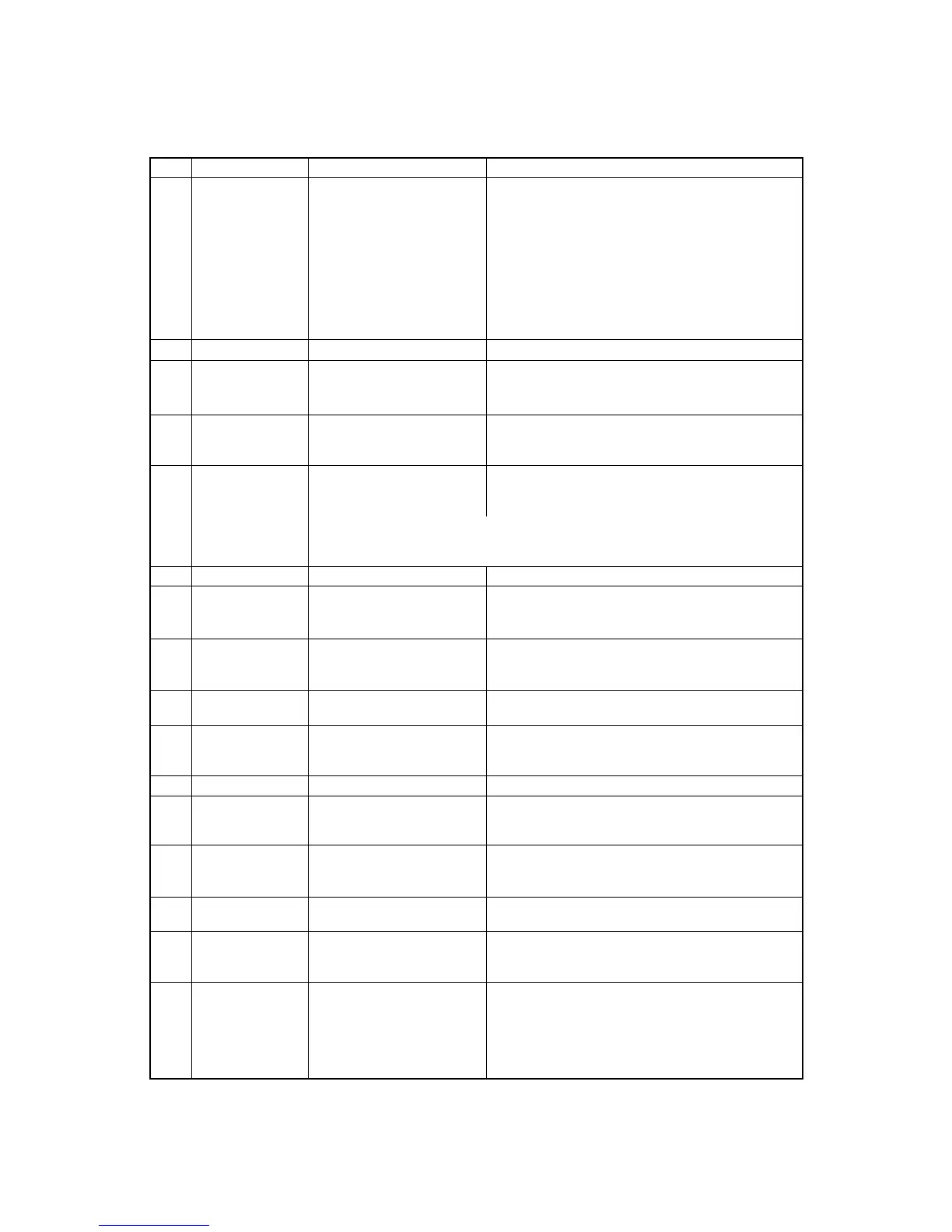
ITEM SYMBOL Hexadecimal Decimal FUNCTION
[35] ESC I n [1B,49] H [27,73] D Selects one of font styles.
n=0 : Draft 10 cpi
n=1 : Speed draft 12 cpi
n=2 : NLQ (Sans Serif)
n=3 : NLQ (Roman)
n=4 : Draft download
n=5 : Speed draft download
n=6 : NLQ (Sans Serif) download
n=7 : NLQ (Roman) download
n=11 : NLQ (Roman) italic
[36] ESC J n [1B,4A,n] H [27,74,n] D Linefeeds in various spacings in n/216" (1≤n≤255).
[37] ESC K n1 n2 [1B,4B,n1,n2,data] H Prints the 8-pin standard-density graphics (60 dpi).
data [27,75,n1,n2,data] D The total number of dots in the data is set by
n1 + n2
x
256.
[38] ESC L n1 n2 [1B,4C,n1,n2,data] H Prints the 8-pin double-density graphics (120 dpi).
data [27,76,n1,n2,data] D The total number of dots in the data is set by
n1 + n2
x
256.
[39] ESC N n [1B,4E,n] H [27,78,n] D Sets bottom margin (1≤n≤255).
n specifies the number of lines not to be printed at the
end of a page.
For example: If the line spacing is 1/6 inch and the page length is 66 lines,
an ESC N 6 command causes the printer to print 60 lines, then skip 6 lines.
The space to be skipped is 1 inch (1/6 inch
x
6).
[40] ESC O [1B,4F] H [27,79] D Cancels bottom margin set by ESC N command.
[41] ESC P n [1B,50,n] H [27,80,n] D Sets/cancels proportional mode
n=0 : Cancels proportional mode.
n=1 : Sets proportional mode.
[42] ESC Q n [1B,51,16] H [27,81,22] D Deselects the printer. DC1 selects the printer.
n=16h : Deselects the printer.
n
≠
16h : Ignores this command.
[43] ESC R [1B,52] H [27,82] D Initializes horizontal tabs to every 8th column and
clears vertical tabs.
[44] ESC S n [1B,53,n] H [27,83,n] D Sets superscript or subscript character mode.
n=0 : the superscript character mode is set.
n=1 : the subscript character mode is set.
[45] ESC T [1B,54] H [27,84] D Cancels super-/subscript character mode.
[46] ESC U n [1B,55,n] H [27,85,n] D Selects unidirectional or bidirectional printing.
n=0 : bidirectional printing is set.
n=1 : unidirectional printing is set.
[47] ESC W n [1B,57,n] H [27,87,n] D Sets or cancels double width character mode.
n=0 : the double width character mode is cancelled.
n=1 : the double width character mode is set.
[48] ESC X n m [1B,5C,n,m] H Sets left and right margins (0≤n<m≤255)
[27,92,n,m] D n: left margin, m:right margin.
[49] ESC Y n1 n2 [1B,59,n1,n2,data] H Prints 8-pin double-speed double-density graphics
data [27,89,n1,n2,data] D (120 dpi). The total number of dots in the data is
set by n1 + n2
x
256.
[50] ESC Z n1 n2 [1B,5A,n1,n2,data] H Prints 8-pin quadruple-density graphics (240 dpi).
data [27,90,n1,n2,data] D The total number of dots in the data is set by
n1 + n2
x
256.
B. Control code summary (IBM)


 To Next Page