76
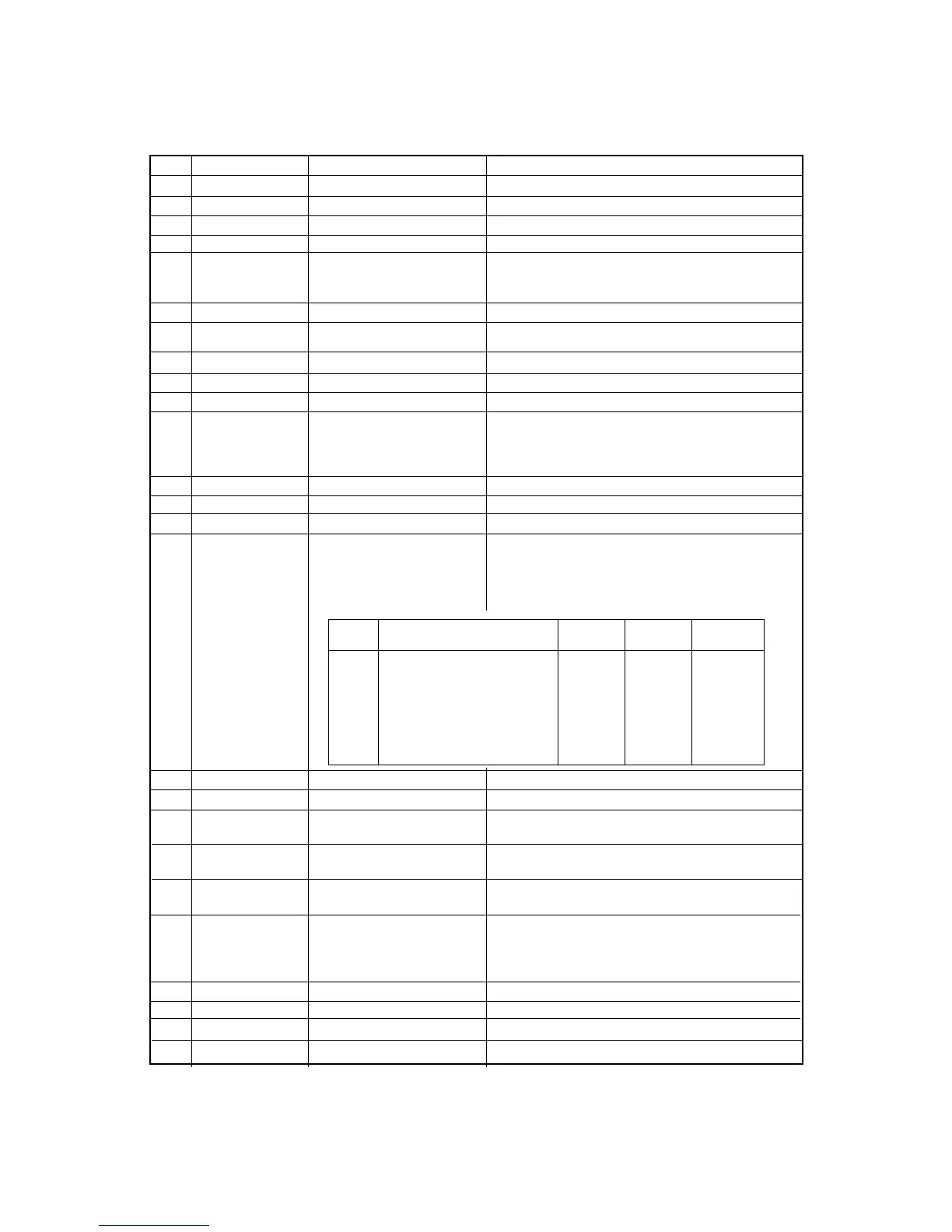
ITEM SYMBOL Hexadecimal Decimal FUNCTION
[27] ESC 0 [1B,30] H [27,48] D Sets line spacing to 1/8".
[28] ESC 1 [1B,31] H [27,49] D Sets line spacing to 7/72".
[29] ESC 2 [1B,32] H [27,50] D Sets line spacing to 1/6".
[30] ESC 3 n [1B,33,n] H [27,51,n] D Sets line spacing to n/216" (0≤n≤255).
[31] ESC 4 [1B,34] H [27,52] D Sets Italic character mode.
Download characters and graphic characters
(B0h-DFh, F4h, and F5h) are not italicized.
[32] ESC 5 [1B,35] H [27,53] D Cancels Italic character mode.
[33] ESC 6 [1B,36] H [27,54] D Enlarges print code area.
Control code area (80h-9Fh) is printed as characters.
[34] ESC 7 [1B,37] H [27,55] D Clears ESC 6 command.
[35] ESC 8 [1B,38] H [27,56] D Disables paper detect function.
[36] ESC 9 [1B,39] H [27,57] D Enables paper detect function.
[37] ESC : NUL [1B,3A,00,n,00] H Copy RAM download character set from ROM
n NUL [27,58,0,n,0] D character set.
n=0 : ROMAN is copied.
n=1 : SANS SERIF is copied.
[38] ESC < [1B,3C] H [27,60] D Moves print head to home position.
[39] ESC = [1B,3D] H [27,61] D Sets MSB of data to "0".
[40] ESC > [1B,3E] H [27,62] D Sets MSB of data to "1".
[41] ESC ? n m [1B,3F,n,m] H Re-assign graphic type for ESC K, ESC L,
[27,63,n,m] D ESC Y, and ESC Z commands.
n : specifies the former graphic type assigned
by "K", "L", "Y", or "Z".
m : specifies the new graphic type in table below.
[42] ESC @ [1B,40] H [27,64] D Initializes printer.
[43] ESC A n [1B,41,n] H [27,65,n] D Sets line spacing to n/72" (0≤n≤85).
[44] ESC B n1 n2... [1B,42,n1,n2,...n16,00] H Sets vertical tab positions beginning from n1 and end
n16 NUL [27,66,n1,n2,...n16,0] D with NUL [00]H. n=1 is at the second line from TOF.
[45] ESC C n [1B,43,n] H [27,67,n] D Sets page length in line unit (1≤n≤127).
The current print line becomes TOF (top of form).
[46] ESC C NUL n [1B,43,00,n] H [27,67,0,n] D Sets page length in inch unit (1≤n≤22).
The current print line becomes TOF (top of form).
[47] ESC D n1 [1B,44,n1,n2,...n32,00] H Sets horizontal tab position (1≤n≤255).
n2...n32 NUL [27,68,n1,n2,...n32,0] D n indicates the number of spaces from the left margin
with the character width at the command execution.
n=1 is at the second column from the left margin.
[48] ESC E [1B,45] H [27,69] D Sets emphasized character mode.
[49] ESC F [1B,46] H [27,70] D Cancels emphasized character mode.
[50] ESC G [1B,47] H [27,71] D Sets double strike character mode.
[51] ESC H [1B,48]H [27,72] D Cancels double strike character mode.
m Graphic Type Number Maximum Horizontal
of Pins Columns Density
0 Standard-density 8 816 60
1 Double-density 8 1632 120
2 Double-speed double-density 8 1632 120
3 Quadruple-density 8 3264 240
4 80 dpi graphics 8 1088 80
5 72 dpi graphics 8 979 72
6 90 dpi graphics 8 1224 90
7 144 dpi graphics 8 1958 144
B. Control code summary (FX)


 To Next Page