81
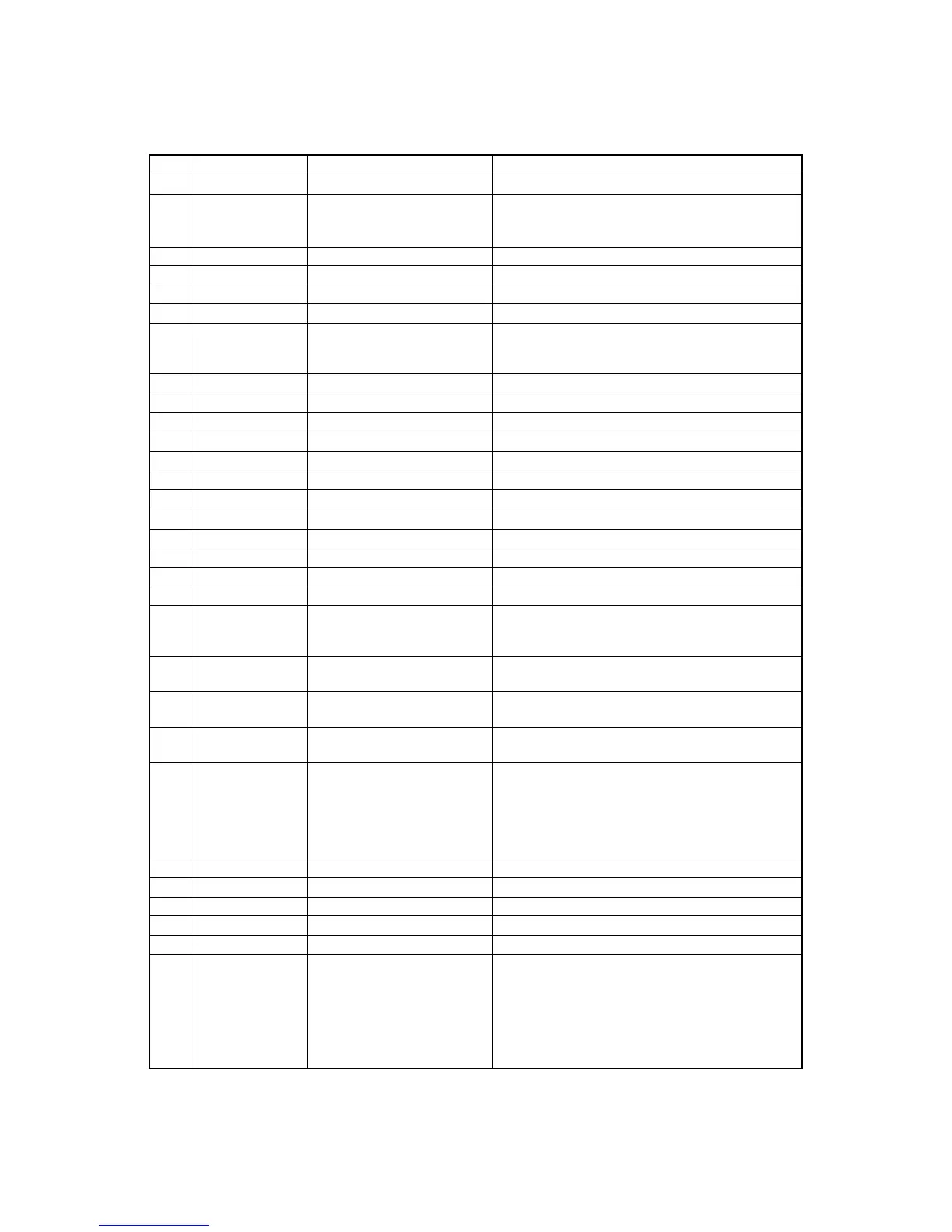
ITEM SYMBOL Hexadecimal Decimal FUNCTION
[17] ESC # [1B,23] H [27,35] D Cancels MSB control.
[18] ESC – n [1B,2D,n] H [27,45,n] D Sets or cancels underline mode.
n=0 : underline is cancelled.
n=1 : underline is set.
[19] ESC . n [1B,2E,n] H [27,46,n] D Sets line spacing to n/144" (1≤n≤127)
[20] ESC / c [1B,2F,c] H [27,47,c] D Selects channel (0-7) of vertical tab.
[21] ESC 0 [1B,30] H [27,48] D Sets line spacing to 1/8".
[22] ESC 1 [1B,31] H [27,49] D Sets line spacing to 7/72".
[23] ESC 2 [1B,32] H [27,50] D Sets line spacing to 1/6" in BP-A mode.
Linefeeds with the line spacing set by ESC A in BP-I
mode.
[24] ESC 3 n [1B,33,n] H [27,51,n] D Sets line spacing to n/216" (1≤n≤255).
[25] ESC 4 [1B,34] H [27,52] D Sets italic character mode.
[26] ESC 5 [1B,35] H [27,53] D Cancels italic character mode.
[27] ESC 6 [1B,36] H [27,54] D Selects IBM character set 2 in BP-I mode.
[28] ESC 7 [1B,37] H [27,55] D Selects IBM character set 1 in BP-I mode.
[29] ESC 8 [1B,38] H [27,56] D Disables paper empty detection.
[30] ESC 9 [1B,39] H [27,57] D Enables paper empty detection.
[31] ESC : [1B,3A] H [27,58] D Sets elite (12 cpi) mode.
[32] ESC < [1B,3C] H [27,60] D Moves print head to home position.
[33] ESC = [1B,3D] H [27,61] D Sets MSB of data to "0" in BP-A mode.
[34] ESC > [1B,3E] H [27,62] D Sets MSB of data to "1" in BP-A mode.
[35] ESC @ [1B,40] H [27,64] D Initializes printer.
[36] ESC A n [1B,41,n] H [27,65,n] D Sets line spacing to n/72" (1≤n≤85).
The line feed spacing becomes effective by ESC 2
command in BP-I mode.
[37] ESC B n1 n2... [1B,42,n1,n2,...n64,00] H Sets vertical tab positions beginning from n1 and end
n64 NUL [27,66,n1,n2,...n64,0] D with NUL [00]H. n=1 is the second line from TOF.
[38] ESC C n [1B,43,n] H [27,67,n] D Sets page length in line unit (1≤n≤127).
The current print line becomes TOF (top of form).
[39] ESC C NUL n [1B,43,00,n] H [27,67,0,n] D Sets page length in inch unit (1≤n≤22).
The current print line becomes TOF (top of form).
[40] ESC D n1 [1B,44,n1,n2,...n28,00] H Sets horizontal tab position (1≤n≤255).
n2...n28 NUL [27,68,n1,n2,...n28,0] D n indicates the number of spaces from the left margin
with the character width at the command execution.
n=1 is at the first character from the left margin.
Tab position changes accordingly with a change of
character width in BP-I mode.
[41] ESC E [1B,45] H [27,69] D Sets emphasized character mode.
[42] ESC F [1B,46] H [27,70] D Cancels emphasized character mode.
[43] ESC G [1B,47] H [27,71] D Sets double strike character mode.
[44] ESC H [1B,48]H [27,72] D Cancels double strike character mode.
[45] ESC J n [1B,4A,n] H [27,74,n] D Linefeeds n/216" (0≤n≤255).
[46] ESC K n1 n2 [1B,4B,n1,n2,data] H Prints the 8-pin standard-density graphics (60 dpi).
data [27,75,n1,n2,data] D The total number of dots in the data is set by
n1 + n2
x
256.
B. Control code summary (BP-A/I)


 To Next Page